Volvo VM Cavalo Mecanico v1.0 ETS2
🟠 Updated over a year agoPreview
🔍 Analysis
- 🏆 #454 of 718 Trucks mods in this game by downloads
📋 About This Mod
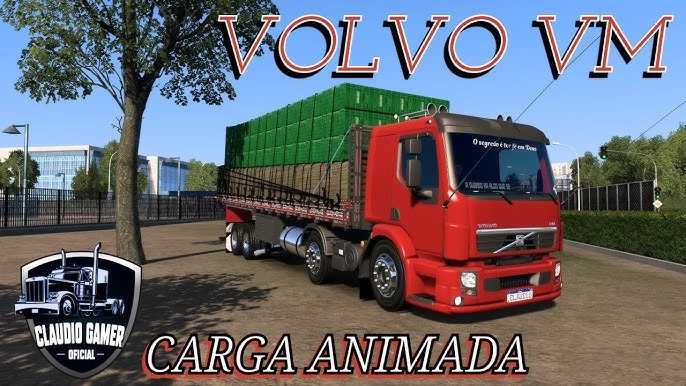
Volvo VM Cavalo Mecanico v1.0 ETS2 - Euro Truck Simulator 2 Mods | American Truck Simulator Mods Euro Truck Simulator 2 Mods ETS2 Trucks ETS2 Bus ETS2 Cars ETS2 Maps ETS2 Trailers ETS2 Interiors ETS2 Other ETS2 Parts/Tuning ETS2 Skins ETS2 Sounds American Truck Simulator Mods ATS Trucks ATS Trailers ATS Maps ATS Bus ATS Cars ATS Interiors ATS Other ATS Packs ATS Parts / Tuning ATS All traffic mods ATS Skins ATS Sounds Farming Simulator 25 Mods American Truck Simulator Mods | Euro Truck Simulator 2 Mods Install ETS 2 mods Download ETS2 ETS2 Trucks Volvo VM Cavalo Mecanico v1.0 ETS2 Euro Truck Simulator 2 Mods | American Truck Simulator Mods | July 12, 2025 --> Volvo VM Cavalo Mecanico v1.0 ETS2 The Volvo VM "Cavalo Mecânico" is a very popular truck in Brazil, known for its versatility and robustness, especially for medium-duty hauling. In Euro Truck Simulator 2 (ETS2), you can bring this iconic Brazilian workhorse into your game through various mods. "Cavalo Mecânico" literally translates to "Mechanical Horse," which is the Portuguese term for a truck tractor or prime mover – essentially, the part of the truck that pulls a trailer, as opposed to a "caminhão rígido" (rigid truck) which has the cargo body permanently attached. Key Features of Volvo VM Cavalo Mecânico Mods for ETS2 Mod creators, especially those from the Brazilian community, put a lot of effort into making the Volvo VM as realistic as possible for ETS2 players. Here's what you can typically expect: Detailed Model: Mods usually feature high-quality 3D models of the Volvo VM, covering both the exterior and a detailed interior, often including specific Brazilian regional accessories. Chassis Options: You'll commonly find various chassis configurations suitable for a "cavalo mecânico," such as: 4×2: Standard two-axle configuration for lighter loads. 6×2: Three-axle, with one liftable axle, for increased load capacity and maneuverability. 6×4: Three-axle, with two driven axles, for heavy hauling and off-road capability. Engine & Transmission Options: The mods typically offer a range of engine power options that reflect the real Volvo VM, which is usually found in horsepower ratings like 220 HP, 270 HP, 330 HP, and 360 HP. Corresponding transmission options (e.g., 12-speed) are also included. Realistic Sounds (FMOD): Many high-quality VM mods incorporate FMOD sound technology to replicate the distinctive engine sounds, air brakes, and horn of the real Volvo VM, greatly enhancing the immersion. Extensive Customization: This is often a major highlight. You can expect to customize: Exterior Accessories: Various bumper options, grilles, lights (including LEDs and spotlights), mudguards, side skirts, antennas, and unique paint jobs or skin templates. Interior Details: Different dashboard options (e.g., white or black panel), seat textures, curtains, radios, GPS, and other interior decorations. Animations: Look for animated wipers, windows, and possibly other cabin elements. Standalone Mod: Most Volvo VM Cavalo Mecânico mods are standalone, meaning they don't replace any default trucks in the game. You'll typically find them available for purchase at the Volvo dealership in ETS2, or sometimes at a custom "mod dealer." Compatibility: Modders regularly update their Volvo VM mods to ensure they work with the latest versions of ETS2 (e.g., 1.50, 1.51, 1.55). Always check the mod's description for compatibility information. Installation Steps (for .scs files): Download: Get the `.scs` file (or multiple `.scs` files if it's a multi-part mod) for the Volvo VM. Locate Mod Folder: Navigate to your ETS2 mod folder. This is usually found in your "Documents" folder: `Documents/Euro Truck Simulator 2/mod`. Copy Files: Copy the downloaded `.scs` file(s) into this `mod` folder. Activate in Game: Launch Euro Truck Simulator 2. From the main menu, go to the Mod Manager. Find the Volvo VM mod(s) in the list and activate them by moving them from the left column to the right column. Set Priority: If there are multiple `.scs` files for the same mod (e.g., a base file, a sound pack, an accessory pack), ensure you set the correct loading order/priority as instructed by the mod creator. Generally, the main truck file goes higher, with sound and accessory packs below it. Confirm your changes and load your game profile. You should then be able to purchase the Volvo VM at the Volvo dealership in-game. The Volvo VM Cavalo Mecânico mod is perfect for ETS2 players who want to experience driving a popular Brazilian truck, adding more diversity and a touch of South American trucking culture to their game. Credits: CLAUDIO GAMER How to install ETS2 mods or ATS Mods In Euro Truck Simulator 2 it’s easy to install mods. You just need to download mod from here, copy/unzip files into: “My Documents\Euro Truck Simulator 2\mod” folder or if you play ATS please install mods to: “My Documents\American Truck Simulator\mod” folder. To unzip files you can use: WinRAR or 7zip. After tha
Volvo VM Cavalo Mecanico v1. 0 ETS2 - Euro Truck Simulator 2 Mods | American Truck Simulator Mods Euro Truck Simulator 2 Mods ETS2 Trucks ETS2 Bus ETS2 Cars ETS2 Maps ETS2 Trailers ETS2 Interiors ETS2 Other ETS2 Parts/Tuning ETS2 Skins ETS2 Sounds American Truck Simulator Mods ATS Trucks ATS Trailers ATS Maps ATS Bus ATS Cars ATS Interiors ATS Other ATS Packs ATS Parts / Tuning ATS All traffic mods ATS Skins ATS Sounds Farming Simulator 25 Mods American Truck Simulator Mods | Euro Truck Simulator 2 Mods Install ETS 2 mods Download ETS2 ETS2 Trucks Volvo VM Cavalo Mecanico v1. 0 ETS2 Euro Truck Simulator 2 Mods | American Truck Simulator Mods | July 12, 2025 --> Volvo VM Cavalo Mecanico v1. 0 ETS2 The Volvo VM "Cavalo Mecânico" is a very popular truck in Brazil, known for its versatility and robustness, especially for medium-duty hauling. In Euro Truck Simulator 2 (ETS2), you can bring this iconic Brazilian workhorse into your game through various mods. "Cavalo Mecânico" literally translates to "Mechanical Horse," which is the Portuguese term for a truck tractor or prime mover – essentially, the part of the truck that pulls a trailer, as opposed to a "caminhão rígido" (rigid truck) which has the cargo body permanently attached. Key Features of Volvo VM Cavalo Mecânico Mods for ETS2 Mod creators, especially those from the Brazilian community, put a lot of effort into making the Volvo VM as realistic as possible for ETS2 players. Here's what you can typically expect: Detailed Model: Mods usually feature high-quality 3D models of the Volvo VM, covering both the exterior and a detailed interior, often including specific Brazilian regional accessories. Chassis Options: You'll commonly find various chassis configurations suitable for a "cavalo mecânico," such as: 4×2: Standard two-axle configuration for lighter loads. 6×2: Three-axle, with one liftable axle, for increased load capacity and maneuverability. 6×4: Three-axle, with two driven axles, for heavy hauling and off-road capability. Engine & Transmission Options: The mods typically offer a range of engine power options that reflect the real Volvo VM, which is usually found in horsepower ratings like 220 HP, 270 HP, 330 HP, and 360 HP. Corresponding transmission options (e.g., 12-speed) are also included. Realistic Sounds (FMOD): Many high-quality VM mods incorporate FMOD sound technology to replicate the distinctive engine sounds, air brakes, and horn of the real Volvo VM, greatly enhancing the immersion. Extensive Customization: This is often a major highlight. You can expect to customize: Exterior Accessories: Various bumper options, grilles, lights (including LEDs and spotlights), mudguards, side skirts, antennas, and unique paint jobs or skin templates. Interior Details: Different dashboard options (e.g., white or black panel), seat textures, curtains, radios, GPS, and other interior decorations. Animations: Look for animated wipers, windows, and possibly other cabin elements. Standalone Mod: Most Volvo VM Cavalo Mecânico mods are standalone, meaning they don't replace any default trucks in the game. You'll typically find them available for purchase at the Volvo dealership in ETS2, or sometimes at a custom "mod dealer." Compatibility: Modders regularly update their Volvo VM mods to ensure they work with the latest versions of ETS2 (e.g., 1. 50, 1. 51, 1. 55). Always check the mod's description for compatibility information. Installation Steps (for .scs files): Download: Get the `.scs` file (or multiple `.scs` files if it's a multi-part mod) for the Volvo VM. Locate Mod Folder: Navigate to your ETS2 mod folder. This is usually found in your "Documents" folder: `Documents/Euro Truck Simulator 2/mod`. Copy Files: Copy the downloaded `.scs` file(s) into this `mod` folder. Activate in Game: Launch Euro Truck Simulator 2. From the main menu, go to the Mod Manager. Find the Volvo VM mod(s) in the list and activate them by moving them from the left column to the right column. Set Priority: If there are multiple `.scs` files for the same mod (e.g., a base file, a sound pack, an accessory pack), ensure you set the correct loading order/priority as instructed by the mod creator. Generally, the main truck file goes higher, with sound and accessory packs below it. Confirm your changes and load your game profile. You should then be able to purchase the Volvo VM at the Volvo dealership in-game. The Volvo VM Cavalo Mecânico mod is perfect for ETS2 players who want to experience driving a popular Brazilian truck, adding more diversity and a touch of South American trucking culture to their game. Credits: CLAUDIO GAMER How to install ETS2 mods or ATS Mods In Euro Truck Simulator 2 it’s easy to install mods. You just need to download mod from here, copy/unzip files into: “My Documents\Euro Truck Simulator 2\mod” folder or if you play ATS please install mods to: “My Documents\American Truck Simulator\mod” folder. To unzip files you can use: WinRAR or 7zip. After tha
📊 Mod Details
- Game
- ETS2 World Mods
- Author
- ets2world
- Version
- 1.0
- Downloads
- 0
- Endorsements
- 0
- Category
- Trucks
- Created
- 7/12/2025
- Updated
- 7/12/2025
🔧 How to Install Euro Truck Simulator 2 Mods
Download from https://www.ets2world.com.
📖 Full step-by-step install guide for Euro Truck Simulator 2 →
Visit the official mod page for specific installation instructions for this mod.
🎮 Need cheat codes or console commands? Check ur gaming wiki for Euro Truck Simulator 2 commands, item IDs, and more.
Keep browsing — more Euro Truck Simulator 2 mods await