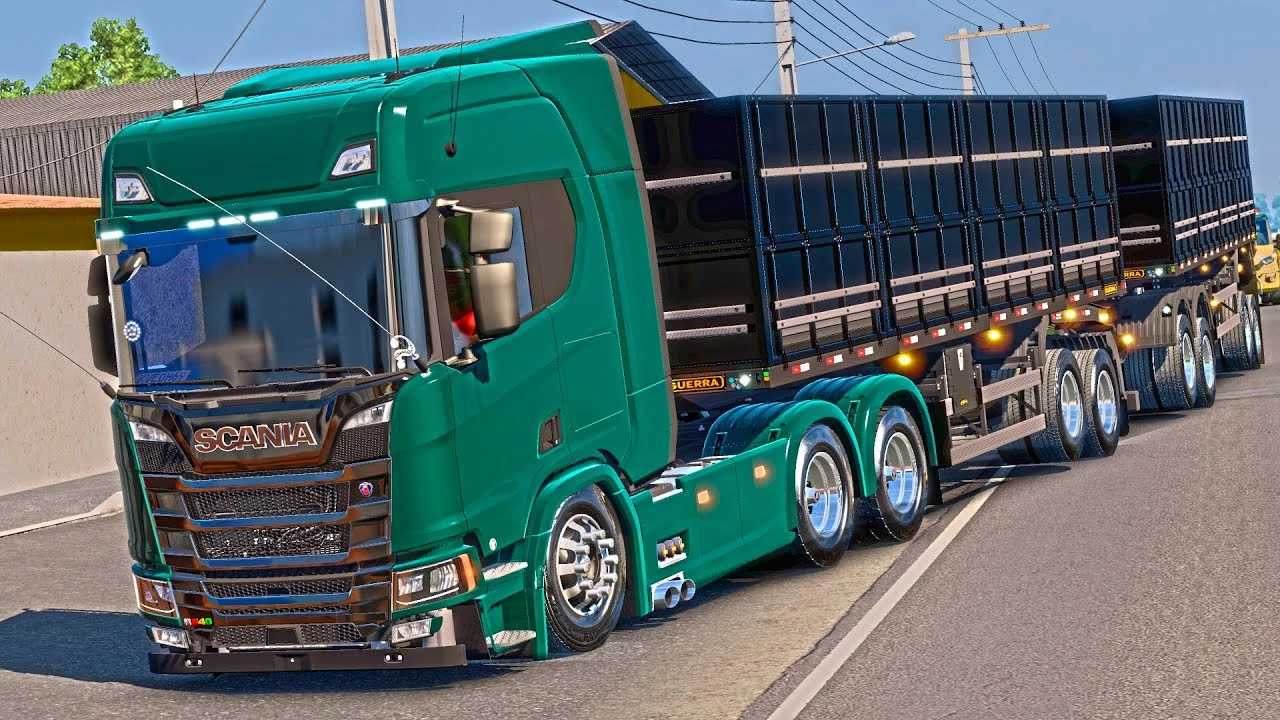
Scania S540 Canivete v1.0 ETS2
🟠 Updated over a year agoPreview
🔍 Analysis
- 🏆 #535 of 718 Trucks mods in this game by downloads
📋 About This Mod
Scania S540 Canivete v1.0 ETS2 - Euro Truck Simulator 2 Mods | American Truck Simulator Mods Euro Truck Simulator 2 Mods ETS2 Trucks ETS2 Bus ETS2 Cars ETS2 Maps ETS2 Trailers ETS2 Interiors ETS2 Other ETS2 Parts/Tuning ETS2 Skins ETS2 Sounds American Truck Simulator Mods ATS Trucks ATS Trailers ATS Maps ATS Bus ATS Cars ATS Interiors ATS Other ATS Packs ATS Parts / Tuning ATS All traffic mods ATS Skins ATS Sounds Farming Simulator 25 Mods American Truck Simulator Mods | Euro Truck Simulator 2 Mods Install ETS 2 mods Download ETS2 ETS2 Trucks Scania S540 Canivete v1.0 ETS2 Euro Truck Simulator 2 Mods | American Truck Simulator Mods | July 1, 2025 --> Scania S540 Canivete v1.0 ETS2 Scania S540 Canivete is a popular term among Euro Truck Simulator 2 (ETS2) enthusiasts in Brazil to refer to mods of Scania S-series (Next Gen) trucks that feature an elongated chassis and often a lower suspension or customizations that give the impression that the truck "bends" or is more flexible, like a canivete. Common features of "Canivete" mods for the Scania S540 in ETS2: Elongated Chassis: One of the main features is an extended chassis, which can be 6×2, 6×4, 8×4 or even longer configurations, providing an imposing appearance and often allowing for greater virtual load capacity. Extensive Customization: These mods are highly configurable. You can expect a wide range of options to customize your truck, including: Cabs: Various cab height options (Standard, Highline, Topline, Executive, Longline Executive). Chassis: Various axle configurations (4×2, 6×2, 6×4, 8×4, etc.), including rear-wheel steering options. Accessories: A multitude of exterior and interior accessories, such as: Lights: Auxiliary headlights, LEDs, position lights in different shapes and colors, allowing you to create a "Christmas tree" look if desired. Sun visors: Standard, plastic, chrome or illuminated sun visor options. Grilles: Different types of front grilles (chrome, black, XT). Exhausts: Custom side or rear exhausts. Horns: Various types of horns, including realistic sounding marine and train horns. Interior: Dashboard options (including compatibility with Steam dashboard mods), interior colors (gray, beige), and hanging accessories (GPS, Starlink antennas, etc.). Skins: Support for various skins from real and fictional companies. Realistic Sounds: Many mods come with custom sound packs that aim to faithfully replicate the sound of Scania engines, including direct exhaust sounds and horns. Animations: May include animations of steering wheel, windows, and other interactive elements. Compatibility: These are usually updated to the latest versions of ETS2 (such as 1.50, 1.53, 1.54), but it is always important to check the specific mod for compatibility. To install a truck mod in ETS2, follow these general steps: 1. Download the mod file: The file will have the extension .scs. If it is in compressed format (.zip or .rar), extract it first. 2. Move the file to the "mod" folder: Copy the .scs file(s) to the `Documents/Euro Truck Simulator 2/mod` folder. 3. Activate in the Mod Manager: Open ETS2. In the main menu, go to the Mod Manager. Find the Scania S540 Canivete mod in the list and activate it by moving it to the right column. Important: Some mods, especially more complex ones or those that depend on other mods (such as accessory or sound packs), may require a specific order of activation in the mod manager. Always read the instructions provided by the mod creator. Click "Confirm Changes". 4. Purchase the truck in-game: Head to the Scania dealership or the in-game mod dealership to purchase and customize your Scania S540 "Switchblade". Please note that the quality and features of mods can vary greatly between creators. It is always a good idea to watch demo videos and read reviews before downloading to ensure that the mod meets your expectations. Credits: PAULO JUNIOR How to install ETS2 mods or ATS Mods In Euro Truck Simulator 2 it’s easy to install mods. You just need to download mod from here, copy/unzip files into: “My Documents\Euro Truck Simulator 2\mod” folder or if you play ATS please install mods to: “My Documents\American Truck Simulator\mod” folder. To unzip files you can use: WinRAR or 7zip. After that you need to activate the mods you want to use. Report bugs in the comments and help modders improve this mod. Always check the comments, you can find a solution. DOWNLOAD MOD PETERBILT 386 DELUXE EDITION 1.18.3 – 1.19.0.1 Mod August 7, 2015 Constellation 24.280 v1.0 ETS2 February 24, 2025 Mercedes LS1634 Rigid + Trailer 3 Axes Double Patronelli Dump 1.42 ETS2 December 8, 2021 Leave a Reply Cancel reply Do you need help or to say thanks to the mod author? Just leave a comment below! Comment * Name * Email * Δ Euro truck simulator All Euro Truck Simulator 2 Mods ETS2 Trucks ETS2 Bus ETS2 Cars ETS2 Maps ETS2 Trailers ETS2 Interiors ETS2 Other ETS2 Parts/Tuning ETS2 Skins ETS2 Sounds American truck s
Scania S540 Canivete v1. 0 ETS2 - Euro Truck Simulator 2 Mods | American Truck Simulator Mods Euro Truck Simulator 2 Mods ETS2 Trucks ETS2 Bus ETS2 Cars ETS2 Maps ETS2 Trailers ETS2 Interiors ETS2 Other ETS2 Parts/Tuning ETS2 Skins ETS2 Sounds American Truck Simulator Mods ATS Trucks ATS Trailers ATS Maps ATS Bus ATS Cars ATS Interiors ATS Other ATS Packs ATS Parts / Tuning ATS All traffic mods ATS Skins ATS Sounds Farming Simulator 25 Mods American Truck Simulator Mods | Euro Truck Simulator 2 Mods Install ETS 2 mods Download ETS2 ETS2 Trucks Scania S540 Canivete v1. 0 ETS2 Euro Truck Simulator 2 Mods | American Truck Simulator Mods | July 1, 2025 --> Scania S540 Canivete v1. 0 ETS2 Scania S540 Canivete is a popular term among Euro Truck Simulator 2 (ETS2) enthusiasts in Brazil to refer to mods of Scania S-series (Next Gen) trucks that feature an elongated chassis and often a lower suspension or customizations that give the impression that the truck "bends" or is more flexible, like a canivete. Common features of "Canivete" mods for the Scania S540 in ETS2: Elongated Chassis: One of the main features is an extended chassis, which can be 6×2, 6×4, 8×4 or even longer configurations, providing an imposing appearance and often allowing for greater virtual load capacity. Extensive Customization: These mods are highly configurable. You can expect a wide range of options to customize your truck, including: Cabs: Various cab height options (Standard, Highline, Topline, Executive, Longline Executive). Chassis: Various axle configurations (4×2, 6×2, 6×4, 8×4, etc.), including rear-wheel steering options. Accessories: A multitude of exterior and interior accessories, such as: Lights: Auxiliary headlights, LEDs, position lights in different shapes and colors, allowing you to create a "Christmas tree" look if desired. Sun visors: Standard, plastic, chrome or illuminated sun visor options. Grilles: Different types of front grilles (chrome, black, XT). Exhausts: Custom side or rear exhausts. Horns: Various types of horns, including realistic sounding marine and train horns. Interior: Dashboard options (including compatibility with Steam dashboard mods), interior colors (gray, beige), and hanging accessories (GPS, Starlink antennas, etc.). Skins: Support for various skins from real and fictional companies. Realistic Sounds: Many mods come with custom sound packs that aim to faithfully replicate the sound of Scania engines, including direct exhaust sounds and horns. Animations: May include animations of steering wheel, windows, and other interactive elements. Compatibility: These are usually updated to the latest versions of ETS2 (such as 1. 50, 1. 53, 1. 54), but it is always important to check the specific mod for compatibility. To install a truck mod in ETS2, follow these general steps: 1. Download the mod file: The file will have the extension .scs. If it is in compressed format (.zip or .rar), extract it first. 2. Move the file to the "mod" folder: Copy the .scs file(s) to the `Documents/Euro Truck Simulator 2/mod` folder. 3. Activate in the Mod Manager: Open ETS2. In the main menu, go to the Mod Manager. Find the Scania S540 Canivete mod in the list and activate it by moving it to the right column. Important: Some mods, especially more complex ones or those that depend on other mods (such as accessory or sound packs), may require a specific order of activation in the mod manager. Always read the instructions provided by the mod creator. Click "Confirm Changes". 4. Purchase the truck in-game: Head to the Scania dealership or the in-game mod dealership to purchase and customize your Scania S540 "Switchblade". Please note that the quality and features of mods can vary greatly between creators. It is always a good idea to watch demo videos and read reviews before downloading to ensure that the mod meets your expectations. Credits: PAULO JUNIOR How to install ETS2 mods or ATS Mods In Euro Truck Simulator 2 it’s easy to install mods. You just need to download mod from here, copy/unzip files into: “My Documents\Euro Truck Simulator 2\mod” folder or if you play ATS please install mods to: “My Documents\American Truck Simulator\mod” folder. To unzip files you can use: WinRAR or 7zip. After that you need to activate the mods you want to use. Report bugs in the comments and help modders improve this mod. Always check the comments, you can find a solution. DOWNLOAD MOD PETERBILT 386 DELUXE EDITION 1. 18. 3 – 1. 19. 0. 1 Mod August 7, 2015 Constellation 24. 280 v1. 0 ETS2 February 24, 2025 Mercedes LS1634 Rigid + Trailer 3 Axes Double Patronelli Dump 1. 42 ETS2 December 8, 2021 Leave a Reply Cancel reply Do you need help or to say thanks to the mod author? Just leave a comment below! Comment Name Email * Δ Euro truck simulator All Euro Truck Simulator 2 Mods ETS2 Trucks ETS2 Bus ETS2 Cars ETS2 Maps ETS2 Trailers ETS2 Interiors ETS2 Other ETS2 Parts/Tuning ETS2 Skins ETS2 Sounds American truck s
📊 Mod Details
- Game
- ETS2 World Mods
- Author
- ets2world
- Version
- 1.0
- Downloads
- 0
- Endorsements
- 0
- Category
- Trucks
- Created
- 7/1/2025
- Updated
- 7/1/2025
🔧 How to Install Euro Truck Simulator 2 Mods
Download from https://www.ets2world.com.
📖 Full step-by-step install guide for Euro Truck Simulator 2 →
Visit the official mod page for specific installation instructions for this mod.
🎮 Need cheat codes or console commands? Check ur gaming wiki for Euro Truck Simulator 2 commands, item IDs, and more.
Keep browsing — more Euro Truck Simulator 2 mods await