Natural EFIJ
⚪ Last updated 2018Preview
📋 About This Mod
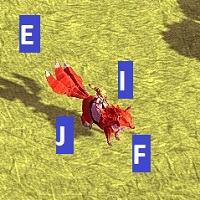
Want to use EFIJ but noticed it isn't mapped to the human brain? This will fix it! To enable the change, go to Options>Keyboard layout and select NaturalEFIJ. The fox will follow the diagonals marked by your fingers on the keyboard: Top-left to Bottom-right: E-F Top-right to Bottom-left: I-J Warning: This will fix diagonals but will make going left, right, and rotating in 45-degree increments counterintuitive. EFIJ is fundamentally flowed, you just get to pick your preferred flow! Try this mod and let me know your thoughts. I find prioritising diagonals a better fit to the isometric 3D world.
📊 Mod Details
- Game
- Epistory Typing Chronicles Mods
- Author
- 76561198337837725
- Version
- N/A
- Downloads
- 98
- Endorsements
- 0
- Category
- N/A
- Created
- 2/18/2018
- Updated
- 2/18/2018
🔧 How to Install Epistory - Typing Chronicles Mods
Subscribe on Steam Workshop. Mods auto-download and install. Launch the game to activate.
📖 Full step-by-step install guide for Epistory - Typing Chronicles →
Visit the official mod page for specific installation instructions for this mod.
🎮 Need cheat codes or console commands? Check ur gaming wiki for Epistory - Typing Chronicles commands, item IDs, and more.
Keep browsing — more Epistory - Typing Chronicles mods await