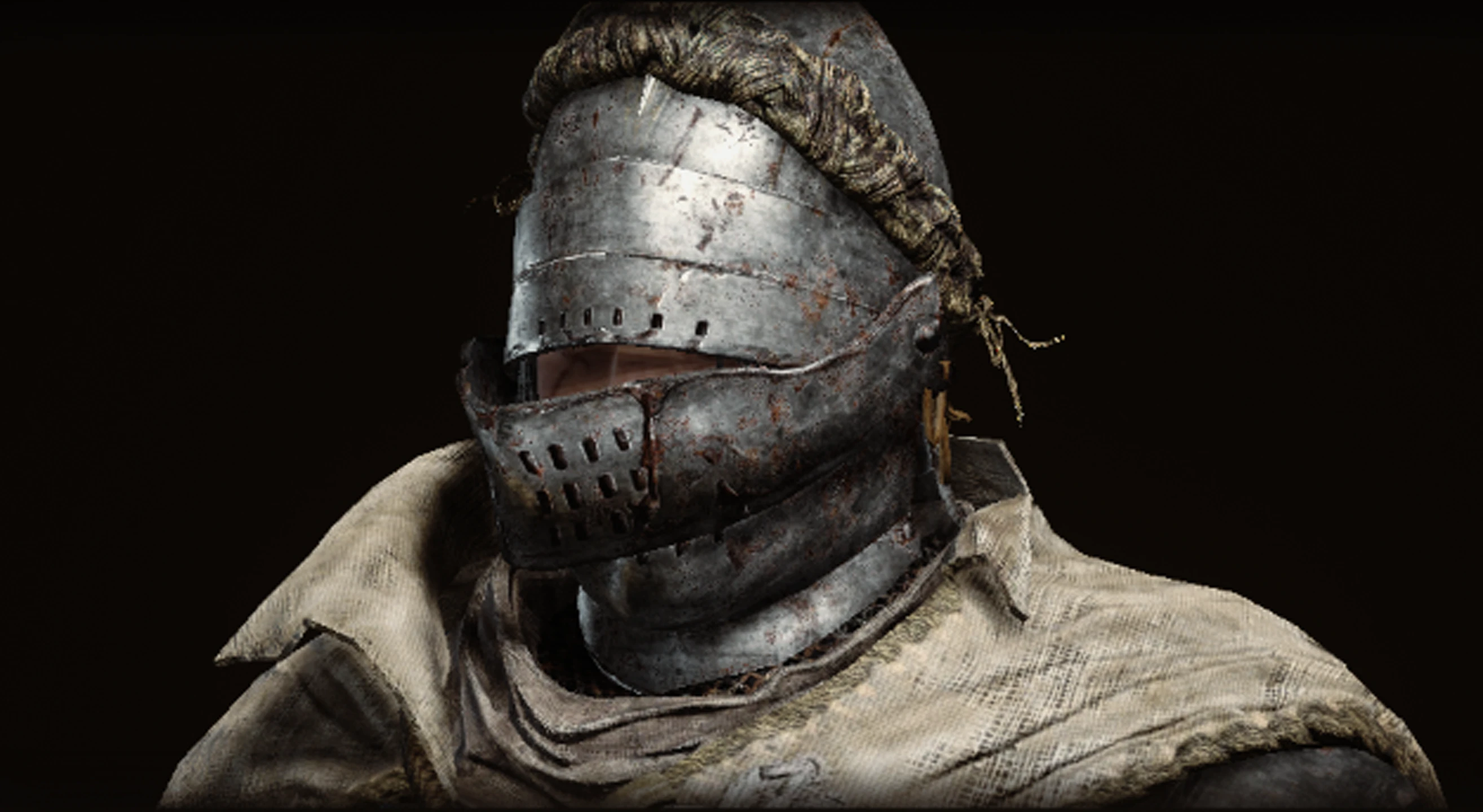
Vagabond Knight Helm Visor Down
⚪ Last updated 2023Preview
🔍 Analysis
- 👍 4.1% endorsement rate — high engagement, a strong quality signal
- 🏆 #37 of 958 Armour mods in this game by downloads
📋 About This Mod
Brings the visor down over the face of the Vagabond Knight Helm. Vanilla and 4K resolution available.
Disclaimers! Please Read!
Ray Tracing must be turned off! Using any mods that edit models like this one, with Ray Tracing on, will crash the game! There is no fix for this as what would have to change is out of my control: either Ray Tracing itself or the very tools we modders use for FromSoftware titles have to change.
The item description for the helm says, The visor is broken and can no longer be lowered. So, while there are lore reasons for it being up, it's a nice idea to have it be lowered. Because it is designed that way, I positioned the visor as best I could so that our character can still "see", and you can more clearly observe that the visor is heavily damaged and dented. I also had to avoid clipping issues.
I use REVENANT ReShade, specifically the Lush version with a couple tweaks of my own. This is reflected in the screenshots I took for this mod, so keep in mind that it may look differently for you if you do not use a ReShade!
I also use Texture Improvement, specifically the 4K textures. This is, again, reflected in the screenshots and so your game/recolors may look different than mine!
DO NOT attempt to play the game online while using any mods or you will be banned! Download Anti-cheat toggler and offline launcher to circumvent EAC, or if you use Mod Engine 2 then that program will automatically disable it.
There is a way to make the model show up on co-op partners, NPCs and the Mimic Tear. Within the parts folder there is a file called a DCX File. All you need to do is make a copy and add "_l" directly before the period in the DCX file name. That's an underscore and lowercase L. So, you'd change hd_m_1280.partsbnd into hd_m_1280_l.partsbnd. Continuing the example: if you started with 1 DCX file, you'll end with 2. This way the mod shows up on you and your co-op partner/NPC/Mimic Tear.
Installation
-
[]Follow the instructions of UXM Selective Unpacker to unpack the parts folder
[
]Extract this mod to your location of choice[]Place the contents of "parts" within the folder of the same name created by UXM
[]Don't forget that if you use UXM to install and use mods, to Patch the game using UXM Selective Unpacker
📊 Mod Details
- Game
- Eldenring Mods
- Author
- BygoneBasilisk AKA HonorKnight26
- Version
- 1.0
- Downloads
- 1,037
- Endorsements
- 43
- Category
- Armour
- Created
- 5/1/2023
- Updated
- 5/1/2023
🔧 How to Install Elden Ring Mods
Download from Nexus Mods.
📖 Full step-by-step install guide for Elden Ring →
Visit the official mod page for specific installation instructions for this mod.
🎮 Need cheat codes or console commands? Check ur gaming wiki for Elden Ring commands, item IDs, and more.
Keep browsing — more Elden Ring mods await