Nvidia 120hz monitor - frame drops and stuttering fix
⚪ Last updated 2022Preview
🔍 Analysis
- 👍 3.6% endorsement rate — high engagement, a strong quality signal
- 🏆 #138 of 569 Gameplay mods in this game by downloads
📋 About This Mod
This is a guide to completely eliminate stuttering / frame drops from Elden Ring.
Hello, my name is Mary, I am a huge FromSoft games fan, and this is my stuttering fix for Elden Ring.
All I can tell you is that before finding this fix, I've tried 50+ fixes posted online and none truly helped. I think about 8-10 hours of my playthrough was me trying to optimize the game instead of enjoying it, cause I'm extremely sensitive to stuttering and fps drops. Luckily, not only that this fix helped, but it COMPLETELY eliminated all hitches, fps drops, slowdowns and fixed all frame pacing issues I had. I am not exaggerating.
It's like I'm playing a different game, I can't believe how perfectly smooth it is. At first glance the solution seems kind of stupid, I cannot guarantee that it will work for everyone, but I advise you to try it and I hope it works for you as well!
Requirements: Nvidia card, at least 120hz monitor, Flawless Widescreen (haven't tested other FPS unlockers, all I know this one does the trick)
1) download Flawless Widescreen from their official site https://www.flawlesswidescreen.org/
2) install it, open the application and enable the Elden Ringprofile and use the settings from the first screenshot
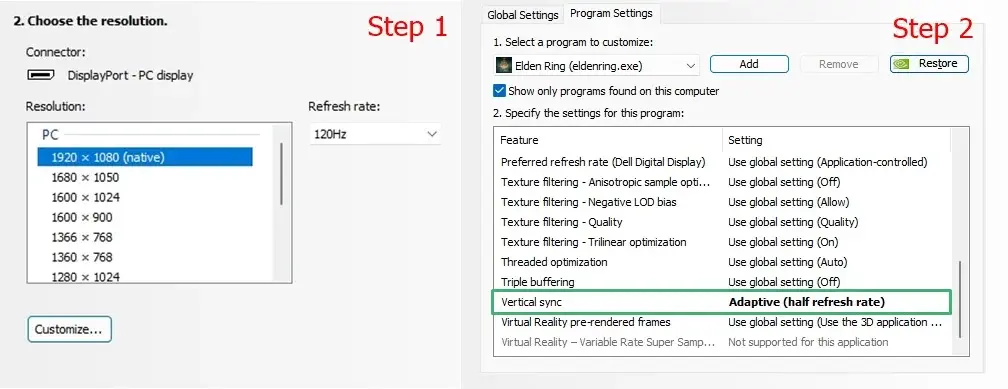
3) access your Nvidia Control Panel settings and set your desktop to 120hz
4) in Nvidia Control Panel select Adaptive (half refresh rate) for Elden Ring
Pros: flawless smoothness (if your hardware can mantain a steady 60fps)
Cons: input lag, use offline only
That's all!
Explanation: Basically, Flawless Widescreen unlocks the refresh rate and fps of Elden Ring, and Nvidia half refresh rate limits it to a half, so you will go from 120hz to 60fps. I don't know what kind of magic this option of the Nvidia driver does, but it fixes the game (I tried half refresh rate option of SpecialK and that didn't help).
Just be wary, with this method if your desktop refresh rate is at 60hz, your fps will now be limited to 30fps and the input lag will be horrible, so for a smooth sailing experience, I suggest trying this on 120hz+ monitors.
If this worked for you, please buy me a coffee! :P
📊 Mod Details
- Game
- Eldenring Mods
- Author
- Mary333
- Version
- 1.0
- Downloads
- 745
- Endorsements
- 27
- Category
- Gameplay
- Created
- 3/16/2022
- Updated
- 3/16/2022
🔧 How to Install Elden Ring Mods
Download from Nexus Mods.
📖 Full step-by-step install guide for Elden Ring →
Visit the official mod page for specific installation instructions for this mod.
🎮 Need cheat codes or console commands? Check ur gaming wiki for Elden Ring commands, item IDs, and more.
Keep browsing — more Elden Ring mods await