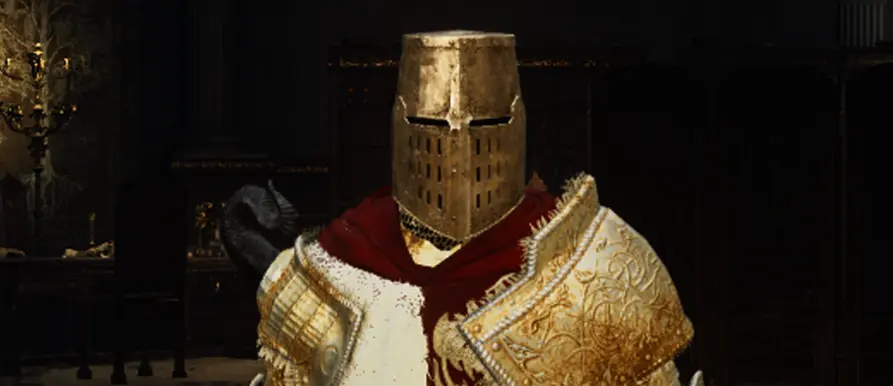
Greathelm Recolors
⚪ Last updated 2022Preview
🔍 Analysis
- 👍 4.3% endorsement rate — high engagement, a strong quality signal
- 🏆 #939 of 1093 Armour mods in this game by downloads
📋 About This Mod
4 recolors of the Greathelm in 4K resolution.
-
[]Black
[
]Silver[]Gold
[]Slate Gray
Disclaimers! Please Read!I use REVENANT ReShade, specifically the Lush version with a couple tweaks of my own. This is reflected in the screenshots I took for this mod, so keep in mind that it may look differently for you if you do not use a ReShade!
I also use Texture Improvement, specifically the 4K textures. This is, again, reflected in the screenshots and so your game/recolors may look different than mine!
DO NOT attempt to play the game online while using any mods or you will be banned! Download Anti-cheat toggler and offline launcher to circumvent EAC, or if you use Mod Engine 2 then that program will automatically disable it.
Modding Tips
This mod can be installed while the game is running, meaning that you don't have to quit the game in order to do so. Tab out of the game (I recommend setting the game to Windowed Borderless), and install the mod as you normally would. Then, back in the game, all you have to do is equip the modded armor. If you were already wearing the armor this mod effects, then you should only have to un-equip and then re-equip the armor for the changes to take effect. If you aren't seeing changes then un-equip the armor, back out of all menus (including the "pause" menu with emotes on the right hand side), and re-equip the armor. Traveling to a Site of Grace can also work.
There is also a way to make the recolors show up on co-op partners, NPCs and the Mimic Tear. Within the parts folder there are numerous files called DCX Files. I always make sure to include altered and unaltered versions, and both genders if the armor has one for each. All you need to do is make a copy and add "_l" directly before the period in the DCX file name. That's an underscore and lowercase L. So, for example, you'd change hd_m_1545.partsbnd into hd_m_1545_l.partsbnd. Do this for each armor piece (am = gauntlets, bd = chest piece, hd = helmet, lg = greaves
📊 Mod Details
- Game
- Eldenring Mods
- Author
- HonorKnight26
- Version
- 5.0
- Downloads
- 1,408
- Endorsements
- 61
- Category
- Armour
- Created
- 5/10/2022
- Updated
- 11/9/2022
🔧 How to Install Elden Ring Mods
Download from Nexus Mods.
📖 Full step-by-step install guide for Elden Ring →
Visit the official mod page for specific installation instructions for this mod.
🎮 Need cheat codes or console commands? Check ur gaming wiki for Elden Ring commands, item IDs, and more.
Keep browsing — more Elden Ring mods await