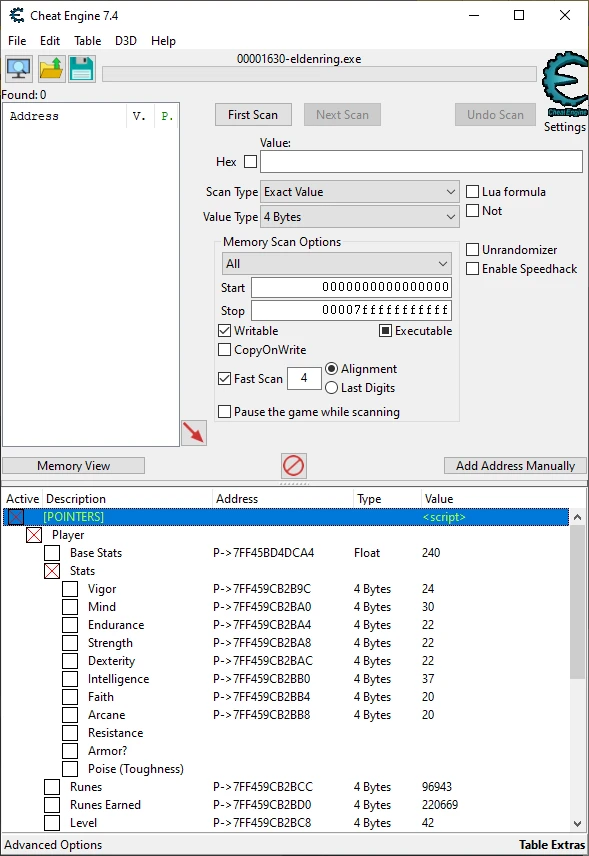
Elden Ring Cheat Table
⚪ Last updated 2024Preview
🔍 Analysis
- 👍 2.5% endorsement rate — high engagement, a strong quality signal
- 🏆 #6 of 156 Miscellaneous mods in this game by downloads
📋 About This Mod
This is cheat table (.CT) requires Cheat Engine (7.2 or later) to be used in conjunction with Elden Ring to allow modifying of in-game data without running internal mods.
Some features may not work for you if you use an outdated, pirated, modified, or otherwise invalid copy of the game. Using mods with this table could also give incorrect results to certain pointers! Please ensure if you wish all data to function that you run the game clean without mods.
Requires: None
Supported Mods: None
Cheat Engine: https://www.cheatengine.org/
Cheat Tables: https://opencheattables.com/
Thread Support: https://opencheattables.com/viewtopic.php?t=300
Disable EAC (Required)
Method 1 (Not Recommended)
DISCLAIMER: This method is highly NOT recommended method to disabling EAC, upon game updates, your game will fail to update this executable and result in using a previous version with inconsistent data and possible corruption of save file. Be sure to repeat this method on every game update or use Method 2.
-
[]Navigate to Elden Ring Directory (..\SteamApps\common\ELDEN RING\Game)
[
]Copy eldenring.exe, and paste the copy within the directory.[]Delete, Move, or Rename start_protected_game.exe to start_protected_game.old.
[]Rename the copy of eldinring.exe to start_protected_game.exe.
[]Start the game via Steam.
DISCLAIMER: Make sure you have extensions visible!
-
[]Navigate to Elden Ring Directory (..\SteamApps\common\ELDEN RING\Game)
[]Create a new txt file named steam_appid.txt in the current directory.
[]Edit the text file and insert the appid "1245620".
[]Save the file.
[]Start directly eldenring.exe via the current directory instead of steam.
- []Download one of the few mods that Automates disabling EAC from Nexus.
-
[]Navigate to Elden Ring AntiCheat Directory (..\SteamApps\common\ELDEN RING\Game\EasyAntiCheat).
[]Open and Edit settings.json in the Folder.
[]Change the values of productid and sandboxid to anything you like, example "420" and "420D" respectfully.
[]Launch Elden Ring.
-
[]Download CE from official website.
[]Download Table from Nexus.
[]Start the game.
[]Run and Attach CE to eldenring.exe process.
[]Load downloaded table.
[]Use to your hearts content.
IMPORTANT FACTS
[]Do NOT use online in public sessions, you will piss off players and get
-
[]Download CE from official website.
📊 Mod Details
- Game
- Eldenring Mods
- Author
- Marcus101RR
- Version
- 1.6
- Downloads
- 282,645
- Endorsements
- 7,125
- Category
- Miscellaneous
- Created
- 2/28/2022
- Updated
- 9/11/2024
🔧 How to Install Elden Ring Mods
Download from Nexus Mods.
📖 Full step-by-step install guide for Elden Ring →
Visit the official mod page for specific installation instructions for this mod.
🎮 Need cheat codes or console commands? Check ur gaming wiki for Elden Ring commands, item IDs, and more.
Keep browsing — more Elden Ring mods await