Compact HUD Tweaks
⚪ Last updated 2022Preview
🔍 Analysis
- 👍 2.1% endorsement rate — high engagement, a strong quality signal
- 🏆 #29 of 127 User Interface mods in this game by downloads
📋 About This Mod
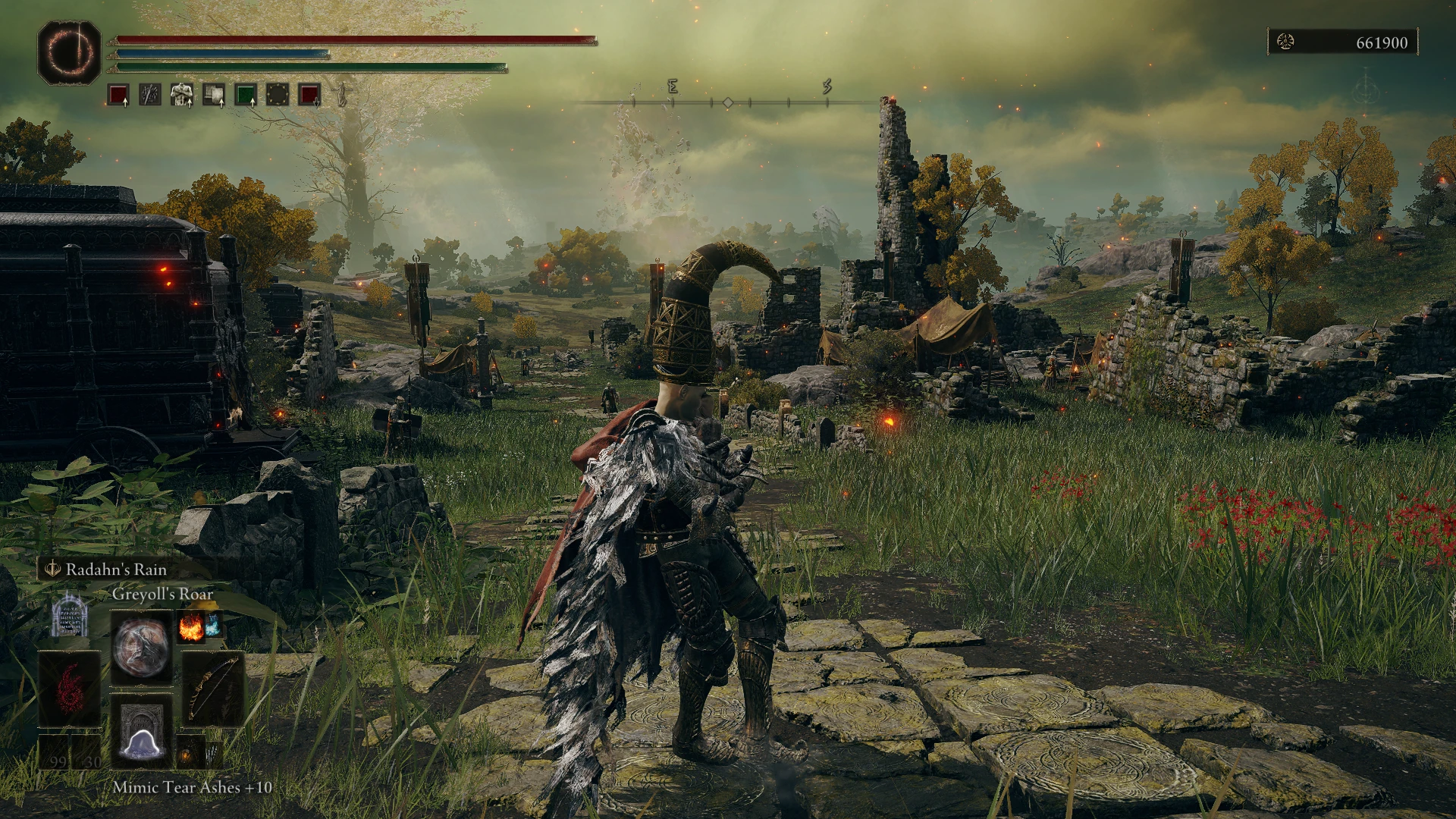
Makes scuffed, sorta small tweaks to make the HUD more compact and less intrusive. Updated to v1.10
Main Change List:
Weapon Skill indicator has been moved down with the rest of the clusterfuck in the bottom left
Summoning and No Attacking icon are below the Weapon Skill indicator
Rune Counter has been moved to the top right
Save icon has been lowered a little to compensate
Width of the background for the Interact Prompt has been reduced by about a third
New Item pop up is now in the bottom right
Item log has been moved up to compensate and moved to the right a bit
Additional Versions
Minimal HUD:
Keeps things from Main changes unless specified
Summoning icon is next to the Rune Counter in the top left
No Attacking icon, Weapon slots and 3rd Spell/Item slots have been removed
Bottom left stuff is in the top left
Arrow/Bolt count is to the right of the slot like Bloodborne
Buffs/Debuffs has been shifted to make room
No Interact Prompt Background:
The background for interact prompt is invisible
Side Status Effect Bars:
Moves the stats effect build up bars to the left above the Weapon Skill indicator
Parameters I've edited in fe.gfx:
Equips & Weapon Skill Indicator: sprites > DefineSprite (392: _01_000_FE_fla. Timeline_45) > frame 1
Summoning Icon: sprites > DefineSprite (475) > frame 1 > PlaceObject3 (200) Depth: 1
No Attacking Icon: sprites > DefineSprite (597) > frame 1 > PlaceObject3 (155) Depth: 1
Interact Prompt Background: sprites > DefineSprite (548/549) > PlaceObject2 (544) Depth: 1
Item Log: frames > frame 1 > PlaceObject2 (569): Depth: 497 (GetItemLog)
New Item Pop Up: frames > frame 1 > PlaceObject2 (596): Depth: 499 (GetItemList)
Magic Specifics: sprites > DefineSprite (376) > frame 1
Item Specifics: sprites > DefineSprite (371) > frame 1
Arrow/Bolt Specifics: sprites > DefineSprite (380) > frame 1
Weapon Skill Indicator Name: sprites > DefineSprite (390) > frame 1 >PlaceObject2 (388) Depth: 3 (Text)
Item & Skill Name: sprites > DefineSprite (369) > frame 1 > PlaceObject3 (367) Depth: 1 (Name)
Buffs: sprites > DefineSprite (449) > frame 1 > PlaceObject2 (407) Depth: 1 (Equip)
Quick Menu: sprites > DefineSprite (467: _01_000_FE_fla. Timeline_44) > frame 1 > PlaceObject2 (402) Depth: 13 (ItemPanel2)
Status Effect Bars: frames > frame 1 > PlaceObject2 (507): Depth: 413 (ConditionGaugeList)
-No Longer Used:
Interact Prompt: frames > frame 1 > PlaceObject2 (551) Depth: 495 (ActionButton)
I may listen to requests for versions with less changes, no guarantees though.
Incredible thanks to Dziggy and his Minimal HUD mod for the inspiration and making access to info and tools easy.
📊 Mod Details
- Game
- Eldenring Mods
- Author
- Linktothekraken
- Version
- 1.1
- Downloads
- 8,925
- Endorsements
- 183
- Category
- User Interface
- Created
- 3/27/2022
- Updated
- 8/13/2022
🔧 How to Install Elden Ring Mods
Download from Nexus Mods.
📖 Full step-by-step install guide for Elden Ring →
Visit the official mod page for specific installation instructions for this mod.
🎮 Need cheat codes or console commands? Check ur gaming wiki for Elden Ring commands, item IDs, and more.
Keep browsing — more Elden Ring mods await