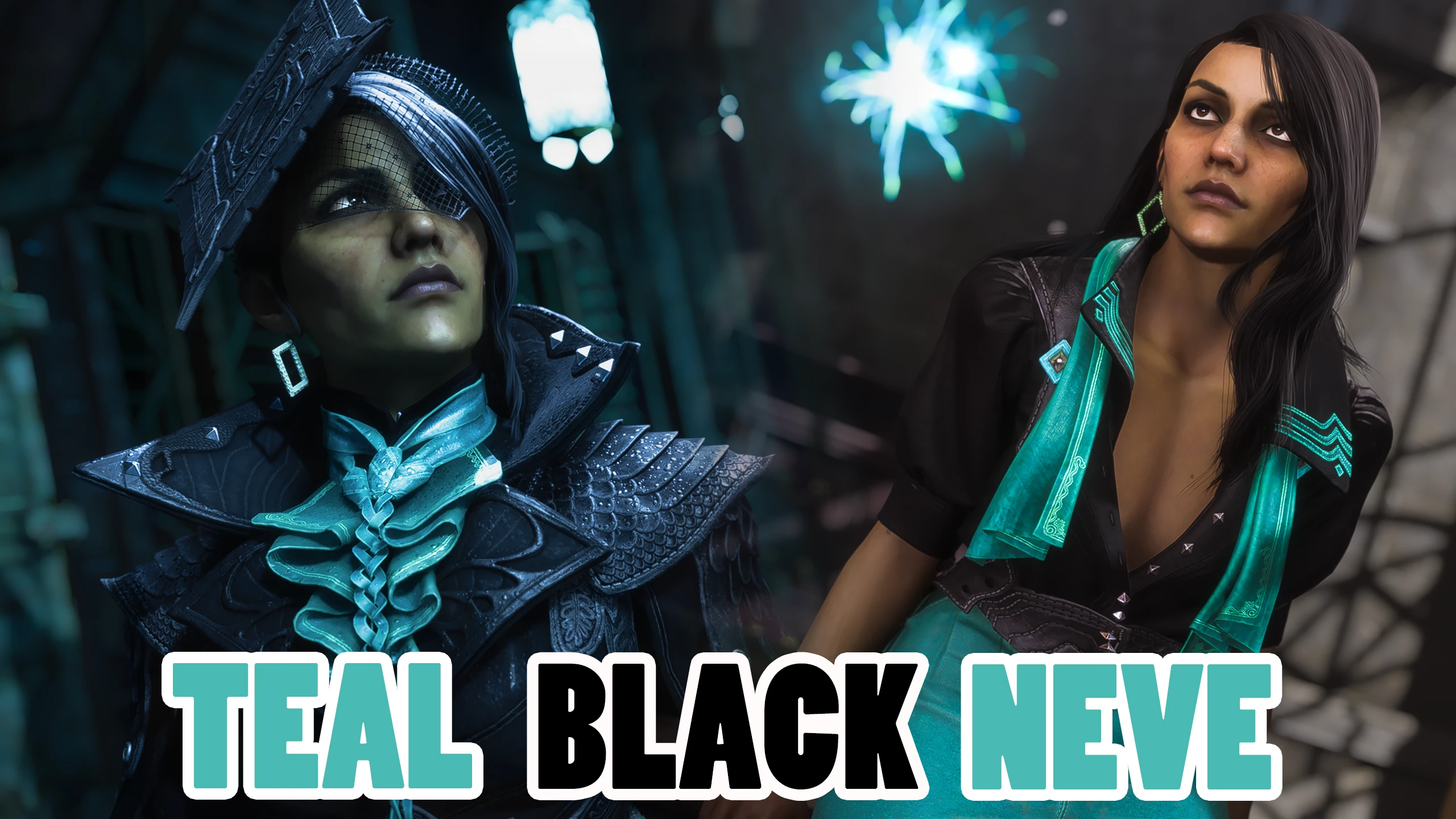
Teal Black Neve
🟠 Updated over a year agoPreview
🔍 Analysis
- 👍 6.8% endorsement rate — high engagement, a strong quality signal
- 🏆 #36 of 1207 Armour and Clothing mods in this game by downloads
📋 About This Mod
I love how amazing Neve looks in black, it really fists her personality.
But I wanted her to have a version that retains her teal details. I feel the color is so iconic to her look and matches her eyeliner :)
Jacket and top now have silver accents to match the look better.
Prosthetic leg is also more silver than gold to match...
INSTALLATION:
Unzip the file before dropping it into mod manager. You don't use .zip file, only .fbmod file inside.
Frosty mod manager tutorial for installation and modding shared in this google document.
Credit to PinkyDude on discord
Install with Frosty Mod Manager. You need version Alpha4 v3 or newer.
Get it HERE
------------------
UPDATE MAY 2025!
A new version of Frosty mod manager and Editor exists now and it's more advanced than previous Wavebend's versions
The new version is J-Lyt's Frosty, older Waveband version will merge into it, and only J-Lyt will be supported and updated from now on, and it also supports more advanced mesh modding, so it's highly recommended you use that version of Frosty from now on and regularly check for updates on their github.
get it here:
J-Lyt FrostyToolsuite
A simple recolor mod for Dragon Age: The Veilguard that changes Neve's basic armor and Lighthouse casual top to black while preserving her teal accents. With 235 endorsements and 3,457 downloads, it's a niche cosmetic option for players who prefer a darker look for Neve.
✨ Key Features
📊 Pros & Cons
✅ Pros
- Community-approved with 235 endorsements and 3,457 downloads
- Preserves Neve's signature teal accents for a cohesive look
- Simple cosmetic change that doesn't alter gameplay
⚠️ Cons
- Only affects two outfits—basic armor and Lighthouse casual top
- No preview images or detailed description provided by author
- Last updated in November 2024—may not be compatible with future game patches
For Dragon Age: The Veilguard players who want a darker aesthetic for Neve without changing her overall design. Skip if you're looking for more substantial outfit overhauls or gameplay tweaks—this is purely cosmetic.
💡 Beginner Tips
- Place the mod files in the game's mod folder (typically Documents/BioWare/Dragon Age The Veilguard/Mods) to ensure proper loading.
- If you're using a mod manager like Frosty Mod Manager, import the mod and apply it before launching the game.
- Check the mod's page for any updates after game patches, as recolors can break if the base armor textures change.
📊 Mod Details
- Game
- Dragonagetheveilguard Mods
- Author
- ThedasWolves
- Version
- 1.0
- Downloads
- 3,457
- Endorsements
- 235
- Category
- Armour and Clothing
- Created
- 11/24/2024
- Updated
- 11/26/2024
🔧 How to Install Dragon Age: The Veilguard Mods
Download from Nexus Mods.
📖 Full step-by-step install guide for Dragon Age: The Veilguard →
Visit the official mod page for specific installation instructions for this mod.
🎮 Need cheat codes or console commands? Check ur gaming wiki for Dragon Age: The Veilguard commands, item IDs, and more.
Keep browsing — more Dragon Age: The Veilguard mods await