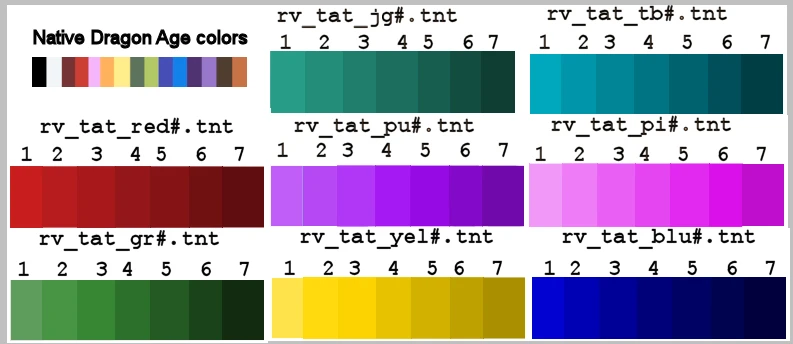
More DA 2 tat colors
⚪ Last updated 2011Preview
🔍 Analysis
- 👍 6.9% endorsement rate — high engagement, a strong quality signal
- 🏆 #21 of 110 Miscellaneous mods in this game by downloads
📋 About This Mod
Additional tattoo colors for DA 2
Update 22 MAR 2011 Added a new white tattoo color. -------------------------------- These are the same additional tattoo colors used in my DA:O mod. With so many additional colors, the tat color slider in game will require very small movements to get the color you want. It isn\'t as user friendly as the color slider in Origins. SPECIAL NOTE: I have seen a few mods that package a chargenmorphcfg.xml inside of an ERF file. These will conflict with any other mods that use the chargenmorphcfg.xml. If you are having mod problems, this could be one of the causes. -------------------------------- Installation: Place the \"RV_DA2_tat_colors\" folder in your override folder... My Documents/BioWare/Dragon Age 2/packages/core/override (Win XP path) I have retained all naming conventions from previous version(s) so it should overwrite any older version. To access the new colors in the in-game Character Creator, a chargenmorphcfg.xml file with the new tat color resource names must also be in the override folder. Many other MODs use this file as well. There should only be one of these in your override folder. The odds are good that you already have one. If you are not sure, do a search for it in your override folder. If none of your current mods have put a chargenmorphcfg.xml file in the override folder, you can just use the one provided in the download. (NOTE: Search will not find any chargenmorphcfg.xml packaged inside of an ERF file.) For those that need to combine multiple chargenmorphcfg.xml files, I recommend manual editing. Using a Compiler will mess up the mods that lets you modify the Iconic Male/Female Hawkes. To avoid this you can combine your existing chargenmorph.xml and the one from this mod manually. The easiest way to do this is with a text editor like Notepad with word wrap turned OFF to avoid any formatting mistakes. Just copy the tat color values from my chargen and paste them in your existing chargen. I have a tutorial for manual chargen editing included in the download for this mod. -------------------------------- Thanks for downloading this Dragon Age mod. I hope you and your characters enjoy your new tattoo colors. :) More DA 2 tat colors Version 1. 0 by Roma Victa -------------------------------- These are some additional character appearance mods that I recommend. WyldTats Strikes Back Chargen Revamp (now includes Tummy_Za Scar Skins) Bidelle\'s Cosmetics II LOTC Skins for DA2 V2 LOTC s Default Eye Texture for DA2 [url=htt
📊 Mod Details
- Game
- Dragonage2 Mods
- Author
- Roma Victa
- Version
- 2
- Downloads
- 6,711
- Endorsements
- 462
- Category
- Miscellaneous
- Created
- 3/19/2011
- Updated
- 3/22/2011
🔧 How to Install Dragon Age 2 Mods
Download from Nexus Mods.
📖 Full step-by-step install guide for Dragon Age 2 →
Visit the official mod page for specific installation instructions for this mod.
🎮 Need cheat codes or console commands? Check ur gaming wiki for Dragon Age 2 commands, item IDs, and more.
Keep browsing — more Dragon Age 2 mods await