Lipsticks and Shadows
⚪ Last updated 2011Preview
🔍 Analysis
- 👍 3.6% endorsement rate — high engagement, a strong quality signal
- 🏆 #21 of 157 Face and Hair mods in this game by downloads
📋 About This Mod
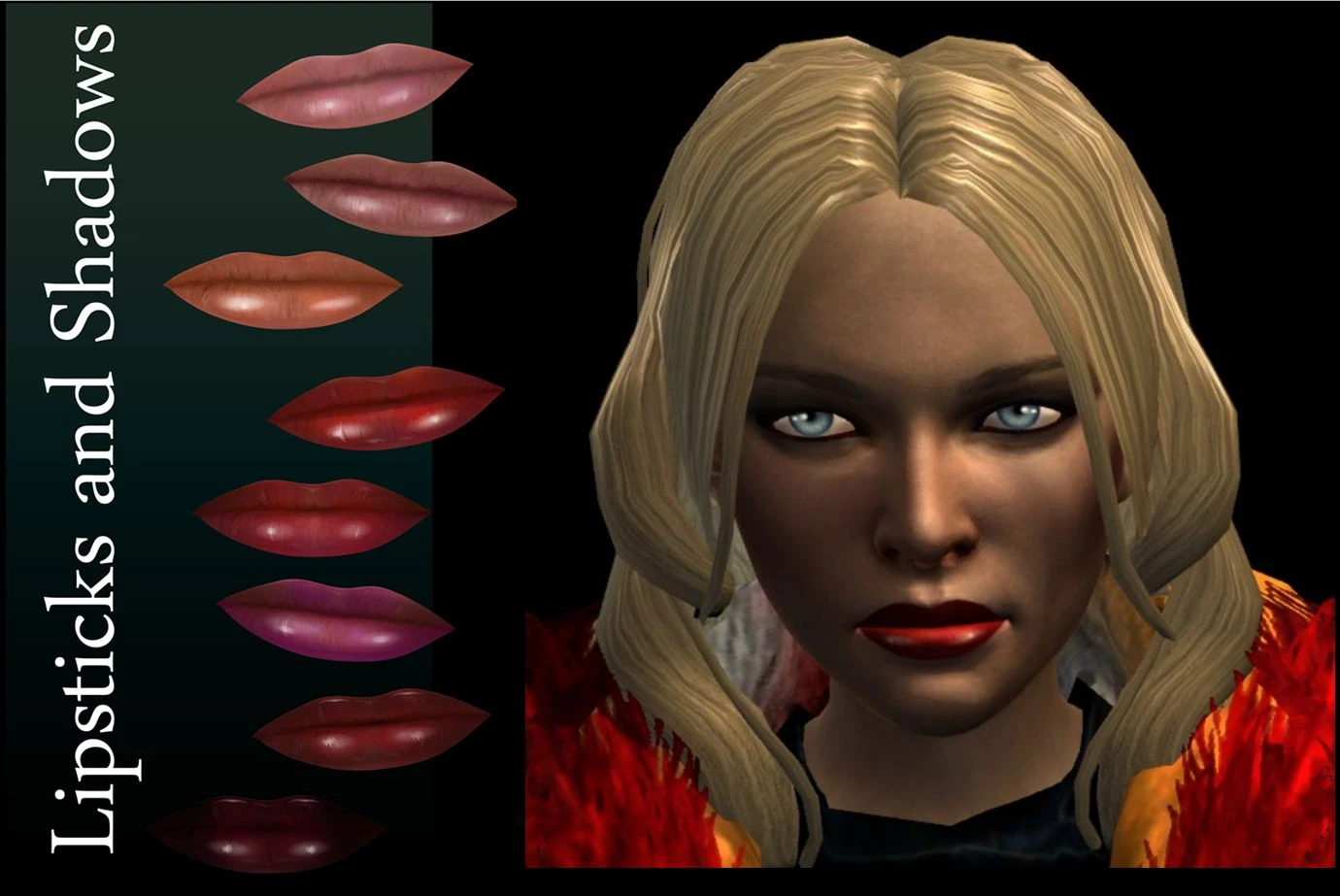
32 alternative skin models with 8 different lipstick shades and 3 intensity eye makeups. They can be used in the character generator or any time in the Black Emporium. NEW FILE with a male and female presets with alternative settings.
Lipsticks and Shadows adds 32 alternative skin models to Dragon Age: Origins, featuring 8 lipstick shades and 3 eye makeup intensities. These can be applied in the character generator or anytime via the Black Emporium. Includes new male and female presets with alternative settings. A cosmetic mod for players seeking more facial customization options.
✨ Key Features
📊 Pros & Cons
✅ Pros
- Solid community backing with 1,501 endorsements and over 41k downloads.
- Works in the Black Emporium, so you can tweak your look mid-game without restarting.
- Includes presets for both genders, saving you time if you want a quick setup.
⚠️ Cons
- Last updated in 2011, so it may not be compatible with newer game versions or DLC.
- Purely cosmetic—if you're after gameplay changes, this isn't it.
For Dragon Age: Origins players who want more variety in their character's face, especially those who enjoy experimenting with makeup looks. If you're a roleplayer who likes to tweak your appearance at the Black Emporium, this is a must-have. Skip if you want gameplay overhauls—this is strictly visual.
💡 Beginner Tips
- Make sure to extract the files into your Dragon Age: Origins 'override' folder, typically found in Documents/BioWare/Dragon Age/packages/core/override.
- If you're using the Black Emporium, remember it's only available after the Lothering quest—so you can't change your look right at the start.
- Check the mod's file structure for any .dazip files; if present, you'll need to install them via the DAUpdater tool instead of manual override.
📊 Mod Details
- Game
- Dragonage2 Mods
- Author
- Khylian
- Version
- V01
- Downloads
- 41,303
- Endorsements
- 1,501
- Category
- Face and Hair
- Created
- 9/19/2011
- Updated
- 10/31/2011
🧩 Commonly Used Together
Users add these mods to the same collections — a real compatibility signal, not an AI guess.
🔧 How to Install Dragon Age 2 Mods
Download from Nexus Mods.
📖 Full step-by-step install guide for Dragon Age 2 →
Visit the official mod page for specific installation instructions for this mod.
🎮 Need cheat codes or console commands? Check ur gaming wiki for Dragon Age 2 commands, item IDs, and more.
Keep browsing — more Dragon Age 2 mods await