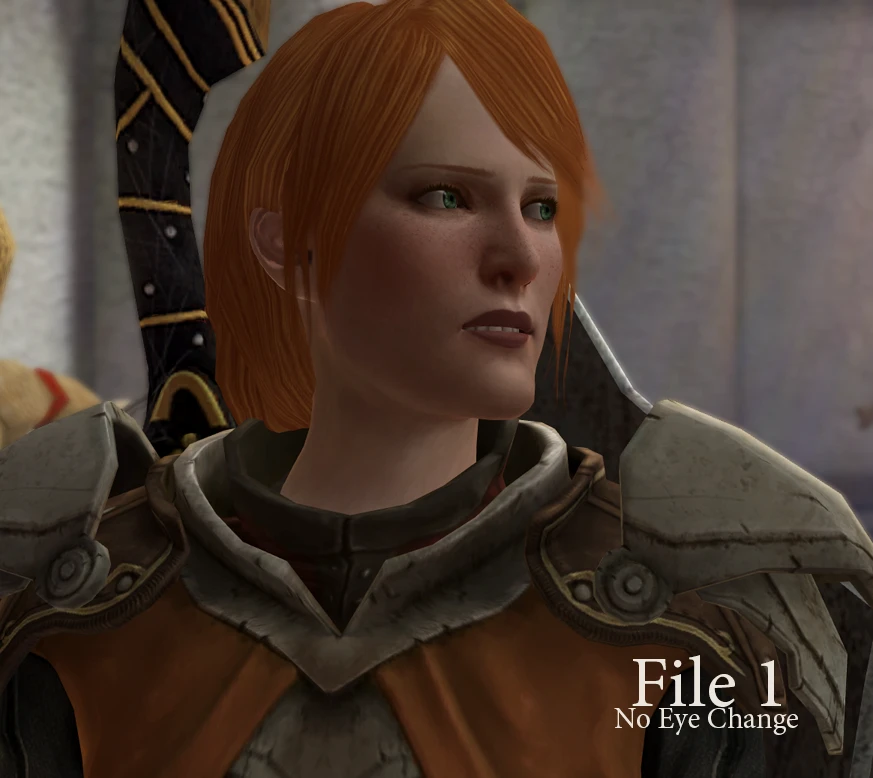
Aveline Headband Removal Fix
⚪ Last updated 2011Preview
🔍 Analysis
- 👍 6.0% endorsement rate — high engagement, a strong quality signal
- 🏆 #117 of 310 Companions mods in this game by downloads
📋 About This Mod
Note: If you are experiencing an issue, try re-downloading. The wrong files were included in the zip. The files have been re-uploaded. Hopefully that will resolve any issues.
Description:
Simple mod that switches Aveline\'s hair to the no-headband version. Second option switches her eye color to a more natural green.
Installation:
1. Download only ONE file. Option 1 is just the hair fix, Option 2 also changes the eyes.
2. Extract the .erf to your BioWare\\Dragon Age 2\\packages\\core\\override directory (usually found in the My Documents folder)
3. Start the game. Easy as that!
Uninstall:
Simply delete the .erf from your override folder.
🤖 AI-enhanced — based on mod data
A small cosmetic fix for Dragon Age 2 that removes Aveline's headband and offers an optional eye color change. With 230 endorsements and 3,836 downloads, it's a niche but appreciated tweak for players who prefer Aveline without her signature headpiece.
✨ Key Features
Removes Aveline's headband from her appearance.
Includes an optional eye color change for Aveline.
📊 Pros & Cons
✅ Pros
- Simple and effective—does exactly what it says, no bloat.
- Community-approved with 230 endorsements and nearly 4k downloads.
- Optional eye color change adds a bit of customization for those who want it.
⚠️ Cons
- Last updated in 2011—may not be compatible with newer game patches or DLC.
- Only affects Aveline's headband and eye color—no other changes.
🎯 Is This For You?
For Dragon Age 2 players who find Aveline's headband distracting or want a slightly different look for her. Skip if you're looking for more substantial companion overhauls or gameplay tweaks.
For Dragon Age 2 players who find Aveline's headband distracting or want a slightly different look for her. Skip if you're looking for more substantial companion overhauls or gameplay tweaks.
📦 Install:Easy· Under 1 minute
💡 Beginner Tips
- Make sure to place the mod files in your Dragon Age 2 'override' folder (Documents/BioWare/Dragon Age 2/packages/core/override).
- If you're using the optional eye color change, test it in-game to see if it fits your preferred Aveline look.
- Since the mod is old, consider using a mod manager like DAO Modmanager or Vortex to keep track of files and avoid conflicts.
📊 Mod Details
- Game
- Dragonage2 Mods
- Author
- ladywaffle
- Version
- 1.0
- Downloads
- 3,836
- Endorsements
- 230
- Category
- Companions
- Created
- 3/25/2011
- Updated
- 3/25/2011
🔧 How to Install Dragon Age 2 Mods
Download from Nexus Mods.
📖 Full step-by-step install guide for Dragon Age 2 →
Visit the official mod page for specific installation instructions for this mod.
🎮 Need cheat codes or console commands? Check ur gaming wiki for Dragon Age 2 commands, item IDs, and more.
Keep browsing — more Dragon Age 2 mods await