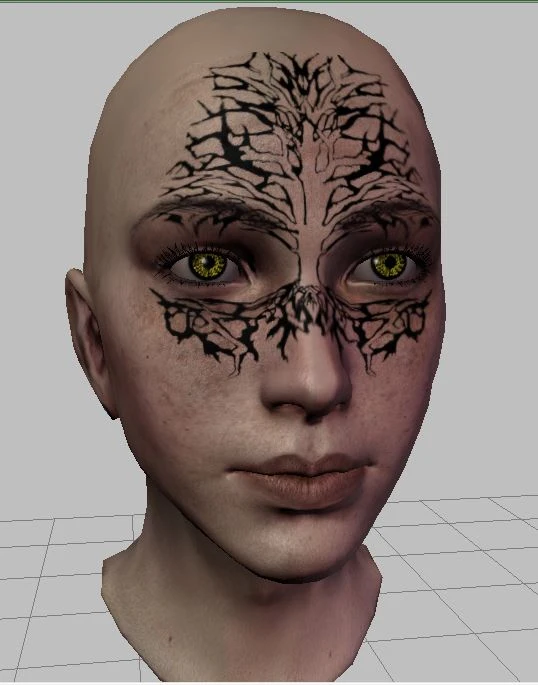
Tree Tattoos
⚪ Last updated 2013Preview
🔍 Analysis
- 👍 7.6% endorsement rate — high engagement, a strong quality signal
- 🏆 #336 of 510 Face and Hair mods in this game by downloads
📋 About This Mod
Four different tree tattoos for your character creating pleasure :)
These are some tattoos which I created using Photoshop. The first is a design based on an actual tattoo I have (although mine is on my back :P). The other three are based on public images found online (no copyright infringement, promise!) ----------------------------------------------------- Installation - For Use in the DA Toolset ------------------------------------------------------ 1. Unzip the main file (using 7zip, WinRar, or similar) and extract the files to your override folder. 2. Open up a head morph (.mrh) file you\'ve been working on or start a new one by navigating to File-->New-->Morph and selecting a base (see Whuffie\'s blog for both basic and in-depth tutorials on head morphs). 3. Select the tattoos by navigating to the Object Inspector (right hand side by default), clicking the \"02. Part selection\" tab, and choosing the appropriate file. 4. Slide any of the color channel sliders (R, G, or B) to get the desired darkness and color (note: must choose a file for color other than black). (Note: This is how I did it for my characters - if you want more detailed instructions I suggest visiting Whuffie\'s blog.) To apply this new face to an existing character, see Whuffie\'s tutorial. ------------------------------------- Installation - For Use in CC ------------------------------------- NOTE: This will replace default tattoos. Unfortunately, there is no way to add more tattoos to the sliders. Believe me, I\'ve tried. So, if you still want to add these to the CC... 1. Unzip the main file (using 7zip, WinRar, or similar) and extract the files to your override folder. 2. Rename the tattoo files based on which race/origin you plan to play: ---> For humans: uh_pct_h01_0t.dds or uh_pct_h02_0t.dds ---> For city elves: uh_pct_h01_0t.dds or uh_pct_h02_0t.dds ---> For dalish elves: uh_tat_ed1_0t.dds, uh_tat_ed2_0t.dds, uh_tat_ed3_0t.dds or uh_tat_ed4_0t.dds ---> For noble dwarves: uh_pct_dn1_0t.dds ---> For commoner dwarves: uh_pct_dc1_0t.dds or uh_pmt_001_0t.dds ---> If you want to the tattoos with more than one race, make copies each and rename accordingly. 3. Begin a new character in the corresponding origin and choose your new tattoo :) ----------------- Unistallation ----------------- Simply delete the files from your override folder. If you have any problems please ask for help and I will assist to the best of my ability. Enjoy! :)
📊 Mod Details
- Game
- Dragonage Mods
- Author
- joyous1ariella
- Version
- N/A
- Downloads
- 2,236
- Endorsements
- 169
- Category
- Face and Hair
- Created
- 7/11/2013
- Updated
- 7/11/2013
🔧 How to Install Dragon Age: Origins Mods
Download from Nexus Mods.
📖 Full step-by-step install guide for Dragon Age: Origins →
Visit the official mod page for specific installation instructions for this mod.
🎮 Need cheat codes or console commands? Check ur gaming wiki for Dragon Age: Origins commands, item IDs, and more.
Keep browsing — more Dragon Age: Origins mods await