Toolset Database Dialogue Fixes - Bodahn Kester and bartenders
⚪ Last updated 2023Preview
🔍 Analysis
- 🏆 #42 of 57 Modders Resources and Tutorials mods in this game by downloads
📋 About This Mod
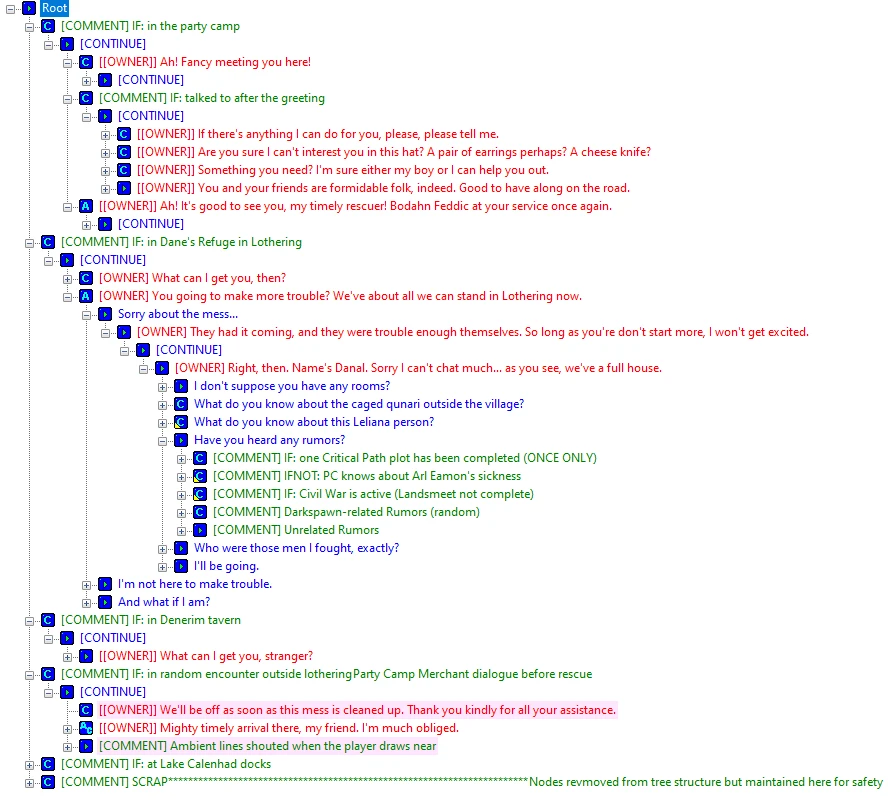
Fixes the dialogue files and tlk strings for Kester, Bodahn, and two bartenders in the toolset database. Toolset only.
This mod fixes an issue in the DAO toolset's database where two conversation files (and thus their string entries) were empty. It will have no effect on the game itself, and is purely a modding resource.
Make sure to read the installation instructions carefully. This mod will not import correctly for some people, and there is a sign to look out for. I am currently investigating the cause.
About
The database provided with the DAO toolset has broken (empty) dialogue files for Kester, Bodahn, Danal (owner of Dane's Refuge in Lothering), and the Gnawed Noble Tavern's bartender (cir100_kester and main_rumour_man, which covers the latter three). The Single Player and core resource source files will also throw an error for these specific files if you try to import them from it using Builder-to-Builder Load.
This means that, other than not being able to view/edit those files (including all the rumours in the game), the String Editor in the toolset is also missing the strings from these conversations, meaning that exporting the singleplayer talktable from the toolset without these fixes will introduce problems in these conversations such as invisible subtitles (and possibly non-controllable conversations).
This mod is a Builder-to-Builder file containing fixed versions of these conversations that can be imported into the toolset to fix your own database files.
Installation
These instructions assume you have the toolset already installed successfully.
-
[]Extract the dadbdata file of this mod somewhere (not the override folder).
[
]Open the Toolset, make sure all editors are closed.[]Click on Tools -> Builder -> Builder to Builder Load. Locate and open the dadbdata file. It may take a bit of time for the Toolset to bring up the next screen.
[]If the files say "New" under the "Exists/New" heading near the right side of the columns, do not continue. I am currently investigating: the files import correctly for some people, but fail for others, and it seems to be linked to whether or not the toolset recognises the singleplayer resources contained in a dadbdata file as the same as the ones already in the database or not. This happens with the vanilla core/singleplayer dadbdata file too. It may have something to do with whether a user has used the database's restore option or not.
- If the files say "Exists" under the "Exists/New" heading, then continue with these instructions. Leave all options as default: both dlg files should already be ticked (dependants are hidden by default and should not be ticked); under StringIDs leave "Use Theirs" selected. Click OK.
There may be a delay, and once the BtB Load window has closed you should
📊 Mod Details
- Game
- Dragonage Mods
- Author
- Ashhawk
- Version
- 1.0
- Downloads
- 130
- Endorsements
- 20
- Category
- Modders Resources and Tutorials
- Created
- 3/20/2023
- Updated
- 3/21/2023
🔧 How to Install Dragon Age: Origins Mods
Download from Nexus Mods.
📖 Full step-by-step install guide for Dragon Age: Origins →
Visit the official mod page for specific installation instructions for this mod.
🎮 Need cheat codes or console commands? Check ur gaming wiki for Dragon Age: Origins commands, item IDs, and more.
Keep browsing — more Dragon Age: Origins mods await