What is Theta HD?
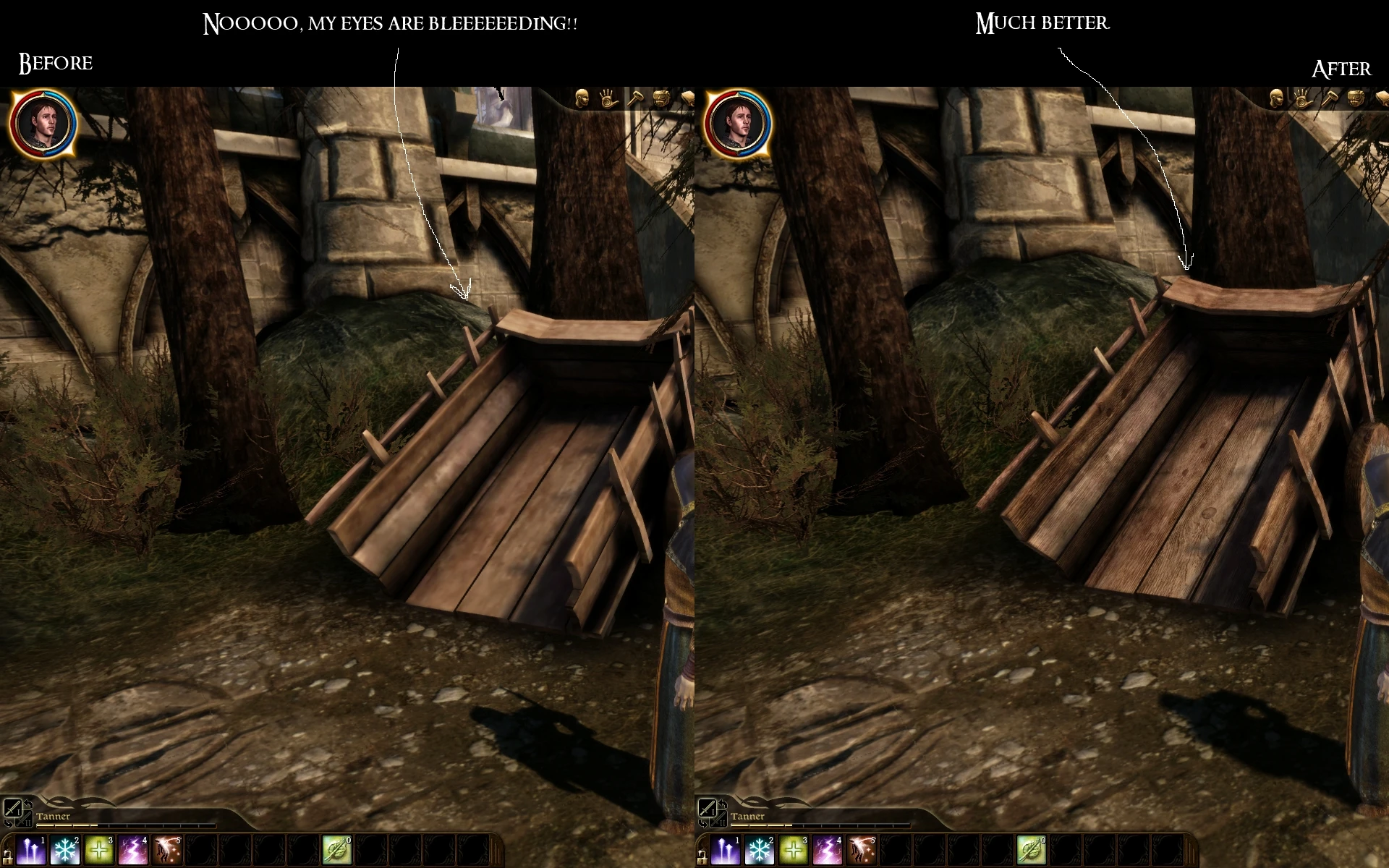
If you\'ve played Dragon Age, you\'ve noticed that some textures are extremely low resolution. The standard texture size in Origins is about 512x512, but some large objects instead use 256x256 textures, which creates glaring graphical inconsistencies. Theta HD is a project to bring ultra-low resolution textures into line with the better ones, and to bake lighting on some items and details that were skipped in development. This improves immersion and graphical fidelity by creating a smooth and consistent amount of detail throughout Ferelden. This mod won\'t blow your mind, but it will fix various immersion-breaking eyesores throughout DAO, for a tiny fraction of the performance hit associated with JB3. There are many textures that I haven\'t shown in the screenshots.
Will it work with JB3?
I don\'t use JB3 textures. Much of his work is done via bump maps and sharpen filters, which are not as effective as overlays or total repaints, and which I\'m personally unwilling to expend RAM for. As many of you know, the Steam Ultimate Edition of DAO is not compatible with LAA patches, so that limits many people in regards to textures as well. Nevertheless, if you use JB3, I recommend that you install this mod last and allow it to overwrite a few JB3 textures for best results.
Is there a performance hit?
While there has to be some performance drop, I\'ve only changed the worst textures in the game. Any performance decrease will be so small it should be unnoticeable, and this does NOT require an LAA patch or other optimization. Anyone who can run vanilla ultra textures should be able to run this mod easily.
Installation
After the download is finished, unzip the folder.
Place all the loose .dds textures inside your My Documents/Bioware/Dragon Age/Packages/Core/Override folder.
What exactly does this mod change?
As mentioned, this mod improves the lowest resolution textures in the game to create a more consistent level of detail. The worst textures have already been finished, and although the mod is \'done\' I am leaving the possibility of adding a few more textures over time.
-All carts and wagons have been increased from 256x256 to 1024x1024 and retextured.
-All large tents (such as the ones at Ostagar) have been increased from 256x256 to 1024x1024 and run through a high-quality cloth filter.
-All 256x256 doors have been increased to 512x512 and retextured.
-Various low resolution statics such as chess boards, hay bales, or log piles have been fully retextured to improve style, detail, and resolution.
-A couple items\' colors have been tweaked to improve graphical consistency.
-Various transparency textures have been increased in resolution and edited to fix large, blurry compression artifacts.
-Many painfully low resolution cloth statics (such as the drape over Morrigan\'s tent) have been increas
🤖 AI-enhanced — based on mod dataTheta HD is a texture overhaul for Dragon Age: Origins that targets the game's worst textures and fixes graphical inconsistencies, aiming to improve visuals without hurting performance or consuming excessive RAM or VRAM. With over 9,000 endorsements and 214,000 downloads, it's a popular choice for players seeking a visual upgrade.
✨ Key Features
Enhances Dragon Age's worst textures
Fixes graphical inconsistencies
Designed to avoid performance hits and excessive RAM/VRAM usage
📊 Pros & Cons
✅ Pros
- Huge community trust with 9,364 endorsements
- Over 214,000 downloads — clearly a go-to for texture fixes
- Performance-friendly approach — no heavy VRAM drain
⚠️ Cons
- Last updated in 2013 — may not be fully compatible with all mod setups or DLC
- Only covers the worst textures, not a complete overhaul
🎯 Is This For You?
For Dragon Age: Origins players who want to clean up ugly textures without sacrificing performance. If you're after a full visual overhaul, this isn't it — but if you want a quick, safe improvement, this is a solid pick.
📦 Install:Easy· Under 5 minutes
💡 Beginner Tips
- Use a mod manager like DAO Mod Manager to install and manage this mod easily.
- Check the mod's compatibility with other texture mods you have installed to avoid conflicts.
- If you're playing on PC, make sure to run the game with large address aware enabled to avoid memory issues.