The Definitive Dragon Age Origins Gamepad
🟠 Updated over a year agoPreview
🔍 Analysis
- 👍 2.1% endorsement rate — high engagement, a strong quality signal
- 🏆 #302 of 336 Gameplay mods in this game by downloads
📋 About This Mod
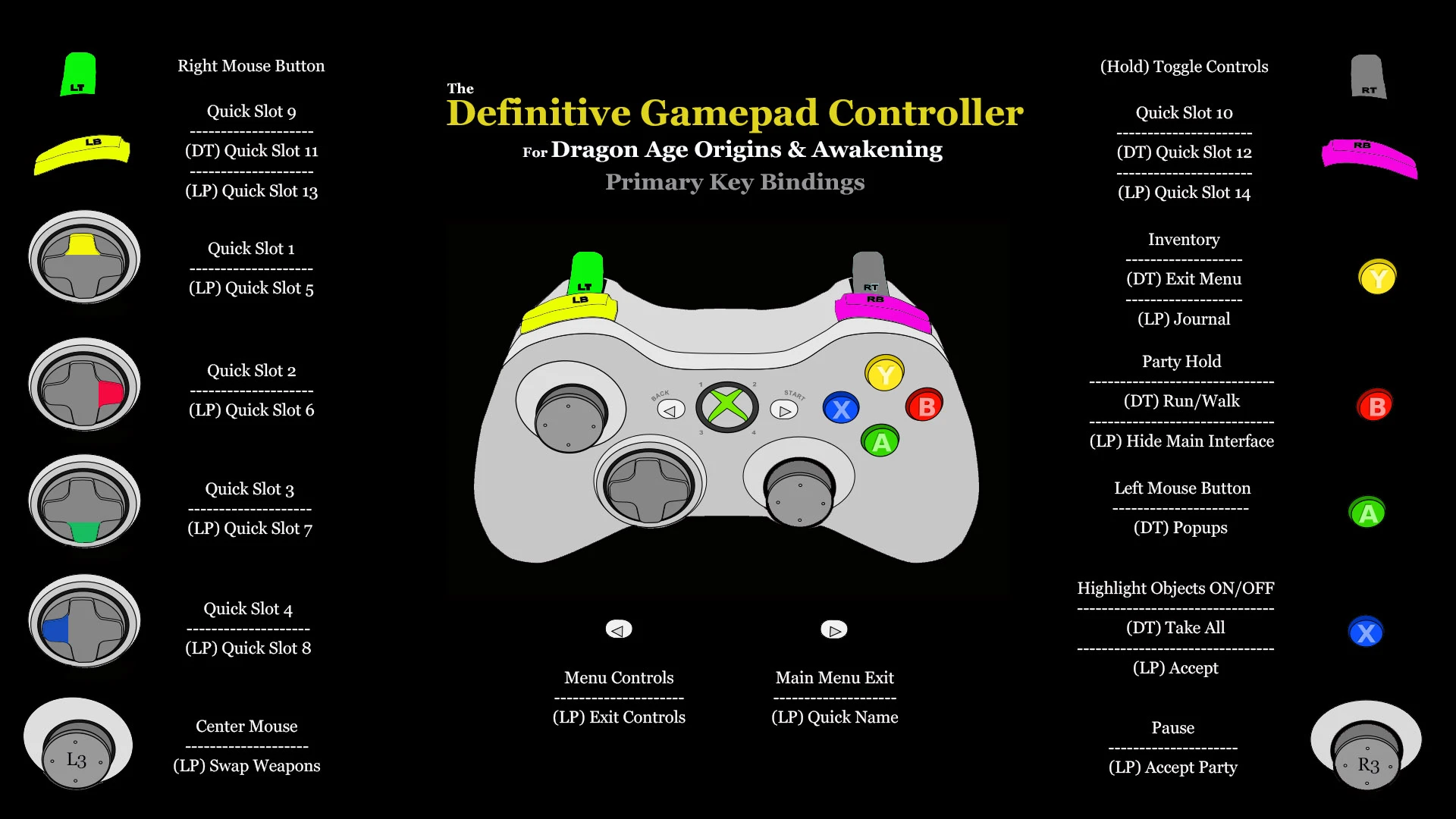
A slew of controls that work in conjunction to create the most advanced gamepad for Dragon Age Origins and Awakening
Sporting 24 Quick Slots, controls for every menu screen, and a functional Keyboard for naming saves and characters makes this the most ambitious gamepad design for Dragon Age Origins and Awakening. Please don't be daunted by so many control profiles, for the most part you won't even realize different controls are loaded. This is fully customizable so if you don't like something, such as the Exit Menu controls, then don't put them in JoyToKey. Or if you only want the Primary Controls leave everything else out.
Version 3. 0
Converted keys to function with a PS4 and PS5 controller
Minor tweaks to XBOX version that aren't really worth redownloading if you have 2. 0
The tweaks are just the cursor returning to a spot when you cancel load and stuff
Requires JoyToKey version 7. 0. 0 or higher
Requires FtG UI Mod - More Readable Fonts and UI
Requires your screen resolution be 1920 x 1080 at 16:9
Actually this only applies if you want the menus. Primary Controls work on any resolution independently.
The reason for so many profile controls is to ensure that you don't have to worry about them. I could have made it smaller by making Left Mouse Button
as A on this screen but on this other screen hold Left Trigger and press X for Left Mouse Button. Then on this screen... you get the idea. This setup is
to ensure that the delete save button is located in the same place on both the Save screen and the Load screen and such. Unfortunately it is simply impossible to have 100% functionality without having access to the programming source but this is the next best thing. Below are a few notes,
Every control setting has a failsafe built into the Select Button that returns control to the Primary Controls. If a window doesn't open but the control switches or vice versa then simply press Select to return to Primary Controls.
Double Tap Y to skip cutscenes and dialogue. Pressing Start will load the Exit Controls without the Exit Window which you don't want to do. So double tap the Y Button to skip cutscenes. If you accidentally find you have pressed the Start button then simply press Select to return to Primary Controls.
*
The Menu Controls will not automatically open in the vender window. Simply press the Select button to access them. They will load automatically f
📊 Mod Details
- Game
- Dragonage Mods
- Author
- MageMaglor
- Version
- 3.0
- Downloads
- 1,457
- Endorsements
- 30
- Category
- Gameplay
- Created
- 9/1/2024
- Updated
- 11/17/2024
🔧 How to Install Dragon Age: Origins Mods
Download from Nexus Mods.
📖 Full step-by-step install guide for Dragon Age: Origins →
Visit the official mod page for specific installation instructions for this mod.
🎮 Need cheat codes or console commands? Check ur gaming wiki for Dragon Age: Origins commands, item IDs, and more.
Keep browsing — more Dragon Age: Origins mods await