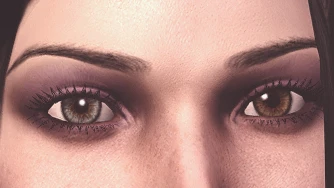
Six Presets with Heterochromia
⚪ Last updated 2020Preview
🔍 Analysis
- 👍 5.6% endorsement rate — high engagement, a strong quality signal
- 🏆 #210 of 510 Face and Hair mods in this game by downloads
📋 About This Mod
I didn't think making characters with different-looking eyes was possible until recently, when I came across DarthParametric's re-UV Mapped Eyes. I wanted to try my hand at making my own heterochromatic eye texture, so I took an iris texture I made a while ago, tinkered with the colours a bit, and voilà! Well, it’s probably far from perfect, I'm not exactly the Michelangelo of GIMP and this is the first and only eye I've ever made. Still, I don't think it looks that bad, and since I thought some other people might be interested in having this option available in the character creator, I created six presets that use this texture, one for each race and gender. Aside from the eyes (obviously), they were made using only vanilla assets, so you don't have to worry about downloading a ton of other mods to get them to work.
Note that I tried to stay on the realistic side of things, since cartoonish or super bright colours aren't exactly my thing. The colours look a bit dark in the dimly lit character creator, but as you can see on my screenshots, they look much better in-game (or at least I think they do).
I initially wasn't planning on making the eyes tintable, but I eventually decided to include a tint mask (the iris isn't the same though, mine doesn't look good once tinted). You'll only be able to alter the right eye; the left one can't be tinted. Please be aware that once you've tinkered with the eye colour slider, you won't be able to revert to the original eye texture. If you’ve changed your mind and want your character to have the original texture, you'll have to start over (hope I’m making sense here).
Please note that unless indicated otherwise, the sclera (the white of the eye) you see on my screenshots is not the one that I uploaded here. I couldn't find whether the one I initially used was usable in game mods or not, so I had to find another one. It doesn’t make much of a difference, though.
I also made a small last-minute adjustment to the male dwarf's facial hair; I gave him more chin scruff and his stubble is now uniform (as you can see on the header and toolset pics).
You shouldn’t need to download DarthParametric’s original mod for my presets to look as intended. I did some testing without it installed and didn’t notice anything weird.
Comes in two flavours:
- Option A, which adds my presets to the existing ones. Only choose this option if you already have a chargenmorphcfg.xml file in your override folder and don't mind having to edit it manually.
- Option B, which replaces some of the existing presets with mine. Choose this option if you don't have a chargenmorphcfg file in your override folder, if you have one but don't want to fiddle with it or if you don't mind my presets replacing the vanilla ones.
Installation
1. Open up the archive and unzip the contents
Six character presets, one for each race and gender, featuring heterochromia (different-colored eyes). Can replace vanilla presets or be added as new ones. No external mods required. Last updated in 2020, with 313 endorsements.
✨ Key Features
📊 Pros & Cons
✅ Pros
- Community-approved with 313 endorsements and over 5,600 downloads
- Works standalone—no dependency headaches
- Flexible: replace vanilla presets or add new ones
⚠️ Cons
- Last updated in 2020, so may not be compatible with the latest game patches
- Limited to six presets—not a huge variety if you want more options
- Potential conflicts with other mods that alter character presets
For players who want a quick way to add heterochromia to their characters without fiddling with sliders. Also great for those who want preset variety across all races and genders. Skip if you're looking for extensive customization or mods that add new gameplay features.
💡 Beginner Tips
- Choose the 'additional presets' version if you want to keep the vanilla presets intact.
- If you're using a mod manager, preview the presets in the character creation screen before finalizing.
- Make sure to place the files in the correct folder (e.g., Data\Textures\Actors\Character\FaceGenData) if installing manually.
📊 Mod Details
- Game
- Dragonage Mods
- Author
- HoneyWhite
- Version
- 1.0
- Downloads
- 5,601
- Endorsements
- 313
- Category
- Face and Hair
- Created
- 9/20/2018
- Updated
- 7/3/2020
🔧 How to Install Dragon Age: Origins Mods
Download from Nexus Mods.
📖 Full step-by-step install guide for Dragon Age: Origins →
Visit the official mod page for specific installation instructions for this mod.
🎮 Need cheat codes or console commands? Check ur gaming wiki for Dragon Age: Origins commands, item IDs, and more.
Keep browsing — more Dragon Age: Origins mods await