More CC tattoo colors
⚪ Last updated 2011Preview
🔍 Analysis
- 👍 5.8% endorsement rate — high engagement, a strong quality signal
- 🏆 #28 of 177 Miscellaneous mods in this game by downloads
📋 About This Mod
This little mod adds some additional tattoo colors for the in-game character creator. Also useable in the toolset, of course.
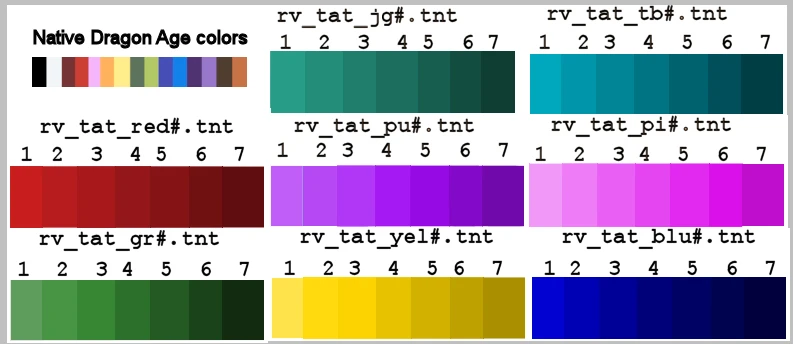
I initially made most of these for personal creation projects. Some are obviously different from the colors available now. Others are similar to the game provided colors, just expansions of the shading from light to dark. For toolset users, a tint identification guide is enclosed for speeding up your work flow.
Unfortunately, I don\'t have the time right now to do any more requested colors. I will update this page when I have the time available to handle requests.
Installation:
Place the \"Roma_Victa_tat_colors\" folder in your override folder...
My Documents/BioWare/Dragon Age/packages/core/override (Win XP path)
To access the new colors in the in-game Character Creator, a chargenmorphcfg.xml file must also be in the override folder. Many other MODs use this file as well. There should only be one of these in your override folder. The odds are good that you already have one.
If you are not sure, do a search for it in your override folder. If none of your current mods have put a chargenmorphcfg.xml file in the override folder, you can just use the one provided in the download.
Two options are provided for updating your existing chargenmorphcfg.xml....
I recommend making a backup copy of your chargenmorphcfg.xml prior to changing it no matter what method you use.
Option One: Use the provided chargenmorphcfg.xml with a compiler. I reccomend Dragon Age CharGenMorph Compiler found at Dragon Age Nexus. http://www.dragonagenexus.com/downloads/file.php?id=971
Carefully follow the instructions that come with it. Questions about the use of the compiler should be directed to it\'s author.
Option Two: A text document is provided with the additional resource name lines for easy manual editing of your existing chargenmorphcfg.xml. XML files can be opened and edited with WordPad or equivalent text editors. Simply copy the resource name lines and paste them in your xml file between
A compact cosmetic mod that adds extra tattoo color options to the character creation screen. With over 1,000 endorsements and 17,000 downloads, it's a popular choice for players seeking more customization variety. Last updated in 2011, it remains a simple, effective addition for character personalization.
✨ Key Features
📊 Pros & Cons
✅ Pros
- Community favorite with over 1,000 endorsements and 17k downloads.
- Does exactly what it says: more tattoo colors, no bloat.
- Lightweight and easy to install, perfect for a quick customization boost.
⚠️ Cons
- Last updated in 2011, so it may not be compatible with newer game versions.
- Only adds colors—no new patterns or styles, so it's limited in scope.
- Potential conflicts with other character creation mods that alter the same UI.
For players who want more variety in character creation without overhauling the system. If you're into role-playing and need that perfect tattoo shade, this is for you. Skip if you're looking for gameplay changes or a full character creation overhaul.
💡 Beginner Tips
- Since it's a simple file drop, make sure to place it in the correct mod folder for your game.
- If you're using a mod manager, enable this mod after any other character creation mods to avoid conflicts.
- Test in character creation to see the new colors—if they don't appear, check your load order.
📊 Mod Details
- Game
- Dragonage Mods
- Author
- Roma Victa
- Version
- 1.0
- Downloads
- 17,311
- Endorsements
- 1,012
- Category
- Miscellaneous
- Created
- 1/31/2011
- Updated
- 1/31/2011
🔧 How to Install Dragon Age: Origins Mods
Download from Nexus Mods.
📖 Full step-by-step install guide for Dragon Age: Origins →
Visit the official mod page for specific installation instructions for this mod.
🎮 Need cheat codes or console commands? Check ur gaming wiki for Dragon Age: Origins commands, item IDs, and more.
Keep browsing — more Dragon Age: Origins mods await