Key toggles for camera control and object highlights
⚪ Last updated 2019Preview
🔍 Analysis
- 👍 5.8% endorsement rate — high engagement, a strong quality signal
- 🏆 #317 of 336 Gameplay mods in this game by downloads
📋 About This Mod
I have made this mod after starting Dragon Age Origins and realised it has no option to toggle camera movement or object highlights.
And holding down right click wasn't at all satisfying so i decided to make a few scripts that toggle these actions at a push of a key.
This is not a traditional mod but rather a few scripts that were made using AutoHotkey and Ahk2Exe.
It is not tied to the game so basically works for anything you can think of.
It comes in two versions:
Ahk Version - is usable if you have Auto Hotkey installed
Exe Version - witch runs as a traditional executable without needing another piece of software to run it
The scripts toggle the following keys:
Right Mouse Click - Toggled when Left ALT is pressed
Left Mouse Click - Toggled when Left ALT is pressed
TAB - Toggled when TAB is pressed
R - Toggled when R is pressed
The scripts are customisable with notepad so if in any case you won't find the default keys suitable feel free to edit the ahk files with notepad and convert them to exe's using Ahk2Exe (which can be found on github) or use them as they are if you have Auto Hotkey installed.
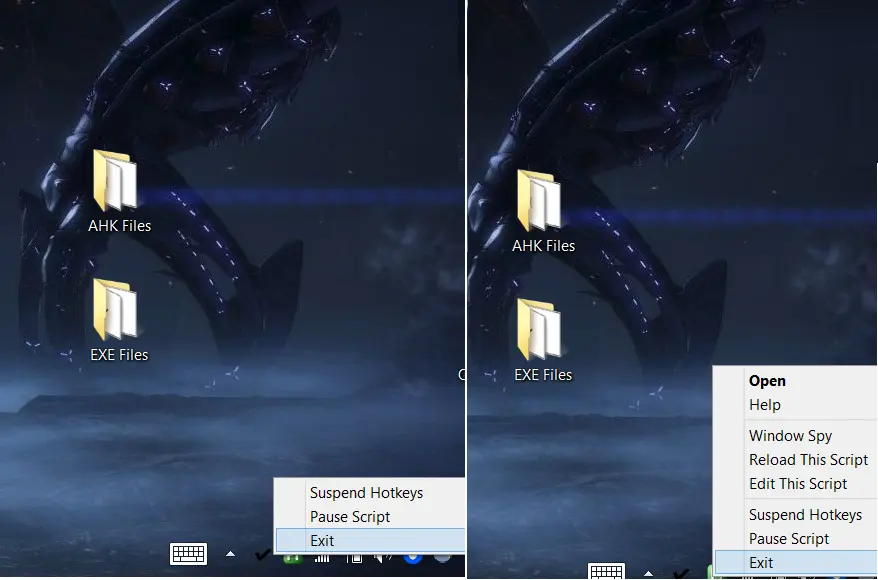
To stop the running scripts: they can be found in the notification area -> right click on icon -> exit
And i hope this might just be a solution that other people are looking for.
📊 Mod Details
- Game
- Dragonage Mods
- Author
- OuTcasT
- Version
- 1.0
- Downloads
- 1,158
- Endorsements
- 67
- Category
- Gameplay
- Created
- 10/22/2019
- Updated
- 10/22/2019
🔧 How to Install Dragon Age: Origins Mods
Download from Nexus Mods.
📖 Full step-by-step install guide for Dragon Age: Origins →
Visit the official mod page for specific installation instructions for this mod.
🎮 Need cheat codes or console commands? Check ur gaming wiki for Dragon Age: Origins commands, item IDs, and more.
Keep browsing — more Dragon Age: Origins mods await