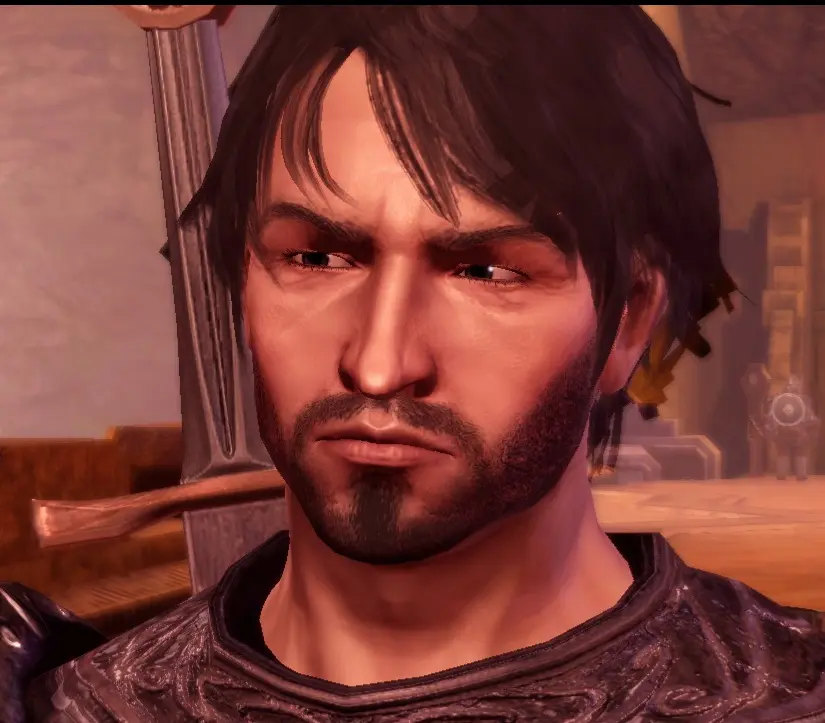
Hawke Preset
⚪ Last updated 2010Preview
🔍 Analysis
- 👍 2.7% endorsement rate — high engagement, a strong quality signal
- 🏆 #112 of 510 Face and Hair mods in this game by downloads
📋 About This Mod
UPDATE: 21-9-2010: Added a female hawke fully equipped with blood smear tattoo. Smear version and duncan beard version for the male hawke coming soon.
UPDATE: 24-8-2010: Corrected teeth position so the cutscenes look better, specially if you are using the mor as Alistair(or any human male) replacement. Included the mor with the hair files and mop in one file.
This is my attempt to create GARRET HAWKE, the default protagonist of the upcoming Dragon Age 2, as seen in the New Dragon Age 2 Cinematic Trailer. I wish there was a good beard in origins that could be used, but sadly there isn\'t any that do not horribly mess up the jaw proportions and hide a big part of the face. So I tried using dark stubble to make up for it. The hair used is not available universally so I\'ve included it in the download.
Installation:
Extract the .zip file and export the .mop file and the hair texture folder to your MyDocuments/BioWare/DragonAge/packages/core/override folder.
Make sure there are no conflicting chargenmorphcfg.xml files. if there are any, use the excellent CharGenMorph Compilermod.
Uninstallation: Just delete the .mop and chargenmorphcfg.xml from the override folder. this will also remove the option to use Nero hair from Character Creator, so if you still want to use the hair in CC, don\'t delete the chargenmorphcfg.xml, and opening it remove the line
This is a face preset mod for Dragon Age: Origins that recreates the appearance of Hawke, the protagonist from Dragon Age 2. It's a simple cosmetic addition for players who want to start their game with a familiar face. With 420 endorsements and over 15,000 downloads, it's a well-received preset for fans of the series.
✨ Key Features
📊 Pros & Cons
✅ Pros
- Solid community approval (420 endorsements)
- High download count (15,617) shows it's been tried by many
- Gives your Warden a familiar, heroic look from the sequel
⚠️ Cons
- Only a face preset – no other changes to gameplay or visuals
- May not perfectly match Hawke's appearance due to engine differences
- Compatibility with other face mods or texture replacers could be an issue
For Dragon Age: Origins players who want to roleplay as Hawke or just like the look. If you're a completionist wanting to tie your games together, this is a nice touch. Skip if you're looking for gameplay changes – this is purely cosmetic.
💡 Beginner Tips
- Place the file in your Dragon Age: Origins 'Override' folder to ensure it loads correctly.
- Preview the preset in character creation before finalizing to see if it fits your vision.
- If you use other face mods, load this preset last to avoid conflicts.
📊 Mod Details
- Game
- Dragonage Mods
- Author
- Nowshin
- Version
- 1.3
- Downloads
- 15,617
- Endorsements
- 420
- Category
- Face and Hair
- Created
- 8/21/2010
- Updated
- 9/20/2010
🔧 How to Install Dragon Age: Origins Mods
Download from Nexus Mods.
📖 Full step-by-step install guide for Dragon Age: Origins →
Visit the official mod page for specific installation instructions for this mod.
🎮 Need cheat codes or console commands? Check ur gaming wiki for Dragon Age: Origins commands, item IDs, and more.
Keep browsing — more Dragon Age: Origins mods await