DASaveReader
⚪ Last updated 2015Preview
🔍 Analysis
- 👍 5.2% endorsement rate — high engagement, a strong quality signal
- 🏆 #18 of 55 Utilities mods in this game by downloads
📋 About This Mod
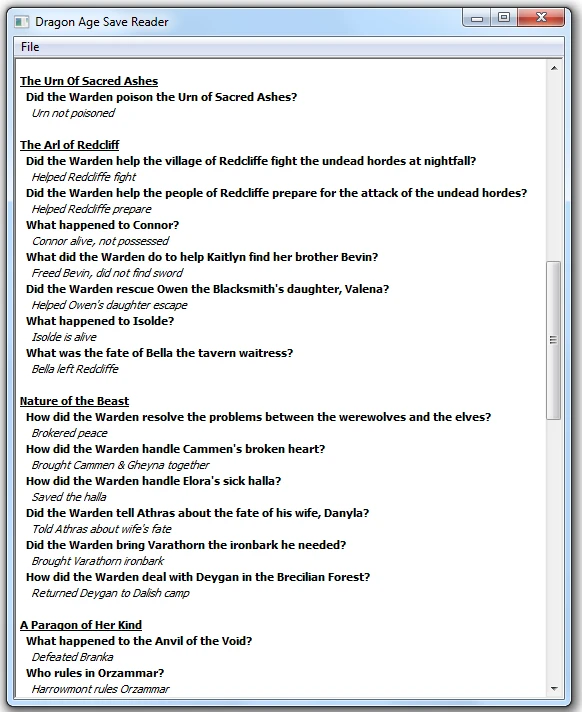
BioWare has not released a tool to export your DAO save file an import it into Inquisition. If you want to transfer your world state, you have to read over your quest logs and put your decisions into Dragon Age Keep. DASaveReader is a tool that will read your Origins save file and print out your decisions so they can easily be entered into Keep. This projects supports all quests in Origins and in the DLCs.
THIS PROJECT IS IN BETA. There are likely bugs.
Windows Users:
- []Download DASaveReaderGui[/] []Extract The File[/] []Double Click On da_reader_gui.exe[/] []Go To 'File' -> 'Open'[/] []Choose Your Save File[/] []Read your world state and input it into Keep[/]
- []Make sure that you have Python installed[/] []Download the DASaveReader ZIP file and extract it[/] []Open a terminal window[/] []Go into the extracted directory[/] []Enter the following: python da_reader.py path/to/my/save/file.das[/] []If you have wxPython installed, you can run: python da_reader_gui.py[/] []Read your world state and input it into Keep[/]
Do I still have to use the Keep interface? Yes, all DASaveReader does is show your Origins world state. You still need to go into Keep and input the decisions by hand.
Acknowledgements:
- []This tool would not be possible without code from pyGFF, created by Mephales . http://social.bioware.com/project/1936/[/]
DASaveReader is a Python utility that reads Dragon Age: Origins save files and prints your choices for easy import into Dragon Age Keep, allowing your world state to carry into Inquisition. With 393 endorsements and 7,533 downloads, it's a niche but proven tool for players who want continuity across the trilogy.
✨ Key Features
📊 Pros & Cons
✅ Pros
- Community-approved with 393 endorsements and over 7,500 downloads
- Solves a real problem: getting your Origins choices into Inquisition without manual entry
- Lightweight Python script, no bloat or heavy dependencies
⚠️ Cons
- Last updated in 2015, so it may not work with newer game patches or OS changes
- Requires Python knowledge to run, not a plug-and-play GUI tool
- Potential compatibility risk with modded save files or DLC choices
For Dragon Age completionists who want their Origins world state to carry into Inquisition without manually recreating it in Keep. Also for players comfortable with command-line tools. Skip if you prefer GUI tools or don't care about world state continuity.
💡 Beginner Tips
- Make sure Python is installed and added to your PATH before running the script.
- Run the script from the command line in the same directory as your save file for best results.
- If you have multiple saves, back them up before using the tool to avoid any accidental overwrites.
📊 Mod Details
- Game
- Dragonage Mods
- Author
- xelrach
- Version
- beta2
- Downloads
- 7,533
- Endorsements
- 393
- Category
- Utilities
- Created
- 11/17/2014
- Updated
- 1/19/2015
🔧 How to Install Dragon Age: Origins Mods
Download from Nexus Mods.
📖 Full step-by-step install guide for Dragon Age: Origins →
Visit the official mod page for specific installation instructions for this mod.
🎮 Need cheat codes or console commands? Check ur gaming wiki for Dragon Age: Origins commands, item IDs, and more.
Keep browsing — more Dragon Age: Origins mods await