Chargenmorph Compilation
⚪ Last updated 2010Preview
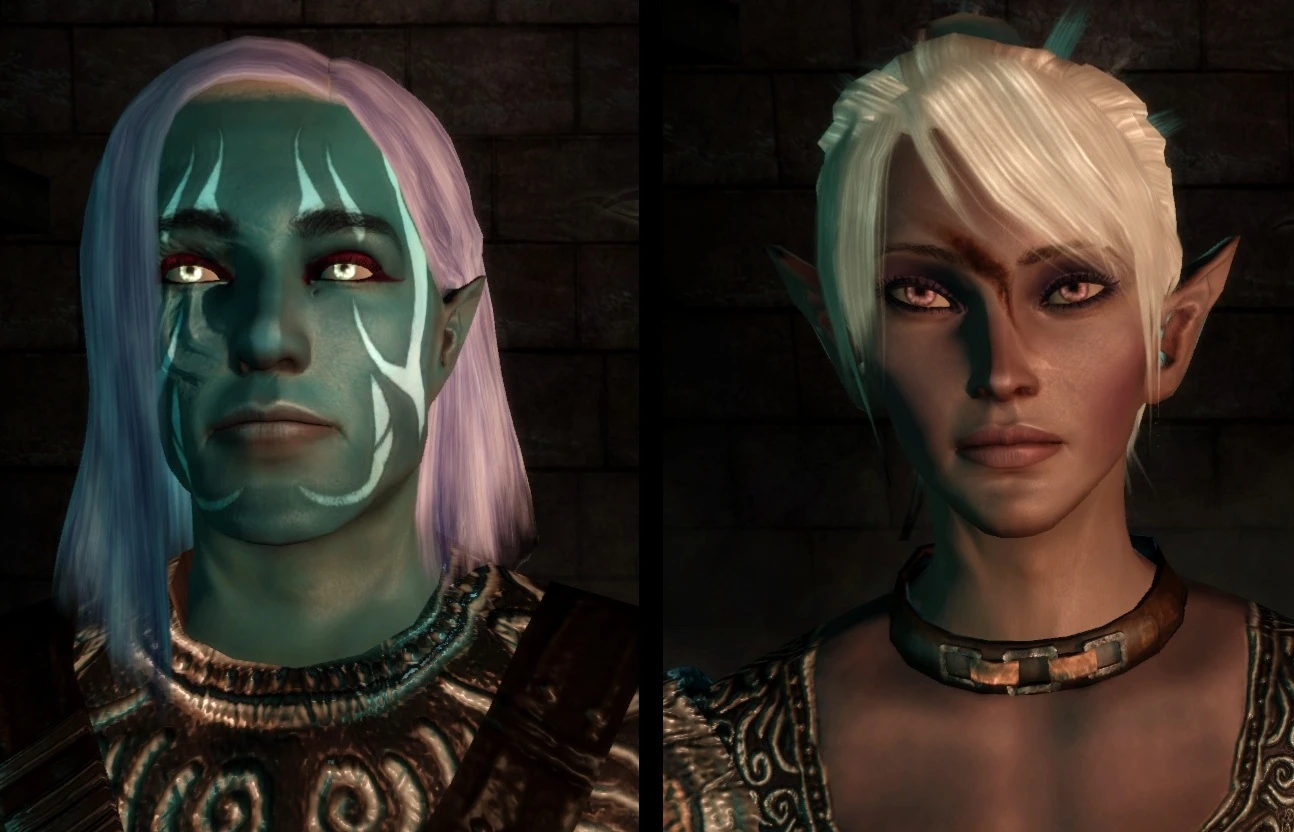
🔍 Analysis
- 👍 3.8% endorsement rate — high engagement, a strong quality signal
- 🏆 #34 of 177 Miscellaneous mods in this game by downloads
📋 About This Mod
I did not make any of the mods this file supports, all credit goes to each of the individual mods creators. I just compiled the chargenmorphcfg files which accompanied each of their mods into a single file so all components would load correctly. Remove all your existing Chargenmorph.xml files from within the Override folder, and associated mod folders, and drop this file in. ____ Be 100% sure all other Chargenmorphcfg files have been removed, this must be the only copy to ensure everything loads in the character creator. Unifies the following: CC Tints & Tones v1-3 http://www.dragonagenexus.com/downloads/file.php?id=69 Pineappletree\'s Vibrent Colors 1_31 http://www.dragonagenexus.com/downloads/file.php?id=153 Chargen Package v1 http://www.dragonagenexus.com/downloads/file.php?id=110 More_Hairstyles 0_24 http://www.dragonagenexus.com/downloads/file.php?id=392 Bidelles Make-up Studio v03 http://www.dragonagenexus.com/downloads/file.php?id=473 Pretty Faces_All Races Female Preset Heads 2 http://www.dragonagenexus.com/downloads/file.php?id=314 ____ Extended installation instructions: For those unsure of how to install the document, here is what must be done - it is really quite simple. Open up your Override file for Dragon Age, located under \"(my) Documents\" > \"BioWare\" > \"Dragon Age\" > \"Packages\" > \"Core\" > \"Override\" Once inside, access any of the containing folders for the mods this supports, and that you have already installed. (if you haven\'t installed the mods yet, just extract them into the Override folder, and then proceed with these directions) In each of the folders there will probably be a file called \"Changemorphcfg\", it is an .xml document. Remove or delete the file from each of the mod folders so the game cannot find and load the wrong file mistakenly. Once all of the Changemorphcfg files have been removed, simply drop my file into the Override folder. The game will now load using my files parameters, and you should be able to access any or all of the mods this file supports and that you have downloaded. If you encounter any errors, ensure you have the same version of the files as I have listed, and double check to be sure mine is the only copy of the Changemorphcfg file located in your Override folder.
Chargenmorph Compilation merges six character creation mods for Dragon Age: Origins into one unified package, including tint packs, hairstyles, makeup, and female preset heads. With 481 endorsements and 12,699 downloads, it's a popular all-in-one solution for players seeking expanded character customization options.
✨ Key Features
📊 Pros & Cons
✅ Pros
- One-stop shop for character creation mods—no need to juggle six separate downloads.
- Community favorite with 481 endorsements and over 12k downloads, so it's proven.
- Covers everything from hair to makeup to face presets, so you get a full customization overhaul.
⚠️ Cons
- Last updated in 2010, so it might not play nice with newer game patches or DLC.
- Merging mods can cause conflicts if you already have any of the originals installed—watch for overwrites.
- Compatibility with other character mods is a gamble; you might need to test load order.
For Dragon Age: Origins players who want a massive character creation upgrade without hunting down multiple mods. Perfect for roleplayers who love tweaking every detail of their Warden. Skip if you're happy with vanilla customization or prefer to pick individual mods yourself.
💡 Beginner Tips
- Since this is a compilation, make sure you don't have any of the included mods already installed—remove them first to avoid conflicts.
- Use a mod manager like DAO Mod Manager to install and track the files, making it easier to uninstall if needed.
- After installing, start a new game to see the new options in the character creator; existing saves won't show them.
📊 Mod Details
- Game
- Dragonage Mods
- Author
- Poosh
- Version
- 4
- Downloads
- 12,699
- Endorsements
- 481
- Category
- Miscellaneous
- Created
- 12/30/2009
- Updated
- 1/7/2010
🔧 How to Install Dragon Age: Origins Mods
Download from Nexus Mods.
📖 Full step-by-step install guide for Dragon Age: Origins →
Visit the official mod page for specific installation instructions for this mod.
🎮 Need cheat codes or console commands? Check ur gaming wiki for Dragon Age: Origins commands, item IDs, and more.
Keep browsing — more Dragon Age: Origins mods await