Beautiful Elf Female Presets
⚪ Last updated 2011Preview
🔍 Analysis
- 👍 1.8% endorsement rate — high engagement, a strong quality signal
- 🏆 #42 of 510 Face and Hair mods in this game by downloads
📋 About This Mod
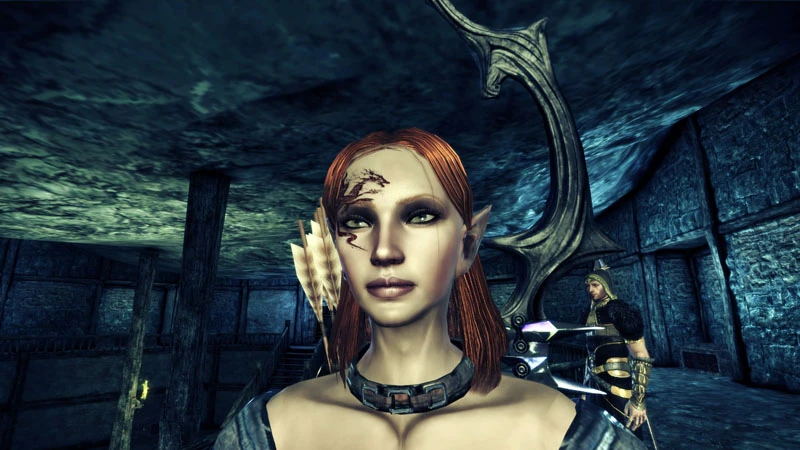
01/09/2011 I had request for Emi to have no tattoos, which I already had in Emi package, but they also wanted smaller ears. I also have Terra Ven packaged with this file. Both morphs are in mop format. 12/28/2010 Per request for Human female version of Emi. 10/04/2010 Emi files archive is repackaged. There is four different morphs of her. I updated the installation readme and also included chargenmorphcfg.xml file. New Morph character called Terra Ven. Ancient Elf from over 1000 years ago, before the war and slavery. Well my version of what she would look like. 9/27/2010 Had to reupload Shianni file. For some reason it got corrupted. Before uploading I went thru and used current textures. 9/21/2010 I went thru and updated Emi files with all new textures that is supported by Dracomies True Textures. So just as long as you have the lastest one installed and the other mods that I mention in the readme file and below. You should be fine. Only real change now with the newer files is her eyes are little darker. So hopefully this will fix the issues people was having. Dave Helpfule advies. If you download any morph file and is causing the character creator or for dragon age to crash after try to select the morph. After you added the file to the chargen file. Most likely, you are missing a simple texture file. When the program can\'t find it,in the override directory it will crash. It would be nice if it would just default to something else instead of crashing. Here is some of the textures that I used for ef_emi_dalish.mor: 1. uh_hed_draconeutralgloss_0d = draconies true textures/dragonage redesign 2. uh_hed_fema_0d 3. pn_eye_dracogreenflashy_0d = draconies true textures/dragonage redesign 4. ef_har_idk03_0 = hairstyle from the more hairstye mod 5. pf_ulm_l3b_0d = eye lashes from the LOTC eye lashes mod These files or any morph that you can\'t get to work. You can open the mor or mop file in the toolset and then expand all to see the text for everything. Even mor files show the main textures used. You can highlight the file name and search for it, in the Bioware foloder most likely on the C:\\ drive. Hope this helps a lot of you. message me if you run to any problems. I am glad to help with this, or another problem. I want you to have the same enjoyment that i have. Dave 9/18/2010 Made few corrections and uploaded Emi Collection file that has four different looks in mor format. For those of you that uses the face changer little easier. I didn\'t include some of the textures, I have the special texture files with the mop versions. The mor files was added per request. Dave 9/18/2010 added few option files of Emi that are in mop format. Fill free to post some new snap shots if you choice to use any or my morphs. Like to see her in action. Will be uploading new version of Shianni as well. 9/17/2010 Just wanted to point out that if you download lets say Arl
This mod provides elf female face presets created by Dave using the toolset. It offers a quick way to customize elf female characters with pre-made appearances. With 984 endorsements and over 54,000 downloads, it's a popular choice for players seeking variety. Last updated in 2011, it remains a simple, file-based addition.
✨ Key Features
📊 Pros & Cons
✅ Pros
- Community favorite with 984 endorsements and over 54k downloads.
- Drop-in files—just place them in the right folder and you're set.
- Gives you instant variety for elf female faces without fiddling with sliders.
⚠️ Cons
- Last updated in 2011—might not play nice with newer game patches.
- Only covers elf females—no male or other race presets here.
- No screenshots or detailed previews in the description, so you're flying blind until you try them.
For Dragon Age: Origins players who want quick, ready-made elf female faces without spending hours in the character creator. Perfect if you're rolling a new elf mage or rogue and want a decent look fast. Skip if you're after male presets or need compatibility with the latest mods.
💡 Beginner Tips
- Place the .mop files in your Documents/BioWare/Dragon Age/Characters folder—that's where custom presets go.
- If you're using other character mods, load this one last to avoid overwriting your custom faces.
- Check the preset in the character creator before finalizing—you can still tweak sliders after applying it.
📊 Mod Details
- Game
- Dragonage Mods
- Author
- Dave
- Version
- 2.6
- Downloads
- 54,334
- Endorsements
- 984
- Category
- Face and Hair
- Created
- 6/30/2010
- Updated
- 1/10/2011
🔧 How to Install Dragon Age: Origins Mods
Download from Nexus Mods.
📖 Full step-by-step install guide for Dragon Age: Origins →
Visit the official mod page for specific installation instructions for this mod.
🎮 Need cheat codes or console commands? Check ur gaming wiki for Dragon Age: Origins commands, item IDs, and more.
Keep browsing — more Dragon Age: Origins mods await