AP Neural Enhanced Textures v4
⚪ Last updated 2022Preview
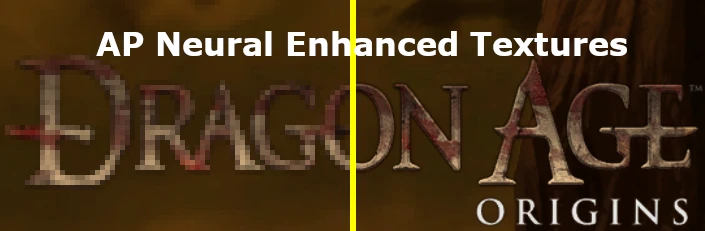
🔍 Analysis
- 👍 2.5% endorsement rate — high engagement, a strong quality signal
- 🏆 #58 of 306 Models and Textures mods in this game by downloads
📋 About This Mod
Extract the files to your Documents\BioWare\Dragon Age\packages\core\override folder.
The following were used:
Program/Architecture – Model/Method –Author/Company
ESRGAN – 4x_Remacri – Foolhardy
ESRGAN – 4x_BSRGAN – Cszn
ESRGAN – 4x_UltraSharp – Kim2091
ESRGAN – 4x_UniscaleV2Sharp – Kim2091
ESRGAN – 4x_Fabric – Kim2091
ESRGAN – 4x_TextSharpV1 – Kim2091
ESRGAN – 4x_ CelFrames – Klexos
ESRGAN – 4x_DigitalFrames_2. 1 – Klexos
ESRGAN – 4x_RealSR_DF2K_JPEG -Jixiaozhong
ESRGAN – 4x_NMKD_Superscale – NMKD
ESRGAN – 8x_NMKD_Superscale – NMKD
ESRGAN – 8x_NMKD_Typescale – NMKD
ESRGAN – 1x_NMKD_YandereInpaint – NMKD
ESRGAN – 1x_NMKD_Jaywreck3 – NMKD
ESRGAN – 1x_NMKD_FarthestNeighbor –NMKD
ESRGAN – 4x_PixelPerfectV4 – MutinCholer
ESRGAN – 1x_SSAntiAlias9x – BlueAmulet
ESRGAN – 1x_Gone_DetailedV2_40-60 –BlueAmulet
ESRGAN – 1x_Artifacts_BC1_Free – Alsa
ESRGAN – 4x_Realistic_Misc – Alsa
ESRGAN – 4x_Cat_Patch – Twittman
ESRGAN+ – Valar – Musl
Real-ESRGAN – RealESRGAN_x4plus– Xinntao
Real-ESRGAN – RealESRGAN_x4plus_anime – Xinntao
Topaz Sharpen AI – Motion Blur Normal– Topaz Labs
Topaz Sharpen AI – Motion Blur VeryBlurry – Topaz Labs
Topaz Sharpen AI – Out of Focus Normal– Topaz Labs
Topaz Sharpen AI – Out of Focus VeryBlurry – Topaz Labs
Topaz Sharpen AI – Too Soft VeryBlurry – Topaz Labs
Topaz Gigapixel AI – Standard – TopazLabs
Topaz Gigapixel AI – Lines – TopazLabs
Topaz Gigapixel AI – Art & CG –Topaz Labs
Topaz Adjust AI – Custom – Topaz Labs
Topaz Studio 2 – Custom – Topaz Labs
Photoshop– Neural Filters – Adobe
Known issues so far:
-
[]Crashes in Denerim
[
]Crashes in Lothering[]Requires your . EXE file to be set for LAA
[]Sometimes you may need to load an older save and then load your latest save to bypass the crashes to desktop. Save Often.
AP Neural Enhanced Textures v4 is a texture upscaling mod that uses ESRGAN, ESRGAN+, Real-ESRGAN, and Topaz Labs AI to enhance textures by 4x and 8x. It chains and interpolates multiple pre-trained models for improved quality. With 526 endorsements and over 20k downloads, it's a popular choice for visual upgrades.
✨ Key Features
📊 Pros & Cons
✅ Pros
- Community-trusted with 526 endorsements and over 20k downloads.
- AI upscaling can dramatically improve texture detail without manual work.
- Multiple AI models chained together for potentially superior results.
⚠️ Cons
- Last updated in March 2022 – may not be compatible with the latest game patches.
- High-resolution textures can increase VRAM usage and impact performance on lower-end systems.
For modders and players who want sharper, more detailed textures without manual editing. If you're on a high-end PC and value visual fidelity, this is worth trying. Skip if you're on a low-end system or prefer vanilla aesthetics.
💡 Beginner Tips
- Check if your game version is compatible with mods from 2022 – if you're on a newer patch, test for stability.
- Since this is a texture mod, use a mod manager to easily enable/disable it and avoid overwriting other texture mods.
- Monitor your VRAM usage in-game; if you see stuttering, consider lowering texture quality settings.
📊 Mod Details
- Game
- Dragonage Mods
- Author
- NewActionPotential
- Version
- 4.00
- Downloads
- 20,988
- Endorsements
- 526
- Category
- Models and Textures
- Created
- 1/21/2021
- Updated
- 3/25/2022
🔗 Required By 1 Mod
These mods list this mod as a dependency.
🔧 How to Install Dragon Age: Origins Mods
Download from Nexus Mods.
📖 Full step-by-step install guide for Dragon Age: Origins →
Visit the official mod page for specific installation instructions for this mod.
🎮 Need cheat codes or console commands? Check ur gaming wiki for Dragon Age: Origins commands, item IDs, and more.
Keep browsing — more Dragon Age: Origins mods await