Adonnays Weapon Replacer
⚪ Last updated 2010Preview
🔍 Analysis
- 👍 3.6% endorsement rate — high engagement, a strong quality signal
- 🏆 #6 of 122 Weapons mods in this game by downloads
📋 About This Mod
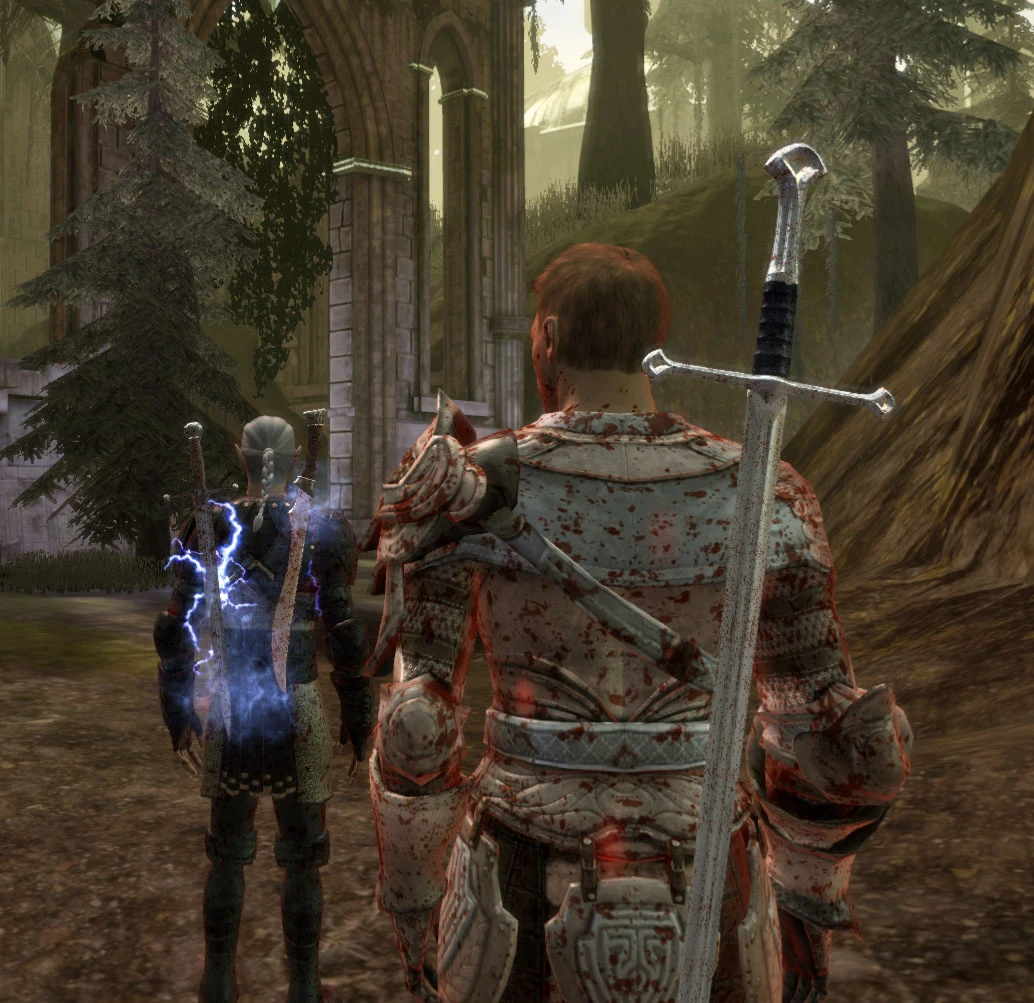
This mod will cover the replacers for the stock weapons. As I think the axes, hammers and maces are fine I will concentrate on what I think needs some tweaking... the swords and daggers. As of version 0. 9 the meshes are not replaced directly but the \"xxx_variations.gda\" files. This was done for different reasons. By not replacing the stock weapons directly it is easier for module builders to reuse the resources without replacing others. The downside however is that it is not as easy to install the mod only in pieces. This time it is not enough to just delete the subfolder of the weapon you want to revert back to the original. This time you will have to edit the respective variation file, i.e. longsword_variations.gda for the longswords, dagger_variations.gda for the daggers and so on. A very handy (and small footprint, no installation necessary) tool is the GDAApp (http://dragonagenexus.com/downloads/file.php?id=214). I strongly recommend it for quick and easy gda changes. To revert a weapon back to its original model, open the respective variation gda and change the string \"adXY\" (where XY stand for the weapon number you want to change) to \"lsXY\", \"dgXY\" or \"gsXY\" for longswords, daggers or greatswords. You notice that you\'ve done something wrong when the weapon you wanted to change doesn\'t show up at all. Deleting single lines out of the variations gda will NOT work. Deleting a whole variation gda will revert ALL weapons of that type back to the stock models. ------------------------------ Known conflicts: ------------------------------ - Legend of Sundown (weapons won\'t display) ------------------------------ Recommendations: ------------------------------ - Alternative arms and armor tints (http://dragonagenexus.com/downloads/file.php?id=1076) ------------------------------ Changelog ------------------------------ v0. 90 - COMPLETELY DELETE/DEINSTALL OLD VERSION FIRST! - - Weapon VFX added! - Daggers scaled down to make them more... well dagger-like - Weapon replacement is now achieved by replacing the different *_variations.gda files instead of the mmh/msh files directly. - Longsword 03 (family sword) replaced - Longsword 04 (elven) replaced with a longsword that matches the elven dagger - Longsword 07 (one handed Starfang) replaced with Maric\'s blade from v0. 80 - Longsword 08 (Maric\'s blade from \"Return to Ostagar\") replaced - Dagger 06 replaced - Greatsword 01 (Chasind flatblade) replaced - Greatsword 02 (dwarven) replaced - Greatsword 03 (standard) reverted back to the one found in earlier versions v0. 80 - Dagger 02 added - Longsword 05 replaced - Hilt of Longsword 02 changed - Sword of Maric (Longsword 08) added v0. 76 - Longsword 06 replaced (Tevinter Sword) v0. 75 - Dagger 03 mesh tweaked slightly - Longsword 01 scaled down slightly - Longsword 02 replaced - Longsword 03 replaced - Mip Maps added v0. 7 - Dagger 01 added - Dagger 04 added - Dag
Adonnay's Weapon Replacer is a compact mod that swaps out several weapons for more realistic-looking versions. With 2,658 endorsements and 74,593 downloads, it's a community favorite despite its age, last updated in 2010. Ideal for players seeking a grounded aesthetic without overhauling the entire game.
✨ Key Features
📊 Pros & Cons
✅ Pros
- Community-approved with 2,658 endorsements and over 74k downloads.
- Adds a grounded, realistic aesthetic without a full overhaul.
- Lightweight and focused—perfect for purists who want subtle changes.
⚠️ Cons
- Last updated in 2010—likely incompatible with current game versions.
- Only a small collection of weapons, so don't expect a complete arsenal revamp.
For players who want a subtle, realistic weapon look without a massive overhaul. If you're after a complete weapon retexture or new models, this might be too limited. Skip if you need modern compatibility or extensive documentation.
💡 Beginner Tips
- Check the mod's file structure and manually place files in your Data folder if you're not using a mod manager.
- Since it's from 2010, test it on a backup save to ensure it doesn't crash with your current game version.
- Look for community patches or compatibility notes on the mod page before installing.
📊 Mod Details
- Game
- Dragonage Mods
- Author
- Adonnay
- Version
- 0.90
- Downloads
- 74,593
- Endorsements
- 2,658
- Category
- Weapons
- Created
- 2/21/2010
- Updated
- 8/1/2010
🔧 How to Install Dragon Age: Origins Mods
Download from Nexus Mods.
📖 Full step-by-step install guide for Dragon Age: Origins →
Visit the official mod page for specific installation instructions for this mod.
🎮 Need cheat codes or console commands? Check ur gaming wiki for Dragon Age: Origins commands, item IDs, and more.
Keep browsing — more Dragon Age: Origins mods await