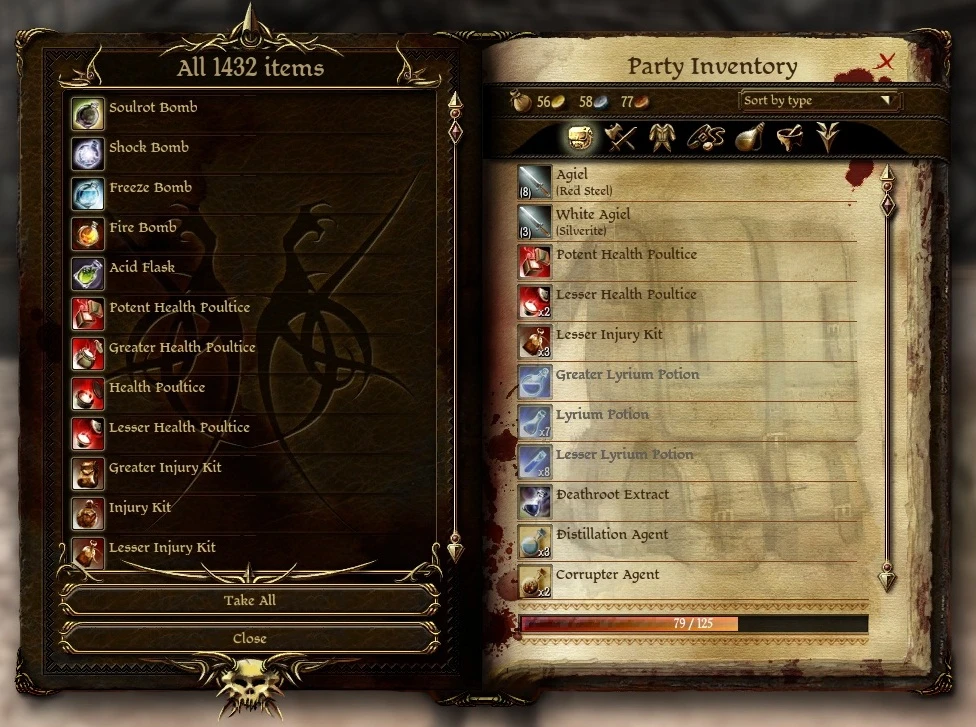
ADD ANY ITEM VISUAL DELUXE

⭐ ⭐⭐ (3,301 endorsements) 📥 90,607 downloads 📌 v1.1 📅 10/16/2010
⚪ Last updated 2010

By Sir A · Utilities

⬇ Download Mod Source: Nexus Mods ↗ 📅 Updated: 10/17/2010 📅 Created: 10/16/2010

🔍 Analysis

  • 👍 3.6% endorsement rate — high engagement, a strong quality signal
  • 🏆 #6 of 55 Utilities mods in this game by downloads

📋 About This Mod

ADD ANY ITEM VISUAL DELUXE Script Satisfying all your present and future Add Item needs. The mother of all AddItem mods. Why? ***Note for STEAM users at the end. - dynamically scans all your Dragon Age files and mods for items - lets you visually pick desired items and filter them by their screen name (not the cryptic resource name) - will work with the items added by any future mods - separates Bioware items from custom user items for your comodity INSTALLATION: 1) Unrar and copy \"siramods_items\" folder to your \"/BioWare/Dragon Age/packages/core/override\" directory. (IN THE ROOT OF THE OVERRIDE FOLDER, NOT ANYWHERE ELSE!) 2) Locate and run \"DAOItemScanner.exe\" to search all items in your Dragon Age installation and update databases. Be sure to restart the game. 3) Launch the game and type in console (for console information look in NOTES section): RUNSCRIPT GET - to get Bioware items, or RUNSCRIPT GETX - to get custom user items. A container will open containing all add-able items, filtered if you entered a filter. can contain spaces and it\'s case insensitive. If not entered, all items will be retrieved. Example: RUNSCRIPT GET WADE\'S SUP - returns all Wade\'s Superior armors RUNSCRIPT GETX - returns all custom mods items IMPORTANT! Update GET and GETX with the file I posted to get batchs of consumables. NOTES: 1) For detailed information on how to use and fix the console, read: http://dragonage.wikia.com/wiki/Console http://dragonagenexus.com/downloads/file.php?id=1110 2) Awakening items may not show in Origins, due to visiblity issues. The workaround for that is to export all Awakening items. Out of the scope of this mod. 3) Sometimes the number of elements displayed in the container title bar will be greater that the actual visible elements. It seems that not all items can be shown by containers. Internal stuff, you are not missing anythig. 4) The total items found by the scanner it\'s not the same as the total items that can be created in game. The DAOItemScanner may report X found items, but ingame you got a total of much less than that. Perfectly normal. You are not missing anything either. Always true for Bioware items, custom items may actually be equal, as modders tend to create tangible stuff. 5) The DAOItemScanner.exe: - needs Microsoft . NET Framework 3. 5 to work - you may keep and run from anywhere, it will always lock on \"../override/siramods_items\" folder to output results - should be run any time you install new DAO stuff to be sure your item databases are up to date - if cannot be run (for unknown reasons), you already have an exhaustive \"itlst_biow.gda\" database and you can add manually items in the \"itlst_user.gda\". Use GDApp. 6) When first running RUNSCRIPT GET with laxe or no filter, due to the great amount of items needed to be checked, it may freeze your game

🤖 AI-enhanced — based on mod data

A utility mod for Fallout 3 that enhances the AddItem menu, making it easier to spawn items. With 3,301 endorsements and 90,607 downloads, it's a popular tool for modders and players. Last updated in 2010, so it's old but still widely used.

✨ Key Features

Enhances the AddItem menu for easier item spawning
Satisfies all present and future Add-Item needs
Popular utility with 3,301 endorsements

📊 Pros & Cons

✅ Pros

  • Community favorite (3,301 endorsements) – clearly does its job well
  • Huge download count (90k+) – proven track record
  • Simple utility – no complex setup, just works

⚠️ Cons

  • Last updated in 2010 – may have compatibility issues with newer setups
  • Old mod – might not be compatible with mod managers or modern load orders
🎯 Is This For You?
For Fallout 3 modders who frequently spawn items and want a better menu. Also for players who use console commands to add items. Skip if you're on a modern Fallout version or expect active updates.
📦 Install:Easy· Under 1 minute

💡 Beginner Tips

  • If you're using a mod manager, manually place the files in your Data folder to avoid conflicts.
  • Check if your game version is compatible – this mod is from 2010, so test it early.
  • Use this mod alongside a load order tool like LOOT to ensure it doesn't clash with other utilities.

📊 Mod Details

Game
Dragonage Mods
Author
Sir A
Version
1.1
Downloads
90,607
Endorsements
3,301
Category
Utilities
Created
10/16/2010
Updated
10/17/2010

🔧 How to Install Dragon Age: Origins Mods

Download from Nexus Mods.

📖 Full step-by-step install guide for Dragon Age: Origins →

Visit the official mod page for specific installation instructions for this mod.

🎮 Need cheat codes or console commands? Check ur gaming wiki for Dragon Age: Origins commands, item IDs, and more.

Keep browsing — more Dragon Age: Origins mods await

📋 All Dragon Age: Origins Mods 🏆 Top 25 📂 More Utilities 👤 More by Sir A 🔎 Similar Mods 🌐 Best Utilities (All Games) 🔀 Check Compatibility ⚖️ Compare Mods 🆕 New Mods