Winter Palace Outfit ReTexture
⚪ Last updated 2017Preview
🔍 Analysis
- 👍 7.7% endorsement rate — high engagement, a strong quality signal
- 🏆 #19 of 267 Clothing mods in this game by downloads
📋 About This Mod
Attention: This mod is no longer being supported or updated.
This mod has been uploaded by "The Care Taker" at the request of its owner. The Care Taker account is run by Nexus Mods for the purpose of hosting mods created by authors who are no longer active in the community.
If you are a mod author and would like to learn more about this service or have questions, you can find details regarding The Care Taker HERE.
Happy modding!
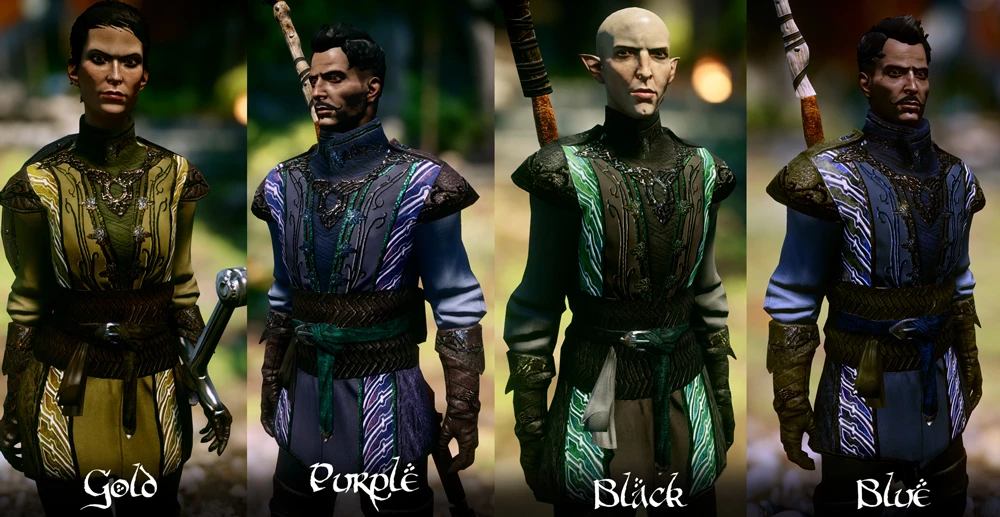
Update 18/3/2015-Added more color options for the Dalish Formal Attire. Look under "Optional Files". Please refer to image in gallery.
Update 9/4/2015- Added the source files and psd files for formal attire 1 and 2.
Getting Mods to work with Bioware's Patch 5
SOURCE: DA:I Tools Forum
From Renmiri - Updated to stop random CTD or Infinite loads
How to run mods with Patch 5: (UPDATED)
1) Copy the patch 5 folder you just got to “Vanillapatch” or whatever name you want
2) Delete 'Patch.daimod' from the modmanager v0. 48a folder. (Skip if it's your first time modding) - IMPORTANT STEP - DO NOT MISS THIS
3) Use ModManager version 0. 48 to merge your mods again. Save the modded merge to a folder named “Merged” or whatever else you liked - Force Rescan must be on
4) Rename the folder named “Patch” to “PatchV”
5) Rename the folder named “Merged” you made on step 3 to “Patch”
6) Start the game
6a) You can delete the folder “PatchV” or leave it there. Keep “Vanillapatch”, You will need “Vanillapatch” if you want to merge more mods
7) to merge new mods:
Delete the folder named “Patch” and make a copy of “Vanillapatch” named “Patch”. Run steps 3-6 again. (This will work for all mods done properly. If you can't enable a mod then it means the mod has a high patch level. In this case, click on the problem mod, look on the right panel what patch level it says it needs and write down the patch level required for the problem mod then see note)
MOD DESCRIPTION:
This mod is a re-texture of the formal outfit. I made it more for persona
A re-texture of the formal wear outfit, offering three design variants. With 1,608 endorsements and 20,830 downloads, it's a popular cosmetic choice for players seeking visual variety. Last updated in 2017, so compatibility with current game versions may be uncertain.
✨ Key Features
📊 Pros & Cons
✅ Pros
- Community favorite with 1,608 endorsements and over 20k downloads
- Simple cosmetic upgrade that adds visual variety to formal wear
- Lightweight mod that doesn't require additional dependencies
⚠️ Cons
- Last updated in 2017 — may not be compatible with the latest game version
- Only affects one outfit, so impact is limited if you don't use formal wear often
- No preview images or detailed description of the three designs
For players who want to freshen up the look of formal wear without overhauling the whole game. If you're into role-playing or just like having stylish outfits, this is a quick win. Skip if you're looking for gameplay changes or if you rarely wear formal attire.
💡 Beginner Tips
- Since it's a re-texture, make sure you have the original formal wear item in-game to see the changes.
- If you're using a mod manager, you can preview the textures before installing to pick your favorite design.
- Check the mod's comments section for any user reports about compatibility with your game version.
📊 Mod Details
- Game
- Dragon Age Mods
- Author
- Skaramoosh
- Version
- 1
- Downloads
- 20,830
- Endorsements
- 1,608
- Category
- Clothing
- Created
- 3/12/2015
- Updated
- 8/25/2017
🔧 How to Install Dragon Age Mods
Download from Nexus.
📖 Full step-by-step install guide for Dragon Age →
Visit the official mod page for specific installation instructions for this mod.
🎮 Need cheat codes or console commands? Check ur gaming wiki for Dragon Age commands, item IDs, and more.
Keep browsing — more Dragon Age mods await