No Shiny Shirt for Josephine
⚪ Last updated 2015Preview
🔍 Analysis
- 👍 8.1% endorsement rate — high engagement, a strong quality signal
- 🏆 #83 of 451 Models and Textures mods in this game by downloads
📋 About This Mod
** Uploaded daimod versions compatible with the new Mod Manager~ Upgrading is highly recommended ^-^
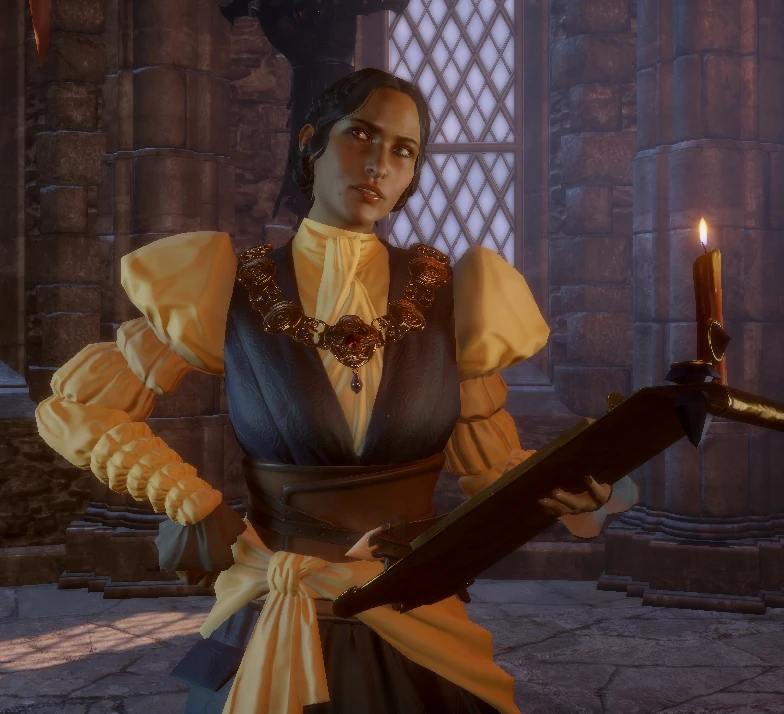
So I know Josephine is supposed to be decked out in shiny silk, but I really can't stand how shiny it looks. So, I made this!
This mod only edits the _s.dds file so if you already have a mod that retextures Josephine this won't conflict unless the mod is packaged with its own _s file (which it shouldn't if it's just a retex).
Install this like any other mod you would use with the DAI Mod Manager.
- []Place contents of zip into your mods folder, wherever you have placed it. [/] []Merge your mods with the Mod Manager.[/]
If you have no other mods, you can install this the old way of just chucking into your Updates folder in the game directory, but I advise against this because then you can only use 1 mod.
A tiny cosmetic fix that removes the glossy shine from Josephine's outfit in Dragon Age: Inquisition. With 856 endorsements and over 10,000 downloads, it's a community-approved tweak for players bothered by the unrealistic sheen. Simple, effective, and still relevant for modded playthroughs.
✨ Key Features
📊 Pros & Cons
✅ Pros
- Community-approved with 856 endorsements and over 10,000 downloads.
- Does exactly what it says—kills that ridiculous shine without touching anything else.
- Zero hassle: drop-in texture replacer, no extra tools needed.
⚠️ Cons
- Last updated in 2015—may not be tested with the latest game patches or DLC.
- Only affects Josephine's default outfit; other costumes remain shiny.
- No screenshots or detailed install notes in the description, so you're flying blind until you test it.
For Dragon Age: Inquisition players who love Josephine but cringe at her plastic-looking clothes. If you're doing a modded playthrough and want a quick visual polish, this is a no-brainer. Skip if you're fine with the original shine or want more comprehensive outfit overhauls.
💡 Beginner Tips
- Place the file in your Dragon Age: Inquisition mod folder (usually Documents/BioWare/Dragon Age Inquisition/Mods) and make sure you have the Frosty Mod Manager or DAIM mod manager set up.
- If you're using other texture mods, load this one after them to ensure the shine removal takes priority.
- Test in the character select screen or cutscenes to see the effect immediately—no need to start a new game.
📊 Mod Details
- Game
- Dragon Age Mods
- Author
- Wendera
- Version
- 2.00
- Downloads
- 10,630
- Endorsements
- 856
- Category
- Models and Textures
- Created
- 1/10/2015
- Updated
- 2/23/2015
🔧 How to Install Dragon Age Mods
Download from Nexus.
📖 Full step-by-step install guide for Dragon Age →
Visit the official mod page for specific installation instructions for this mod.
🎮 Need cheat codes or console commands? Check ur gaming wiki for Dragon Age commands, item IDs, and more.
Keep browsing — more Dragon Age mods await