My D2R Mod Manager
⚪ Last updated 2021⚠️ Install Order · 1 step
Install in this order, then this mod last — most mods fail to load without their framework and dependencies in place.
Preview
🔍 Analysis
- 👍 3.8% endorsement rate — high engagement, a strong quality signal
- 🏆 #24 of 45 Utilities mods in this game by downloads
📋 About This Mod
ABOUT-
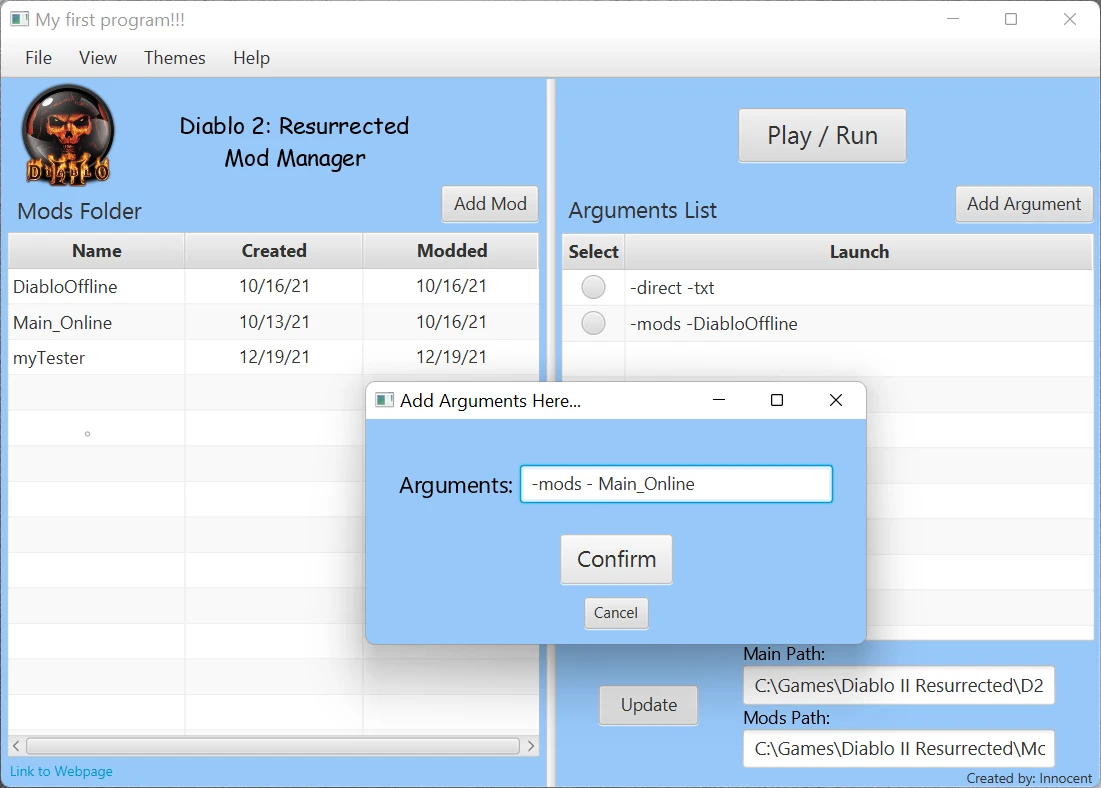
You can use the Tool Bar at the top of the application to:
File: 1. View files, 2. Add mods, 3. Exit the Application
View: 1. Open prefs file, 2. Open arguments file
Themes: 1. Blue, 2. Red, 3. Gray
Help: 1. Open Nexus, 2. Open ModDB, 3. Open Google
You can use the Left Side of the application to:
Add Mod: Import mod to mods folder
Table: View all mods in the mods folder (Name, Date, Last Modified)
Open Folder: Right click a folder to open it.
Link to Webpage: Open Google
You can use the Right Side of the application to:
Play/Run: Start Diablo with selected arguments.
Add Argument: Adds argument to arguments file.
Table: Select and Display arguments in arguments file.
Main Path: Path to Diablo 2 Resurrected executable.
Mods Path: Path to your mods location.
VIDEO-
wSUgYDjvbBE
NOTES-
Requires java 17.
If all arguments in table don't have a select button just click the update button, that should fix it.
You shouldn't have to access your prefs file unless you want to add a custom color theme for your background.
If the Application starts messing up just close it and delete your prefs and arguments files and retry.
I don't think it works online, I did try tho and got an error I think it's an authentication thing maybe.
You can view the source by opening the .jar file with a tool like 7 zip.
I really hope this helps some people more easily enjoy all these dope mods! :D
GitHub link: My D2R Mod Manager - GitHub
A Java-based mod manager for Diablo 2 Resurrected, created as a student final project. It simplifies sharing and playing different mods, requiring Java 17. With 34 endorsements and 887 downloads, it's a niche tool for players who want a lightweight way to manage mods.
✨ Key Features
📊 Pros & Cons
✅ Pros
- Lightweight and simple—perfect if you just want to swap mods without hassle
- Decent traction for a student project (34 endorsements, 887 downloads)
- Open-ended—you can use it with any mods you already have
⚠️ Cons
- Last updated in December 2021—might not work with the latest D2R patches
- Requires Java 17, which some players may not have installed
For D2R players who juggle multiple mods and want a simple, no-frills manager. If you're comfortable with Java and don't mind a basic tool, this could work. Skip if you need advanced features like mod profiles or auto-updates.
💡 Beginner Tips
- Make sure you have Java 17 installed—you can check with 'java -version' in your terminal
- Place the mod manager in a folder where you have write permissions, as it needs to modify mod files
- Since it's a student project, test with a single mod first to see how it handles your setup
📊 Mod Details
- Game
- Diablo2resurrected Mods
- Author
- aiTookMyJob
- Version
- 1.0
- Downloads
- 887
- Endorsements
- 34
- Category
- Utilities
- Created
- 12/22/2021
- Updated
- 12/22/2021
🔧 How to Install Diablo II: Resurrected Mods
Download from Nexus Mods.
📖 Full step-by-step install guide for Diablo II: Resurrected →
Visit the official mod page for specific installation instructions for this mod.
🎮 Need cheat codes or console commands? Check ur gaming wiki for Diablo II: Resurrected commands, item IDs, and more.
Keep browsing — more Diablo II: Resurrected mods await