D2R Simple Loot Filter
⚪ Last updated 2021Preview
🔍 Analysis
- 👍 1.5% endorsement rate — high engagement, a strong quality signal
- 🏆 #14 of 164 Miscellaneous mods in this game by downloads
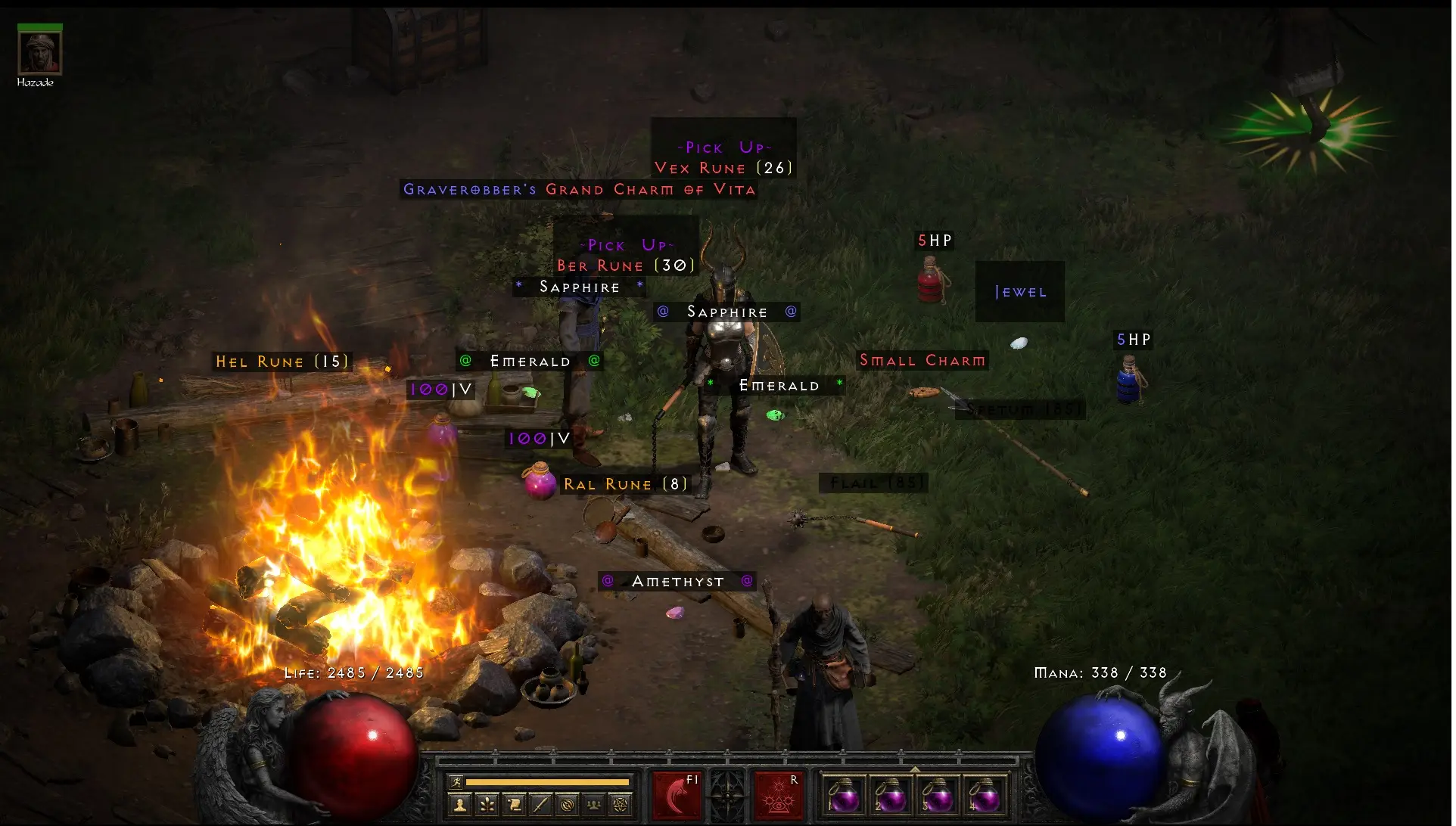
📋 About This Mod
Known bug= Gheeds Grand Charm drops as red not as unique color since every Grand Charm is made red dunno if i can change it
ONLY WORKS WITH ENGLISH LANGUAGE
Bigger pickup box for runes number 20+
Rune numbering (1) - (33)
Gem Quality
(-) Chipped
() Flawless
(@) Perfect
Antidote (A) green
Thawing (*T) yellow
1HP, 2HP, 3HP, 4HP, 5HP (Red)
1MP, 2MP, 3MP, 4MP, 5MP (Blue)
#Rejuvination
35 V, 100 V (Purple)
Stamina (Blank)
Exploding (Blank)
Fulminating (Blank)
Oil (Blank)
Stangling (Blank)
Choking Gas (Blank)
Rancid Gas (Blank)
Blank means you can still see the item and read the name if you hover over it but the box is pretty much black
This is also for damaged white items wich are pretty much useless. except if you upgrade them to normal rarity.
Bigger pickup box
Small Charm (Red)
Grand Charm (Red)
Town Portal (Blue)
Identify (Red)
#Invis/Blank
Low Quality
Installation
This D2R Loot filter
1. Make sure you have 30 Gigs free since you will be extracting the Diablo II Resurrected data to edit.
2. Download CascView
- Website: http://www.zezula.net/en/casc/main.html
- Download: http://www.zezula.net/download/cascview_en.zip
3. Place CascView in your Diablo II Resurrected Root Directory.
- Example: C:\Program Files (x86)\Diablo II Resurrected
4. Open CascView (Use default config)
5. Click Open Storage (Top left corner)
6. Navigate to Diablo II Resurrected Data Folder "Diablo II Resurrected\Data"
7. Select the Data Folder.
8. Inside CascView Navigate to Data\Data
9. Highlight all three folders: global, hd, local
10. Extract to: Diablo II Resurrected\Data (This will take awhile).
11. Diablo II Resurrected\Data should now have the following folders:
- config, data, global, hd, indices, local
12. Replace the .json files with the ones from this rar
13. use -direct -txt as Command line ( make a shortcut of D2R.exe from your install directory go to properties on the shortcut and add -direct -txt like this( Diablo II Resurrected\D2R.exe" -direct -txt)
or open battlnet launcher next to play click on the wheel go to game settings check additional command line arguments and add -direct -txt there
i would advise to use the shortcut method so you can play online if you start from bnet and can play mods if you start from shortcut
D2R Simple Loot Filter is an outdated Diablo II: Resurrected mod from the game's release era, offering a basic loot filtering system. It has 179 endorsements and 12,122 downloads, but the author explicitly labels it outdated and directs users to an updated version. Useful for reference or as a base for custom tweaks.
✨ Key Features
📊 Pros & Cons
✅ Pros
- Solid download count (12,122) shows it was popular back in the day
- Author explicitly allows reuse and modification, so it's a good starting point for your own filter
- Lightweight and straightforward—no bloat, just the basics
⚠️ Cons
- Outdated—author says it's from the game's release and points to a newer mod
- Only 179 endorsements, so it's not the community's top pick even when it was fresh
- No detailed feature list, so you're flying blind on what exactly it filters
For D2R players who want a bare-bones loot filter and don't mind tinkering with an old mod. It's also handy for modders looking for a base to build on. Skip if you want a polished, up-to-date filter—grab the updated version instead.
💡 Beginner Tips
- Since the mod is outdated, check the linked updated version first—it's likely more compatible with current patches.
- If you still want to use this one, back up your original game files before dropping in the mod.
- Look at the file structure to understand how the filter works—it's a great way to learn modding basics.
📊 Mod Details
- Game
- Diablo2resurrected Mods
- Author
- Cbraqz
- Version
- 1.01
- Downloads
- 12,122
- Endorsements
- 179
- Category
- Miscellaneous
- Created
- 10/13/2021
- Updated
- 10/14/2021
🔧 How to Install Diablo II: Resurrected Mods
Download from Nexus Mods.
📖 Full step-by-step install guide for Diablo II: Resurrected →
Visit the official mod page for specific installation instructions for this mod.
🎮 Need cheat codes or console commands? Check ur gaming wiki for Diablo II: Resurrected commands, item IDs, and more.
Keep browsing — more Diablo II: Resurrected mods await