Custom Item Colors for D2RMM
🟡 Updated this year⚠️ Install Order · 1 step
Install in this order, then this mod last — most mods fail to load without their framework and dependencies in place.
Preview
🔍 Analysis
- 👍 2.5% endorsement rate — high engagement, a strong quality signal
- 🏆 #7 of 120 User Interface mods in this game by downloads
📋 About This Mod
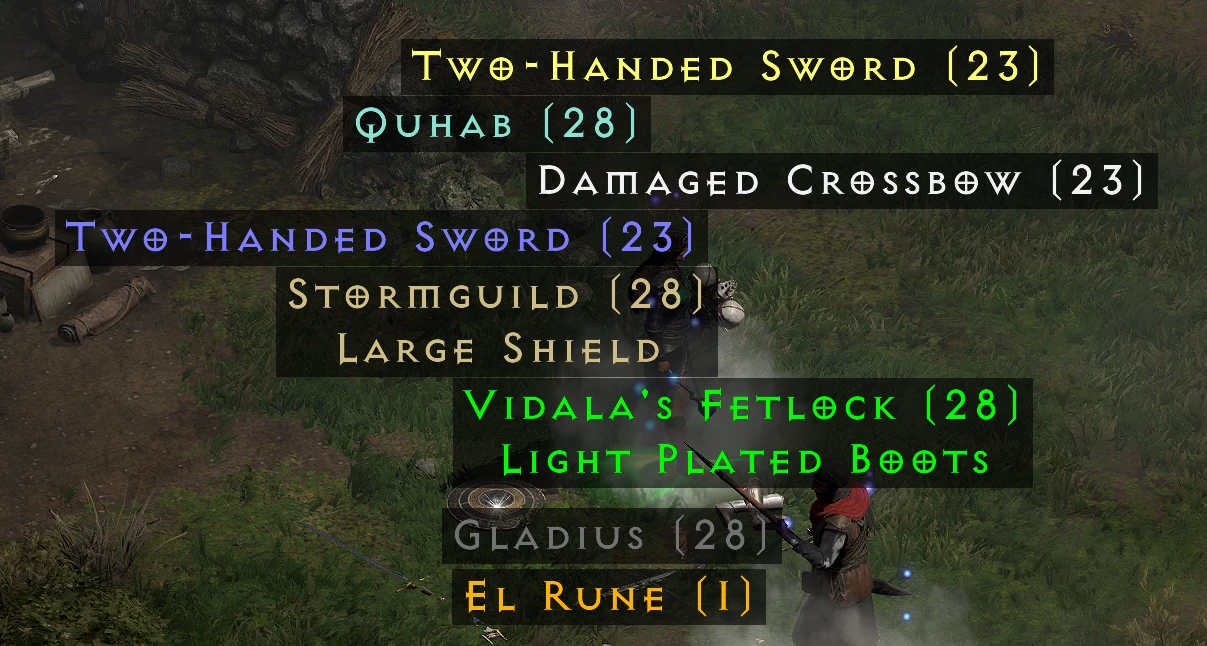
This D2RMM mod allows customizing the colors of items' names in their tooltips when they are on the ground. Note, this does not affect the color of the items' names when they are in your inventory/stash/cube - only when they are on the ground.
By default, the only change the mod makes it making ethereal items appear as light teal so they are distinguishable from socketed items.
See the source code on GitHub.
Custom Item Colors for D2RMM lets Diablo II: Resurrected players change the color of item name tooltips for items on the ground, offering a simple UI customization. It requires the D2RMM mod manager and has a solid following with 538 endorsements and 21,338 downloads, last updated in March 2026.
✨ Key Features
📊 Pros & Cons
✅ Pros
- Community-approved with 538 endorsements and over 21k downloads.
- Simple UI tweak that makes ground loot easier to spot at a glance.
- Actively maintained, last updated March 2026.
⚠️ Cons
- Requires D2RMM, so you need to set that up first.
- Only affects tooltip colors on the ground—no other UI changes.
- Compatibility with other D2RMM mods that alter tooltips could be a risk.
For Diablo II: Resurrected players who want to quickly identify loot on the ground by color-coding item names. If you're already using D2RMM and want a lightweight UI tweak, this is for you. Skip if you're looking for gameplay changes or don't use mod managers.
💡 Beginner Tips
- Make sure D2RMM is installed and working before adding this mod.
- Use D2RMM's mod list to enable and order this mod correctly.
- Test in a game session to see the color changes on ground items immediately.
📊 Mod Details
- Game
- Diablo2resurrected Mods
- Author
- olegbl
- Version
- 1.3
- Downloads
- 21,338
- Endorsements
- 538
- Category
- User Interface
- Created
- 2/13/2022
- Updated
- 3/2/2026
🔧 How to Install Diablo II: Resurrected Mods
Download from Nexus Mods.
📖 Full step-by-step install guide for Diablo II: Resurrected →
Visit the official mod page for specific installation instructions for this mod.
🎮 Need cheat codes or console commands? Check ur gaming wiki for Diablo II: Resurrected commands, item IDs, and more.
Keep browsing — more Diablo II: Resurrected mods await