Fluffy Manager 5000
⚪ Last updated 2023Preview
🔍 Analysis
- 👍 3.5% endorsement rate — high engagement, a strong quality signal
- 🏆 #1 of 54 Utilities mods in this game by downloads
📋 About This Mod
IMPORTANT NOTICE: The following link is the main entry for the mod manager on NexusMods. Go here for the latest version download, up-to-date usage information, and active post section: https://www.nexusmods.com/site/mods/818
Mirror download link that always links to the latest version: www.fluffyquack.com/tools/modmanager.rar
Video guide:
8BykRnBiQ6o
Troubleshooting guide: Read through this if you encounter any problems
Support me on Patreon if you find any of my modding tools or mods useful: https://www.patreon.com/FluffyQuack
- []Extract the mod manager anywhere (if you're upgrading from an old version, simply extract it over the older version).
[
]Before running the mod manager for the first time, ensure all PAK files in your DMC5 install are unmodified (to easily do this, right-click the game in Steam and choose "verify file integrity").[]Copy mods to "\Games\DMC5\Mods" (note that not all mods are compatible with the mod manager, that's up to the mod authors to ensure).
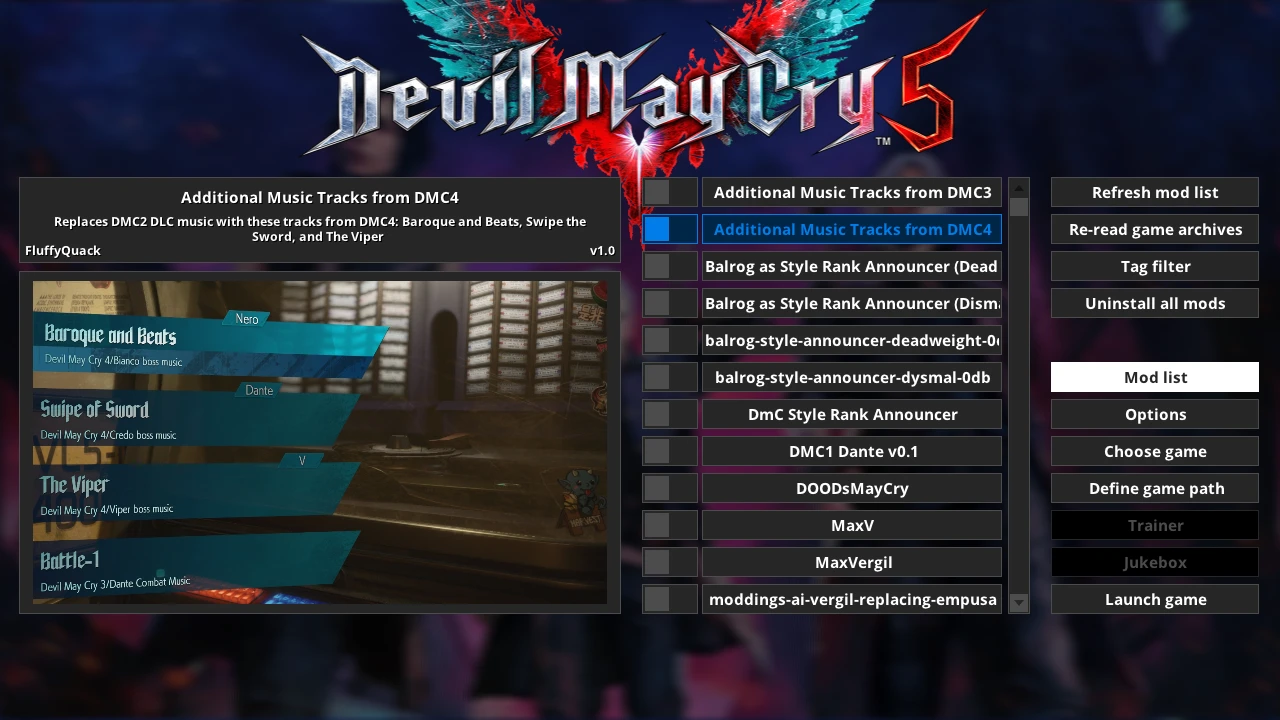
[]Run mod manager, click on "Manage Mods" and click on mods to install or uninstall them.
What to do if DMC5 gets patched when you don't have mods installed:
- []Click on "re-read game archives" in the "manage mods" menu in the mod manager.
[
]Installing and uninstalling mods should work again. Note that some mods may not be compatible with a new version of the game.What to do if DMC5 gets patched when you have mods installed:
- []Try to uninstall a mod via the mod manager. You should get an error message about a PAK file being different.
[
]Turn on the "force uninstall" option at the top of the manage mods menu.[]Click on "uninstall all mods".
[]This shouldn't be necessary, but just as a precaution, I suggest right-clicking the game in Steam and selecting "verify file integrity".
[]Click on "re-read game archives" in the "manage mods" menu in the mod manager.
[]Installing and uninstalling mods should work again. Note that some mods may not be compatible with a new version of the game.
Info for mod creators: If you click on "mod downloads" you can download a mod which gives you a good example of how a mod should be structured.[]If you click on "mod downloads" you can download a mod which gives you a good example of how a mod should be structured.
[]Note that the modinfo.ini file is optional (and all entries within it are optional too).
[]Mod manager will always check for a "screenshot.jpg" or "screenshot.png" to use as mod preview image even if modinfo.ini doesn't exist.
[]It is highly recommended you compress mods into RAR archives with the "solid archive" option set to off (which should be the default in WinRAR).
- []Try to uninstall a mod via the mod manager. You should get an error message about a PAK file being different.
- []Click on "re-read game archives" in the "manage mods" menu in the mod manager.
Fluffy Manager 5000 is a utility mod manager for Devil May Cry 5, designed to simplify the installation and management of PAK file mods. With over 20,000 endorsements and 578,000 downloads, it's a widely trusted tool for modding the game. Last updated in September 2023, it remains a go-to for players wanting to customize their experience.
✨ Key Features
📊 Pros & Cons
✅ Pros
- Massive community adoption (20k+ endorsements) — this is the standard tool for DMC5 modding.
- Streamlines PAK file management, saving you from manual file swapping headaches.
- Still updated as of late 2023, so it's likely compatible with current game versions.
⚠️ Cons
- Description is bare-bones — no install guide or feature list beyond the basics.
- Requires manual PAK file handling knowledge; not a one-click installer for all mods.
- No mention of support for other games, so it's DMC5-only.
For Devil May Cry 5 players who want to install mods without breaking their game. If you're tired of manually replacing PAK files and risking save corruption, this manager is a must-have. Skip if you don't mod DMC5 or prefer manual installation.
💡 Beginner Tips
- Make sure to run the manager as administrator to avoid permission issues when modifying PAK files.
- Always back up your original PAK files before applying mods — the manager may not do it automatically.
- Check the mod's last update date (Sept 2023) to ensure compatibility with your game version.
📊 Mod Details
- Game
- Devilmaycry5 Mods
- Author
- FluffyQuack
- Version
- 3.016
- Downloads
- 578,141
- Endorsements
- 20,354
- Category
- Utilities
- Created
- 3/21/2019
- Updated
- 9/23/2023
🔧 How to Install Devil May Cry 5 Mods
Download from Nexus Mods.
📖 Full step-by-step install guide for Devil May Cry 5 →
Visit the official mod page for specific installation instructions for this mod.
🎮 Need cheat codes or console commands? Check ur gaming wiki for Devil May Cry 5 commands, item IDs, and more.
Keep browsing — more Devil May Cry 5 mods await