Rio Grande Steam Skin
⚪ Last updated 2020Preview
🔍 Analysis
- 👍 2.0% endorsement rate — high engagement, a strong quality signal
- 🏆 #49 of 1002 Models and Textures mods in this game by downloads
📋 About This Mod
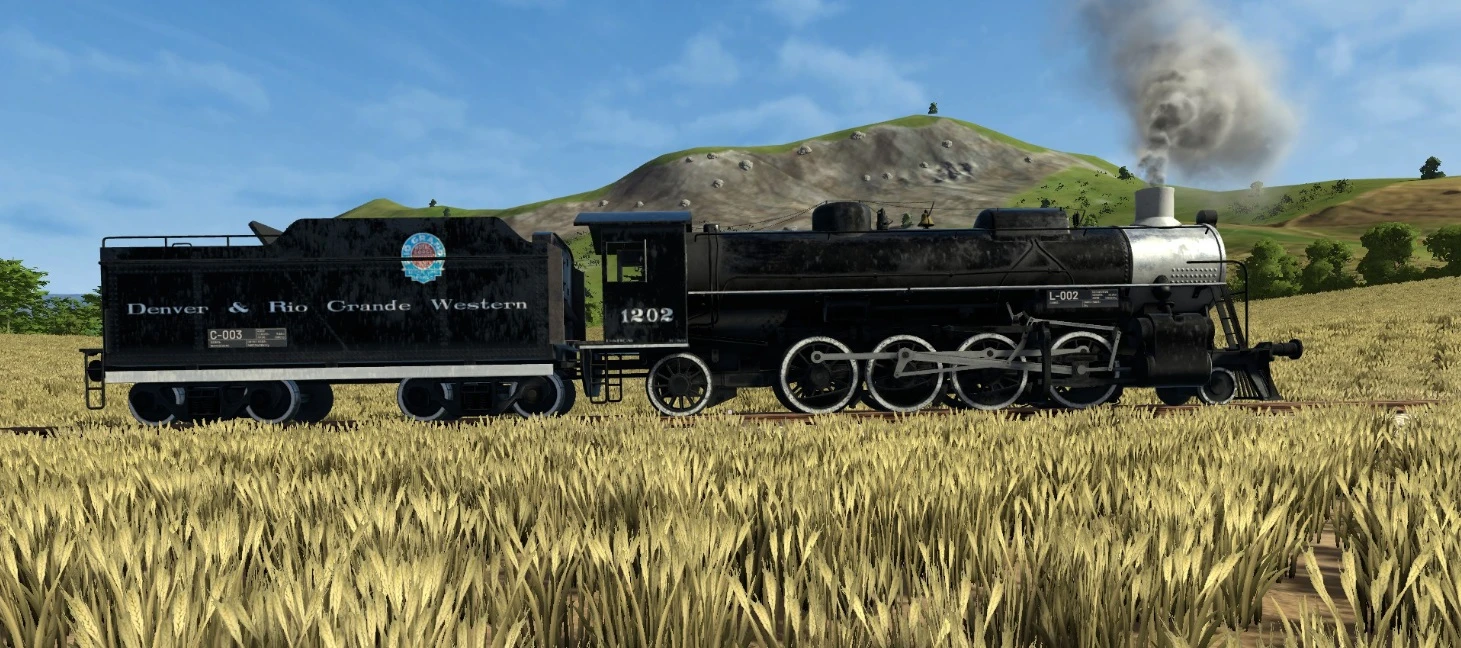
For those who play Derail Valley and are looking for something a little more special than just an "American Locomotive" skin or one of the other skins offered in the existing skin packs (Union Pacific, Southern Pacific, etc), here is something for you. I, having a deep passion for the D&RGW, have created this K-59 class #1202 skin for you to enjoy. The "K" standing for mikado and the "59" meaning 59,000 lbs of tractive effort. The number (#1202) was choses as it was an actual number of a Rio Grande mikado locomotive and there were photos available of it. Though the model will be the game's typical Euro-style engine, the skin will be pretty close to accurate when it comes to the model. I may try to make some newer versions of it as well as I figure out the color mapping of the locomotives more and can make colors more accurate. This is the only model I know of for steam engines that has this much detail put into the tender specifically and has certain details like the gold bell on the engine.
How to Install
-
[]Download and install Skin Manager Mod
[
]Navigate to the Mod's folder and open 'Skins' folder ( \Steam\steamapps\common\Derail Valley\Mods\SkinManagerMod\Skins\loco_steam_H) or ( \Steam\steamapps\common\Derail Valley\Mods\SkinManagerMod\Skins\loco_steam_tender)[]Extract the contents of the download inside the proper folder
[]Run the game
Once in the game, go up to a track, press "p" and then using the "[" and "]" keys you can cycle through the types of engines or cars to place. Clicking "i" or "o" changes the direction. Once you have the loco_steam_H selected, use the mouse and pointer to expand the skin options in the upper left corner of the screen and then select "Rio Grande Engine" and press "enter" to place the engine. Do the same process but with the tender to place the tender.
A cosmetic skin for the steam locomotive in the game, featuring a Denver & Rio Grande Western design for both engine and tender. Custom-made with attention to accuracy. With 50 endorsements and 2,549 downloads, it's a niche choice for rail fans seeking authentic liveries.
✨ Key Features
📊 Pros & Cons
✅ Pros
- Authentic livery for rail enthusiasts (50 endorsements)
- Covers both engine and tender for a complete look
- Lightweight cosmetic mod that doesn't affect gameplay
⚠️ Cons
- Last updated in 2020 — may not be compatible with the latest game version
- Only one skin included — no variety if you want options
For train sim fans who want authentic Denver & Rio Grande Western liveries on their steam locomotives. Perfect for players who enjoy historical accuracy and don't mind a simple cosmetic change. Skip if you're looking for gameplay tweaks or multiple skin options.
💡 Beginner Tips
- Check if your game version still supports mods from 2020 — if not, look for a compatibility patch.
- Since it's a texture replacement, make sure to back up the original files before overwriting.
- If you're using a mod manager, preview the skin in-game to ensure it applies correctly to both engine and tender.
📊 Mod Details
- Game
- Derailvalley Mods
- Author
- FJX2000
- Version
- 1.0
- Downloads
- 2,549
- Endorsements
- 50
- Category
- Models and Textures
- Created
- 4/4/2020
- Updated
- 5/12/2020
🔧 How to Install Derail Valley Mods
Download from Nexus Mods.
📖 Full step-by-step install guide for Derail Valley →
Visit the official mod page for specific installation instructions for this mod.
🎮 Need cheat codes or console commands? Check ur gaming wiki for Derail Valley commands, item IDs, and more.
Keep browsing — more Derail Valley mods await