Remote Dispatch
🟠 Updated over a year agoThis mod may not work until the author updates it. Check for an update, or see the rollback guide.
Preview
🔍 Analysis
- 👍 3.0% endorsement rate — high engagement, a strong quality signal
- 🏆 #2 of 23 Miscellaneous mods in this game by downloads
📋 About This Mod
Note
Derail Valley only supports IPv4 connections. If your ISP gives you only an IPv6 internet address, you can use the IPv6->IPv4 reverse proxy tool written by GamingCoookie found here.
How to connect
Starting the Remote Dispatch server.
-
[]Install the mod with Unity Mod Manager.
[
]Start Derail Valley.[]Open the Unity Mod Manager interface (Ctrl-F10 by default, if you do not have it configured to appear at startup).
[]Find the entry in the list for the Remote Dispatch mod.
[]Click the options button.
[]Adjust the network port is necessary (7245 by default).
[]Set a server password, or leave it blank.
[]Start a new session, or load an existing session. Wait for the game to load. The server will start automatically as the game loads.
Connecting with your desktop computer
-
[]Open a modern web browser (Chrome, Firefox, Opera, Edge, etc.) on your computer, and navigate to http://127. 0. 0. 1:7245. (Adjust the port number here if you changed it in step 4.)
[
]Enter a username to identify yourself and the server password if you set one.Connecting with your mobile device
-
[]Determine your desktop's local IP address. On Windows 10, this can be found in Settings->Network & Internet->Properties (button next to your network adapter)->scroll down to Properties->IPv4 address. Alternatively, open a command prompt and run ipconfig, then look for the IPv4 Address entry.
[
]Ensure your device (tablet/phone) is connected to the same Wifi network as your desktop.[]Open the device web browser and navigate to http://192. 168. 0. 64:7245, adjusting the address to what you found in the prior step, and the port if you changed it when setting up the server.
[]Enter a username to identify yourself and the server password if you set one.
Playing with a friend
-
[]Set up port forwarding for your router. You can find guides for your router make and model at https://portforward.com. You want to forward the TCP port you set up above (7245 by default) to your desktop computer.
[
]Determine your external network address. (https://ip.me/) - Tell your friend to point their web browser (desktop or mobile) to http://1. 1. 1. 1:7245, using the correct IP address that you discovered in the prior step, and have them enter a username to identify them, and the server password if you set one.
Granting permissions
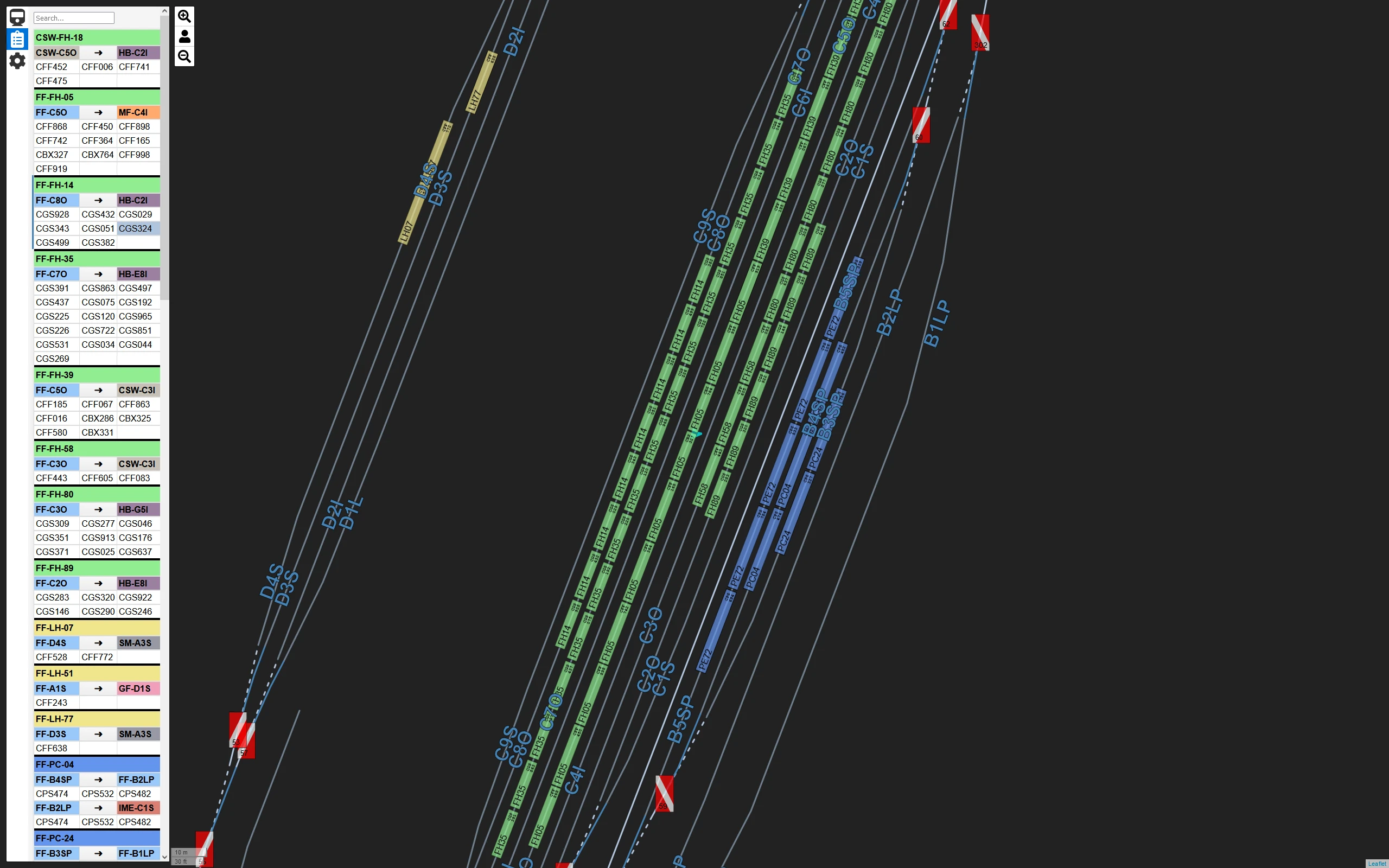
By default, you can use the web browser to examine the map, cars, and jobs, but cannot affect anything. To change junctions or drive a locomotive using the web browser, you must go
-
[]Set up port forwarding for your router. You can find guides for your router make and model at https://portforward.com. You want to forward the TCP port you set up above (7245 by default) to your desktop computer.
-
[]Determine your desktop's local IP address. On Windows 10, this can be found in Settings->Network & Internet->Properties (button next to your network adapter)->scroll down to Properties->IPv4 address. Alternatively, open a command prompt and run ipconfig, then look for the IPv4 Address entry.
-
[]Open a modern web browser (Chrome, Firefox, Opera, Edge, etc.) on your computer, and navigate to http://127. 0. 0. 1:7245. (Adjust the port number here if you changed it in step 4.)
Remote Dispatch lets you plan routes, adjust switches, and view car placement on an interactive map of the valley in your browser. It's designed for multiplayer, allowing a friend to act as your dispatcher. With 640 endorsements and 21,525 downloads, it's a well-received tool for enhancing coordination in the game.
✨ Key Features
📊 Pros & Cons
✅ Pros
- Solid community support with 640 endorsements and over 21k downloads
- Adds a whole new way to play with friends—having a dedicated dispatcher is a game-changer
- Works on any device with a browser, so you can use a tablet or phone as a second screen
⚠️ Cons
- Requires a second device or browser tab to use the dispatcher feature, which might be clunky for some
- Last updated in April 2025—check if it's compatible with your current game version
For players who love multiplayer coordination and want a more strategic way to manage routes. Perfect for those who have a friend willing to act as a dispatcher. Skip if you prefer solo play or don't want to fiddle with browser setups.
💡 Beginner Tips
- Make sure your game and mod are up to date to avoid compatibility issues
- Test the browser interface on your phone and desktop to see which works best for you
- Have your friend join as dispatcher before starting a session to get the full experience
📊 Mod Details
- Game
- Derailvalley Mods
- Author
- Zeibach
- Version
- 1.2.0
- Downloads
- 21,525
- Endorsements
- 640
- Category
- Miscellaneous
- Created
- 7/12/2021
- Updated
- 4/23/2025
🔧 How to Install Derail Valley Mods
Download from Nexus Mods.
📖 Full step-by-step install guide for Derail Valley →
Visit the official mod page for specific installation instructions for this mod.
🎮 Need cheat codes or console commands? Check ur gaming wiki for Derail Valley commands, item IDs, and more.
Keep browsing — more Derail Valley mods await