Dispatcher
⚪ Last updated 2022This mod may not work until the author updates it. Check for an update, or see the rollback guide.
Preview
🔍 Analysis
- 👍 4.0% endorsement rate — high engagement, a strong quality signal
- 🏆 #8 of 150 Gameplay mods in this game by downloads
📋 About This Mod
This mod is being continued over here! (Thanks, Banjobeni!)
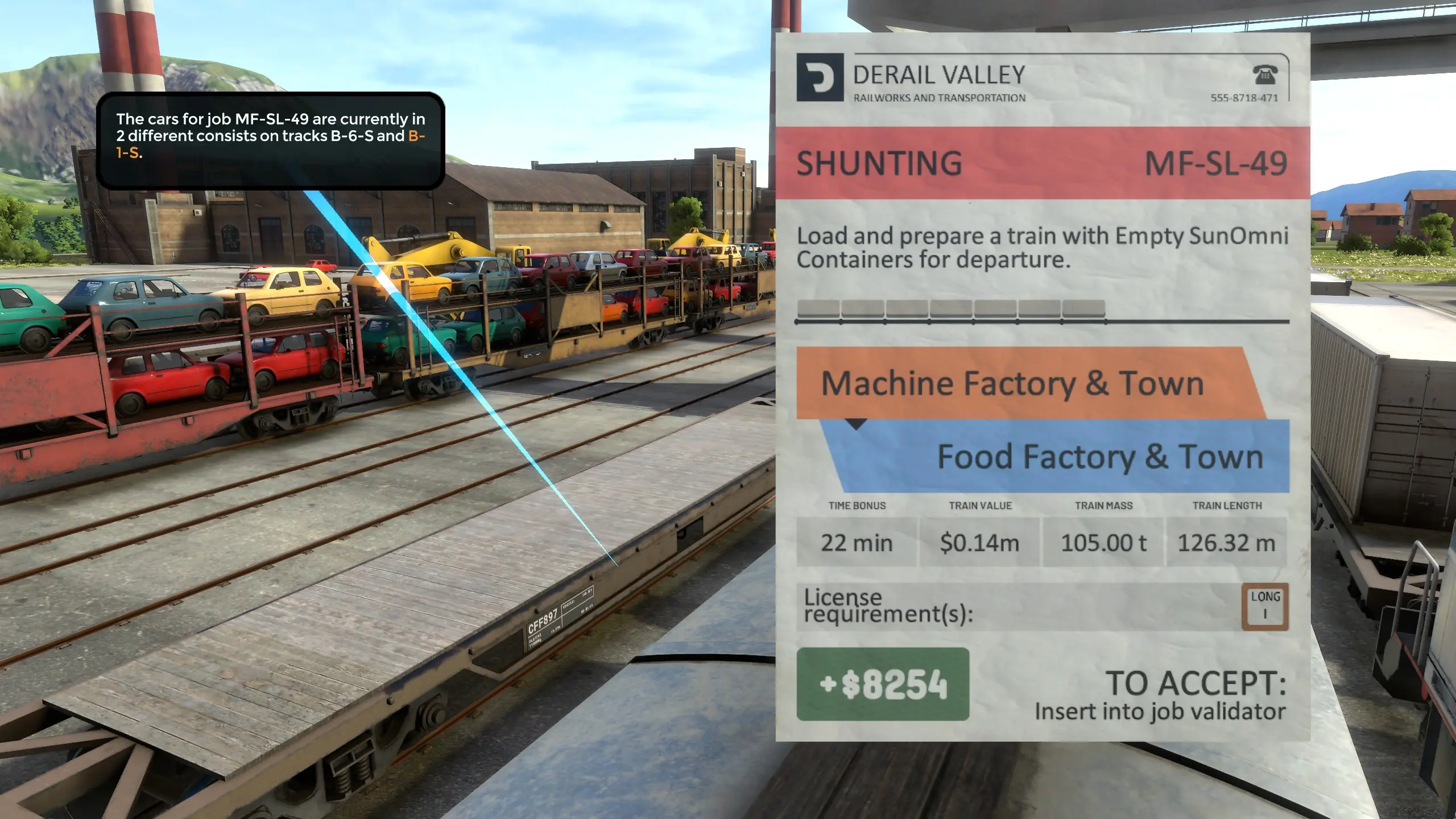
This is a prototype mod that reuses the tutorial popups to show you where the cars for a job are. As usual, this mod requires the Unity Mod Manager for installation.
So far, the popups only guide you before you accept a job. If you are in VR, the popups will only show up when you hold the job overview in your right hand.
Version 0. 3. 0: Refactored codebase (special thanks to Banjobeni and DerJJ). The debug text may go off the textbox now, but more changes will be in the works.
Version 0. 2. 4: Improved line loading/rendering with less debug spam.
Version 0. 2. 3: Updated for build #90 with special thanks to katycat6.
Version 0. 2. 0 Changelog:
-
[]The dispatcher now appears when holding an accepted job booklet and can let you know if a job is actually done before you turn it in.
[
]The second-long period of "searching for cars..." has been removed for desktop users.[]The car in the middle of a consist is now the car pointed to.
[]If your last loco is attached to a consist, the loco will be pointed to instead of the middle.
[]Added update checking and a link to this page.
Source Code: https://github.com/Cappycot/DVDispatcherMod
To-Do Hot List:
-
[]Make popup text depend on page of job booklet.
[]Check for any derailed cars.
[]Check destination tracks for blockage before accepting a job. (Will make toggleable since this would be a cheat.)
Planned Features:
- Multiple different-colored lines to show job cars, destination tracks, and obstructing cars.
-
[]Make popup text depend on page of job booklet.
Dispatcher is a gameplay mod for Project Zomboid that adds a notification system to alert players when vehicles for their current job arrive. With 391 endorsements and nearly 10,000 downloads, it's a niche utility that helps you track mission-related cars. Last updated in August 2022, it remains a simple, focused addition for players who want clearer job cues.
✨ Key Features
📊 Pros & Cons
✅ Pros
- Community-approved with 391 endorsements and nearly 10k downloads.
- Solves a real pain point—no more wandering around looking for the right car.
- Simple concept that doesn't bloat your mod list.
⚠️ Cons
- Last updated in August 2022—might be out of sync with the latest game patches.
- Niche feature—if you don't struggle with job vehicles, this mod does little for you.
For Project Zomboid players who take job missions and get tired of hunting for the assigned vehicle. If you're a completionist or roleplayer who wants clearer mission cues, this is a handy QoL addon. Skip it if you rarely do jobs or prefer a more hardcore experience without extra hand-holding.
💡 Beginner Tips
- Make sure to enable the mod in the game's mod menu after installing.
- If you're using other vehicle mods, test Dispatcher in a sandbox save first to ensure no conflicts.
- Check the Steam Workshop page for any user comments about compatibility with your game version.
📊 Mod Details
- Game
- Derailvalley Mods
- Author
- Cappycot
- Version
- 0.3.0
- Downloads
- 9,782
- Endorsements
- 391
- Category
- Gameplay
- Created
- 5/30/2020
- Updated
- 8/28/2022
🔧 How to Install Derail Valley Mods
Download from Nexus Mods.
📖 Full step-by-step install guide for Derail Valley →
Visit the official mod page for specific installation instructions for this mod.
🎮 Need cheat codes or console commands? Check ur gaming wiki for Derail Valley commands, item IDs, and more.
Keep browsing — more Derail Valley mods await