Derail Valley Railworks and Transportation - DE2
⚪ Last updated 2023Preview
🔍 Analysis
- 👍 4.3% endorsement rate — high engagement, a strong quality signal
- 🏆 #11 of 1002 Models and Textures mods in this game by downloads
📋 About This Mod
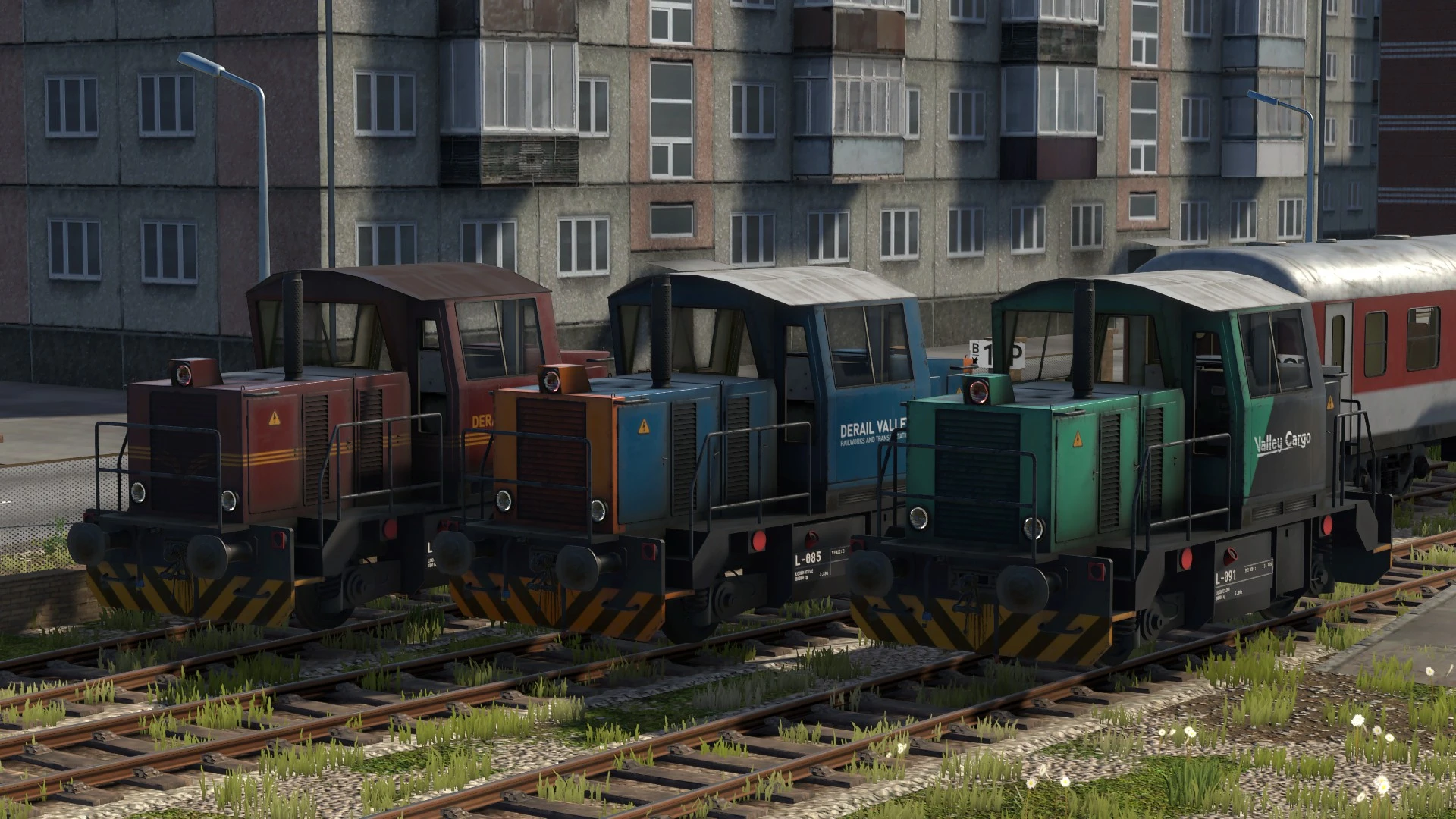
A set of skins for the DE2 lettered for the same Derail Valley Railworks and Transportation that shows up on the job paperwork. Based on Kaarkyu's skins for the DE6.
3 Paint Schemes
- []Teal with yellow-orange ends (based off of a number of early American road-switcher paint schemes)
[
]Maroon with golden pinstripes (something in between the New South Wales 48 class and the Pennsylvania GG1)[]Valley Cargo, a 'sectorized' paint scheme based loosely off of the SNCF Fret scheme
How to Install
-
[]Download and install UnityModManager and Skin Manager Mod (if you haven't already)
[]Download the skin archive from the files tab
[]Drag and drop the skin archive into the UnityModManager Installer app under the Mods tab where it says, "Drop zip files here"
- Run the game
-
[]Download and install UnityModManager and Skin Manager Mod (if you haven't already)
Adds 3 DE2 locomotive skins inspired by Kaarhyu's DE6 skins, offering visual variety for Derail Valley players. With 239 endorsements and 5,532 downloads, it's a niche cosmetic mod last updated in November 2023.
✨ Key Features
📊 Pros & Cons
✅ Pros
- Community-tested with 239 endorsements and 5,532 downloads
- Simple drop-in cosmetic mod—no complex setup
- Gives the DE2 some much-needed visual flair if you're tired of the default look
⚠️ Cons
- Only 3 skins—might not be enough variety for some
- Last updated in November 2023—could be outdated if the game has changed since
- No screenshots or detailed description, so you're flying blind on what the skins actually look like
For Derail Valley players who want to customize their DE2 without messing with gameplay. If you're a fan of Kaarhyu's DE6 skins and want matching looks for your DE2, this is a quick grab. Skip if you're after new locomotives or gameplay tweaks—this is purely cosmetic.
💡 Beginner Tips
- Make sure to place the files in the correct mod folder—check the game's modding guide if you're new.
- If you're using a mod manager, preview the skins in-game to see which one you like before committing.
- Since it's cosmetic, you can safely remove it anytime without breaking your save.
📊 Mod Details
- Game
- Derailvalley Mods
- Author
- Niko Fox
- Version
- 3.1.0
- Downloads
- 5,532
- Endorsements
- 239
- Category
- Models and Textures
- Created
- 9/27/2020
- Updated
- 11/24/2023
🔧 How to Install Derail Valley Mods
Download from Nexus Mods.
📖 Full step-by-step install guide for Derail Valley →
Visit the official mod page for specific installation instructions for this mod.
🎮 Need cheat codes or console commands? Check ur gaming wiki for Derail Valley commands, item IDs, and more.
Keep browsing — more Derail Valley mods await