Somewhat Imperfect Keyboard Buttons
⚪ Last updated 2012Preview
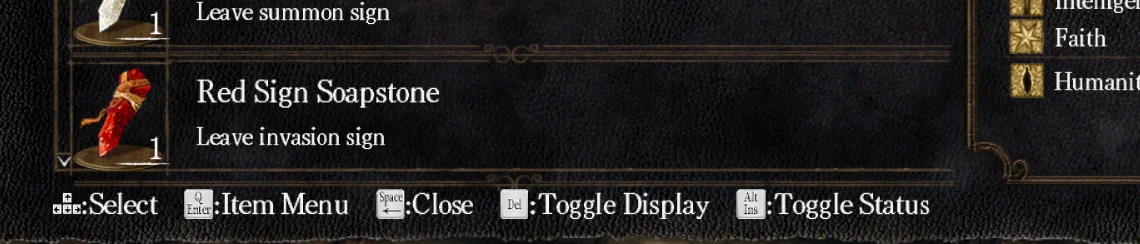
🔍 Analysis
- 👍 4.6% endorsement rate — high engagement, a strong quality signal
- 🏆 #41 of 269 User Interface mods in this game by downloads
📋 About This Mod
This mod simply replaces the Xbox 360 buttons in the interface with their corresponding keyboard defaults. This probably will not be too useful for people who are already used to moving around easily through the game, but it should be a welcome addition if you\'re still trying to figure out what key works where. There\'s two keys displayed on some actions, as different keys correspond to the same controller button depending if you\'re in a menu or not. This solution is not perfect, as some keys do not correspond in certain windows such as leaderboards, and will be rendered obsolete if the mouse fix mod gets updated with the dynamic button retexturing feature. To install this, just enable texture override in DSfix, and extract the archive into Dark Souls Prepare to Die Edition\\DATA\\dsfix\\tex_override
Replaces Xbox 360 button prompts in the user interface with corresponding keyboard default key labels. For PC players who use keyboard and mouse but see controller prompts. Simple, lightweight tweak with 329 endorsements and 7,214 downloads, last updated September 2012.
✨ Key Features
📊 Pros & Cons
✅ Pros
- Community-approved with 329 endorsements from players who wanted keyboard prompts over Xbox buttons.
- Does exactly what it says — a straightforward UI swap with no extra baggage.
- Lightweight and performance-friendly; just texture replacements for button icons.
⚠️ Cons
- Last updated in 2012, so may not work with newer game patches or expansions.
- Only replaces Xbox 360 prompts, not prompts for other controller types like DualShock.
- If you use a controller, this mod is pointless — it's exclusively for keyboard and mouse players.
PC gamers who play with keyboard and mouse but are annoyed by Xbox 360 button prompts cluttering the interface. Perfect for players who want visual consistency with their input method. Skip if you use a controller or if you don't mind the default controller icons.
💡 Beginner Tips
- If you're a keyboard player, this mod removes controller prompts from menus and HUD, making the interface match your input.
- Before installing, check if your game already has an option to switch button prompts in its settings — you might not need a mod.
- If you use other UI mods, install this one after them to ensure its button icons take priority in case of conflicts.
📊 Mod Details
- Game
- Darksouls Mods
- Author
- Scapes
- Version
- 1
- Downloads
- 7,214
- Endorsements
- 329
- Category
- User Interface
- Created
- 9/24/2012
- Updated
- 9/24/2012
🔧 How to Install Dark Souls Mods
Download from Nexus Mods.
📖 Full step-by-step install guide for Dark Souls →
Visit the official mod page for specific installation instructions for this mod.
🎮 Need cheat codes or console commands? Check ur gaming wiki for Dark Souls commands, item IDs, and more.
Keep browsing — more Dark Souls mods await