Retextured Enemy Shields and Weapons
⚪ Last updated 2015Preview
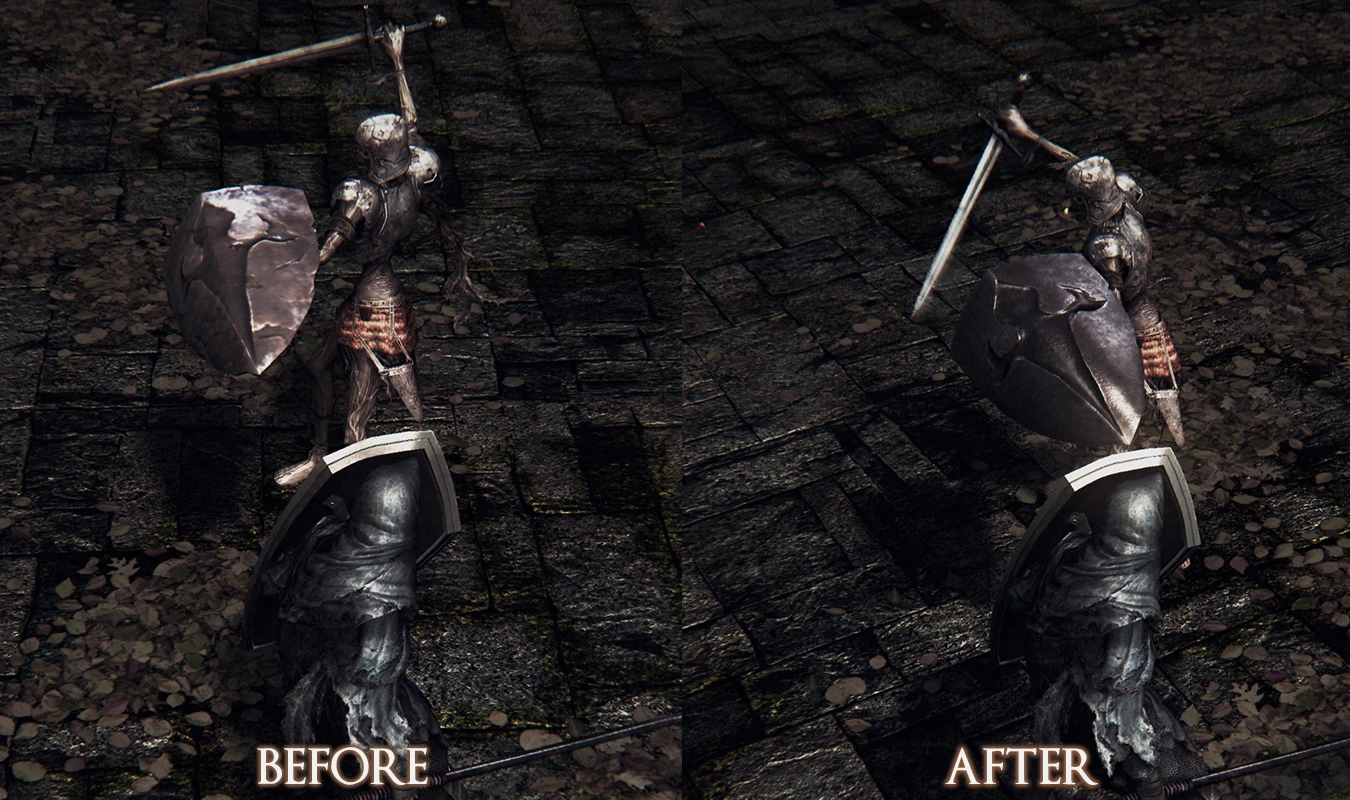
🔍 Analysis
- 👍 5.1% endorsement rate — high engagement, a strong quality signal
- 🏆 #5 of 63 Weapons and Armour mods in this game by downloads
📋 About This Mod
- ---------UPDATES----------
- Optional Files - Gobbo's Dirty Pack (8/16/2015)
- Some textures have been lightly saturated with sepia tones and/or dirt added.
- Good if you think pure silver looks too new.
UPDATE 1. 1 (8/12/2015) -Bandit Knife and Buckler Shield appeared too new. Added more dents and knicks to both. -Converted all previous DDS files to PNG.
- --------DESCRIPTION---------
- Many of the default enemy weapon and shield textures are 256x256. Some of you less nitpicky people might not even notice. For me personally, playing at 4k, once I started modding my weapon textures I noticed how low quality enemy textures were and I couldn't unsee it.
Changes range from simply replacing textures with higher res player textures, to complete retextures. But in all cases the textures are larger than the default sizes. May add more, but for now these are the only textures that really stuck out to me.
Affected Textures: Hollow Soldiers: Longsword, Hollow Soldier Shield, Wooden Shield, Spear, Light Crossbow Balder Soldiers: Balder Side Sword, Rapier, Buckler, Balder Shield Man-Serpents: Greatsword, Flamberge, Serpent Soldier Shield Thief: Bandit Knife, Target Shield
Some are textures found here on the nexus that only changed player textures. These have been converted to work with enemies.
- --------CREDITS---------
- Hollow Soldier Shield by Jake Salt
- Balder Soldier Shield by Jake Salt
- Balder Side Sword - Dark Hilt by Monti_ro
- Cleaner Man-Serpent Greatsword by ZDU
- Fiery Flamberge by StrangeMortim (Retextured Silver)
*I have no way of knowing how this will perform on an HDD, as my Dark Souls is installed on SSD. May cause slight stutters when getting near certain enemies, but for me it works fine. Feel free to let me know of any issues.
Installation -Install DSFix -Extract all files to dsfix/texoverride
Retextures default enemy weapons and shields, replacing 256x256 textures with higher-resolution versions—either borrowing player textures or full retextures. Aimed at players who want sharper enemy gear without changing gameplay. With 304 endorsements and a 2015 update, it's a focused visual upgrade for weapon and armor enthusiasts.
✨ Key Features
📊 Pros & Cons
✅ Pros
- 304 endorsements from players who liked the visual upgrade.
- 5,930 downloads show it gained traction for a texture-only mod.
- Improves visual clarity on enemy gear that was previously muddy 256x256.
⚠️ Cons
- Old mod from 2015—texture standards have moved on, so it may look dated compared to modern 2K/4K retextures.
- Only covers enemy weapons and shields, not armor or environment—if you want a full visual overhaul you'll need more mods.
- Texture replacers can conflict with other mods that alter the same weapon or shield textures, causing visual mismatches.
For players who want enemy gear to look sharper in combat without touching gameplay balance. If you run texture mods for your own weapons, this keeps enemy drops from looking low-res by comparison. Skip if you're happy with vanilla textures or want full coverage—this only handles enemy shields and weapons.
💡 Beginner Tips
- Install with a mod manager so you can quickly toggle it on/off to compare textures in-game.
- If you're also using a weapon retexture for player gear, place this mod after it in the load order so enemy textures don't get overwritten by player-only files.
- For manual installs, drop the texture files into your game's Data/Textures folder, preserving folder structure.
📊 Mod Details
- Game
- Darksouls Mods
- Author
- HesterDW and Gobbo96
- Version
- 1.1
- Downloads
- 5,930
- Endorsements
- 304
- Category
- Weapons and Armour
- Created
- 8/11/2015
- Updated
- 8/16/2015
🔧 How to Install Dark Souls Mods
Download from Nexus Mods.
📖 Full step-by-step install guide for Dark Souls →
Visit the official mod page for specific installation instructions for this mod.
🎮 Need cheat codes or console commands? Check ur gaming wiki for Dark Souls commands, item IDs, and more.
Keep browsing — more Dark Souls mods await