Health Bar Usability Tweaks
⚪ Last updated 2013⚠️ Install Order · 1 step
Install in this order, then this mod last — most mods fail to load without their framework and dependencies in place.
Preview
🔍 Analysis
- 👍 5.4% endorsement rate — high engagement, a strong quality signal
- 🏆 #39 of 269 User Interface mods in this game by downloads
📋 About This Mod
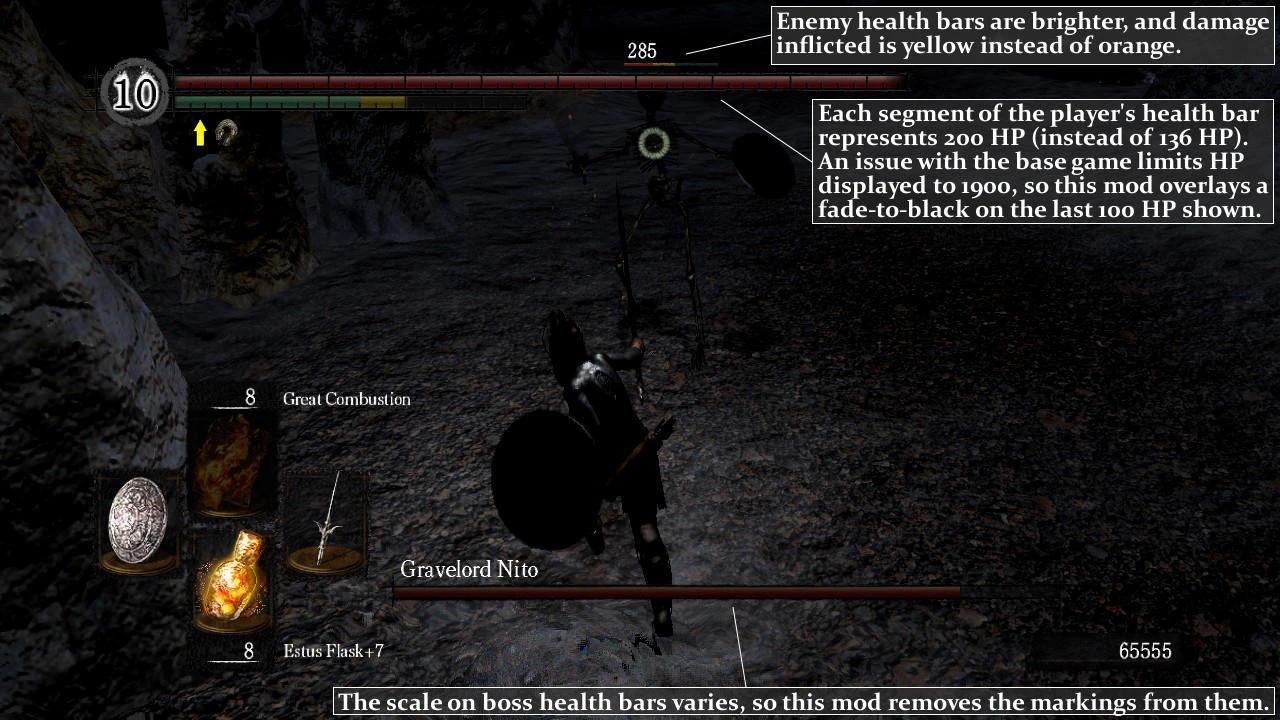
This mod makes several tweaks to player and enemy health bars, increasing usability without sacrificing the original art style:
1. Enemy health bars are brighter, and damage inflicted is yellow instead of orange.
2. Each segment of the player's health bar represents 200 HP (instead of 136 HP). An issue with the base game limits HP displayed to 1900, so this mod overlays a fade-to-black on the last 100 HP shown.
3. The scale on boss health bars varies, so this mod removes the markings from them.
DSfix is required to use this mod. Simply place the included PNG file in your data\\dsfix\\tex_override folder, and make sure your DSfix.ini includes the line "enableTextureOverride 1". (Note that with or without this mod, "enableHUDmod 1" causes issues with boss health bars; I recommend setting that to 0 for a glitch-free experience.)
If you find any bugs or issues, please note them in the comments so I can promptly address them.
Tweaks player and enemy health bars in Dark Souls for improved usability while retaining the original art style. Requires DSfix. For players who find default health bars hard to read. Compact UI mod with 420 endorsements and 7,720 downloads, last updated August 2013.
✨ Key Features
📊 Pros & Cons
✅ Pros
- 420 endorsements means it's trusted by the Dark Souls community.
- 7,720 downloads so plenty of players have used it successfully.
- Keeps the vanilla art style, so it won't ruin the game's atmosphere.
⚠️ Cons
- Requires DSfix, so it adds a dependency if you don't already use it.
- Last updated in 2013, so it may have issues with later game patches or mod setups.
- Alters health bars, so it could conflict with other UI or HUD mods.
For Dark Souls players who find the default health bars hard to read in the heat of combat. For those already running DSfix and wanting a small UI improvement without changing the game's aesthetic. Skip if you don't use DSfix or want bigger gameplay changes.
💡 Beginner Tips
- Install DSfix first and make sure it launches the game successfully, then add this mod's files.
- If you use other UI mods, install this one last to avoid having its health bar tweaks overwritten.
- Test in a couple of combat encounters to see if the new health bar readability works for you; if not, it's easy to remove the files.
📊 Mod Details
- Game
- Darksouls Mods
- Author
- David Sid
- Version
- 2
- Downloads
- 7,720
- Endorsements
- 420
- Category
- User Interface
- Created
- 7/14/2013
- Updated
- 8/19/2013
🔧 How to Install Dark Souls Mods
Download from Nexus Mods.
📖 Full step-by-step install guide for Dark Souls →
Visit the official mod page for specific installation instructions for this mod.
🎮 Need cheat codes or console commands? Check ur gaming wiki for Dark Souls commands, item IDs, and more.
Keep browsing — more Dark Souls mods await