Dark Souls Dualshock 4 Interface
⚪ Last updated 2014Preview
🔍 Analysis
- 👍 4.5% endorsement rate — high engagement, a strong quality signal
- 🏆 #29 of 269 User Interface mods in this game by downloads
📋 About This Mod
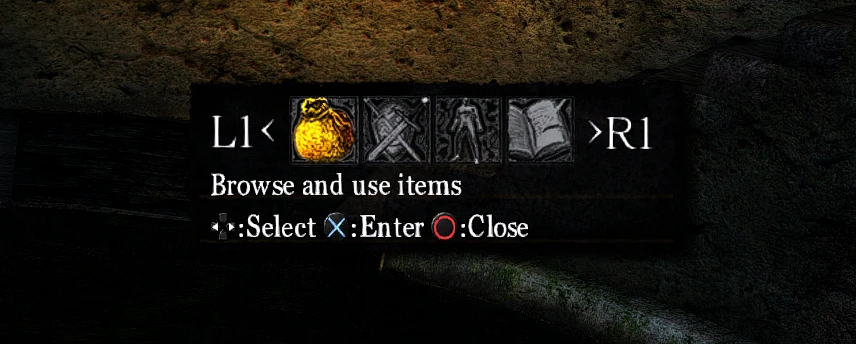
Replaces the default Xbox 360 controller button prompts in the interface with PS4 controller (Dualshock 4) button prompts.
🤖 AI-enhanced — based on mod data
Replaces the default Xbox 360 controller button prompts in Dark Souls' interface with DualShock 4 (PS4) button prompts. It is for PC players using a PS4 controller who want accurate on-screen icons. Community-backed with 462 endorsements and 10,279 downloads, last updated April 2014.
✨ Key Features
Replaces the default Xbox 360 controller button prompts in the interface.
Adds DualShock 4 (PS4) controller button prompts in their place.
Changes only the visual UI elements, not controller support or input mapping.
📊 Pros & Cons
✅ Pros
- 462 endorsements show it's a trusted fix for DualShock 4 users.
- 10,279 downloads means plenty of players have used it without issue.
- Straightforward purpose: just swap the button icons and you're done.
⚠️ Cons
- Last updated in 2014, so it doesn't support Dark Souls Remastered or any post-2014 game patches.
- Purely cosmetic—it won't help if your DualShock 4 isn't recognized by the game in the first place.
- May conflict with other UI mods that alter button prompts or interface textures.
🎯 Is This For You?
For Dark Souls PC players using a DualShock 4 who want the on-screen prompts to match their controller. Also for anyone who wants a quick, no-frills UI tweak without extra features. Skip if you're fine with Xbox prompts or don't use a PS4 controller.
For Dark Souls PC players using a DualShock 4 who want the on-screen prompts to match their controller. Also for anyone who wants a quick, no-frills UI tweak without extra features. Skip if you're fine with Xbox prompts or don't use a PS4 controller.
📦 Install:Easy· Under 5 minutes
💡 Beginner Tips
- If you're using Steam Input, make sure your DualShock 4 is configured as an Xbox controller, or the game won't recognize it—this mod only changes the icons.
- Manually replace the original button prompt files in the game's install folder rather than deleting them, so you can revert without re-downloading.
- Launch the game after installing and check the main menu first—if the prompts don't change, you may have placed the files in the wrong directory.
📊 Mod Details
- Game
- Darksouls Mods
- Author
- Net_Bastard
- Version
- Final
- Downloads
- 10,279
- Endorsements
- 462
- Category
- User Interface
- Created
- 1/4/2014
- Updated
- 4/7/2014
🔧 How to Install Dark Souls Mods
Download from Nexus Mods.
📖 Full step-by-step install guide for Dark Souls →
Visit the official mod page for specific installation instructions for this mod.
🎮 Need cheat codes or console commands? Check ur gaming wiki for Dark Souls commands, item IDs, and more.
Keep browsing — more Dark Souls mods await