Black Hard Leather Recolor
⚪ Last updated 2012Preview
🔍 Analysis
- 👍 3.8% endorsement rate — high engagement, a strong quality signal
- 🏆 #2 of 248 Armour mods in this game by downloads
📋 About This Mod
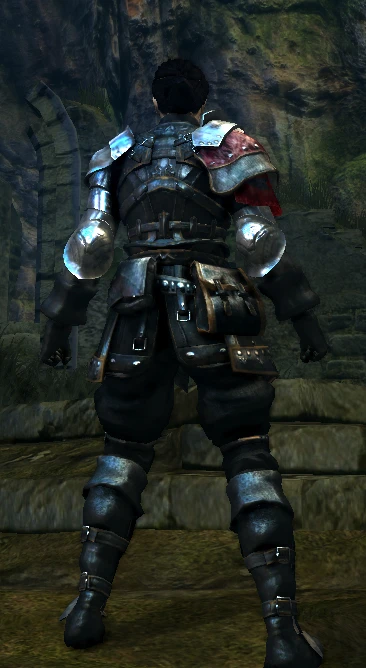
Done by request Female and Male done. Female has 2 versions. Only a slight difference. Optional version = Added little dragon head from the Dragon Crest Shield on the shoulder cloth Any comments are welcome, constructive especially; hope you enjoy. To install: 1) Get DSfix 2) Enable Texture Override in the .ini 3) Put the files you want inside the Texture Override folder Notes: Male and Female share the same gloves Update: PNG version included in Misc for those that don\'t want/Can\'t use DDS My other Recolors: Hunter Armor Recolor Cleric Starter Recolor Full Wanderer Recolor Red and Black Uchigatana Great Scythe Recolor-Reskin Wanderer Recolor Mix Female Wanderer Recolor FEATHERLESS Red and Black Quiver
Recolors the Hard Leather armor to black for both male and female characters. Includes both DDS and PNG versions, with the PNG added as an update for users who can't or don't want to use DDS. A simple cosmetic texture swap with 945 endorsements and 25k downloads, last updated in 2012.
✨ Key Features
📊 Pros & Cons
✅ Pros
- 945 endorsements show this recolor is widely appreciated by the community.
- 25,130 downloads indicate it's a popular choice for players wanting a black leather look.
- The added PNG version makes it accessible even if you have issues with DDS files.
⚠️ Cons
- Last updated in 2012, so it may not be compatible with newer game updates or texture overhauls.
- Black is the only color option offered, which might feel limiting if you want multiple looks.
- As a texture replacer, it will conflict with any other mod that alters the same armor's textures.
Players who want a clean black recolor of the Hard Leather armor without changing gameplay. Ideal for those building a dark-themed character or visual load order. Skip if you're looking for new armor models, stats, or multiple color variants.
💡 Beginner Tips
- If using a mod manager, simply download and install as usual; the DDS version is the standard choice.
- When installing manually, preserve the folder structure from the archive so the game can find the textures.
- If you already use other armor texture replacers, install this one last to ensure the black recolor takes priority.
📊 Mod Details
- Game
- Darksouls Mods
- Author
- Magnanimousmudd
- Version
- 1.0
- Downloads
- 25,130
- Endorsements
- 945
- Category
- Armour
- Created
- 10/5/2012
- Updated
- 10/10/2012
🔧 How to Install Dark Souls Mods
Download from Nexus Mods.
📖 Full step-by-step install guide for Dark Souls →
Visit the official mod page for specific installation instructions for this mod.
🎮 Need cheat codes or console commands? Check ur gaming wiki for Dark Souls commands, item IDs, and more.
Keep browsing — more Dark Souls mods await