Big Red HUD
🟡 Updated this year⚠️ Install Order · 1 step
Install in this order, then this mod last — most mods fail to load without their framework and dependencies in place.
Preview
🔍 Analysis
- 👍 1.0% endorsement rate
- 🏆 #42 of 142 User Interface mods in this game by downloads
📋 About This Mod
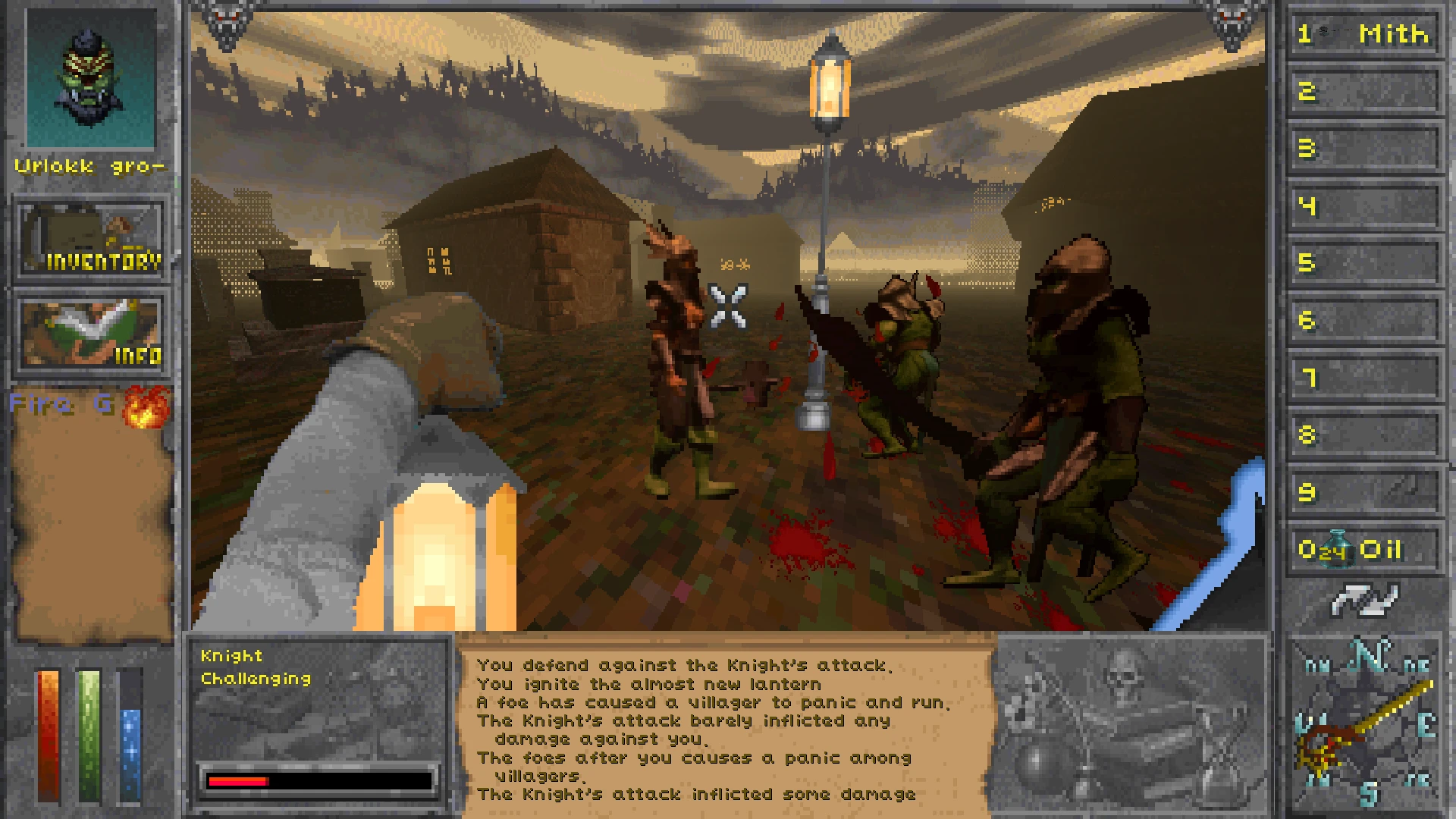
If you're tired of pop-up and mid-screen text messages cluttering your game view, this one's for you.
As of Version 1. 1. 2, this mod no longer requires a DLL of Harmony. Instead, it will use the functions provided by Harmony from TheSin0fPride.
Can be used in two ways. Switch between them by pressing F10 or toggling the Fullscreen option in the in-game Pause Menu:
-
[]LARGE HUD - Can choose either a SIDE or CENTER style of message box. Recommended for use with Retro-Frame, otherwise, it blocks the vitals and compass on the vanilla Large HUD.[/]
[]FULLSCREEN - The message box is placed on the bottom-center (changeable in Mod Settings) of the screen, leaving the vitals and compass visible.[/]
-
[]Automatically culls some repetitive vanilla messages (Press button to fire spell, Save against spell made, etc)[/]
[]When pointing at an entity with Large HUD enabled, the entity's name, challenge rating based on level difference, and condition (health) are displayed on the free space. The appearance of the condition can be toggled between Description (Uninjured, Wounded, etc), exact Number of hitpoints, Percentage of max hitpoints and a health Bar.[/]
[]If World Tooltips is installed and Large HUD is enabled, the tooltips will be displayed in the free space.[/]
-
[]SphincterVision Messages For Your Eyes - Adds context to combat events like attacking, missing, hitting, saving spells etc.[/]
[]Retro-Frame - As mentioned in USAGE[/]
[]World Tooltips - As mentioned in USAGE[/]
Much thanks to the good folk on the Lysandus' Tomb DFU Modding discord server for their feedback and testing.
BIG BIG credit towards Excoriated for walking me through the Harmony patching process and TheSin0fPride for the Harmony mod for DFU!
Big Red HUD is a compact UI mod that consolidates all pop-up and mid-screen text messages into a single log, keeping your game view unobstructed. Requires Harmony. With 70 endorsements and 7,078 downloads, it's a niche but functional quality-of-life improvement for players tired of screen clutter.
✨ Key Features
📊 Pros & Cons
✅ Pros
- Declutters your screen—no more random text popping up mid-combat.
- Solid download count (7,078) shows it's been tried by a decent number of players.
- Simple concept that does exactly what it says: one log for all messages.
⚠️ Cons
- Requires Harmony, so you'll need to install that dependency first.
- Only 70 endorsements—might be a niche mod that not everyone sticks with.
- Compatibility with other UI mods that also handle messages could be a risk.
For players who hate screen clutter and want all game messages in one place. If you're a UI purist who likes a clean view, this is for you. Skip if you prefer seeing messages in their original spots or if you don't want to mess with Harmony.
💡 Beginner Tips
- Make sure Harmony is installed and up to date before adding this mod, or it won't work.
- If you use other UI mods, test them together to see if any messages get lost or duplicated.
- Check the mod's settings (if any) to customize which messages appear in the log.
📊 Mod Details
- Game
- Daggerfallunity Mods
- Author
- RedRoryOTheGlen
- Version
- 1.1.2
- Downloads
- 7,078
- Endorsements
- 70
- Category
- User Interface
- Created
- 5/15/2025
- Updated
- 7/25/2026
🔧 How to Install Daggerfall Unity Mods
Download from Nexus Mods.
📖 Full step-by-step install guide for Daggerfall Unity →
Visit the official mod page for specific installation instructions for this mod.
🎮 Need cheat codes or console commands? Check ur gaming wiki for Daggerfall Unity commands, item IDs, and more.
Keep browsing — more Daggerfall Unity mods await