Service Weapon Hotkeys
⚪ Last updated 2020Preview
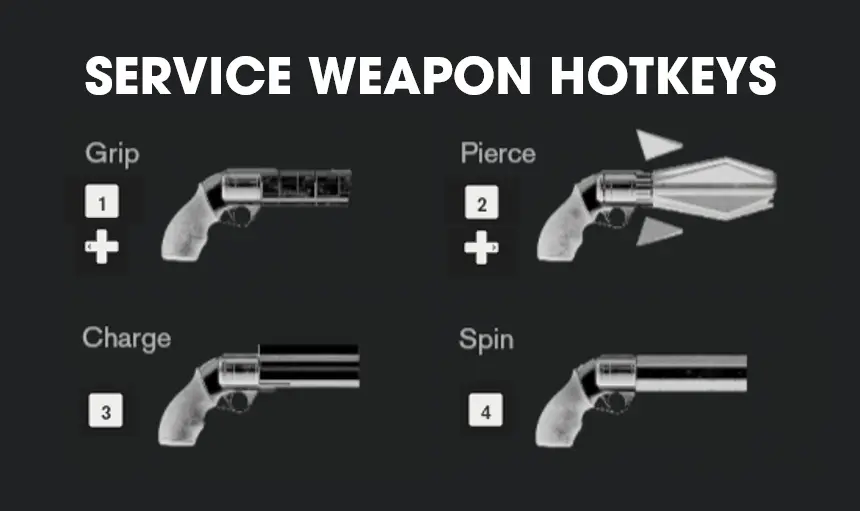
🔍 Analysis
- 👍 5.4% endorsement rate — high engagement, a strong quality signal
- 🏆 #3 of 18 Gameplay Effects and Changes mods in this game by downloads
📋 About This Mod
This ( ability / mod ) allows you to switch between all Service Weapon forms without having to pause the game to change your loadout.
Service Weapon Hotkeys
This <ability / mod> allows you to switch between all Service Weapon forms without having to pause the game to change your loadout.
In the base game, you are limited to two equip slots. Switching to a Service Weapon form that is not equipped has no in-game cost, but requires pausing the game and entering menus to change your loadout, which can severely interrupt the flow of the game.
There are six awesome Service Weapon forms available to Jesse - no sense in limiting yourself to just two during gameplay!
This mod requires the Control Plugin Loader.
Usage
On keyboard:
The number keys 1-6 will switch between all six Service Weapon forms.
On gamepad:
and can be used to switch between Service Weapon forms.
Up to three weapons of your choice can be assigned to each D-Pad direction button.
Installation
1. Install the prerequisite: Control Plugin Loader.
2. Extract WeaponSwitch.dll and WeaponSwitch.ini into the following folder: <Control Installation Directory>\plugins. Create the plugins folder if it does not exist.
3. Launch the game.
Configuration
In the configuration file, you can specify the weapons assigned to each key or D-Pad direction button. Weapon assignments can be changed while the game is running, a restart is not required.
Open WeaponSwitch.ini in a text editor such as Notepad to configure settings.
Valid weapons names are as follows: Grip, Shatter, Spin, Pierce, Charge, Surge.
On keyboard:
Under the section, you can assign the weapons of your choice to each number key.
Weapon1 = Grip
Weapon2 = Shatter
Weapon3 = Spin
Weapon4 = Pierce
Weapon5 = Charge
Weapon6 = Surge
With the above config, the number key 1 will activate Grip, 3 will activate Spin, etc.
On gamepad:
Under the section, you can assign the weapons of your choice to each D-Pad direction.
DPadLeft1 = Grip
DPadLeft2 = Charge
DPadRight1 = Shatter
DPadRight2 = Pierce
DPadRight3 = Spin
With the above configuration:
Pressing once will switch to Grip. Pressing it twice will switch to Charge.
Pressing once will switch to Shatter. Pressing it three times will switch to Spin.
📊 Mod Details
- Game
- Control Mods
- Author
- reg2k
- Version
- 1.0
- Downloads
- 21,482
- Endorsements
- 1,165
- Category
- Gameplay Effects and Changes
- Created
- 9/13/2020
- Updated
- 9/13/2020
🔧 How to Install Control Mods
Download from the official mod page and follow its install instructions. Use a mod manager where supported.
📖 Full step-by-step install guide for Control →
Visit the official mod page for specific installation instructions for this mod.
🎮 Need cheat codes or console commands? Check ur gaming wiki for Control commands, item IDs, and more.
Keep browsing — more Control mods await