Third Person Mod with First Person Aiming
🟡 Updated this yearPreview
🔍 Analysis
- 👍 2.1% endorsement rate — high engagement, a strong quality signal
- 🏆 #13 of 44 Gameplay mods in this game by downloads
📋 About This Mod
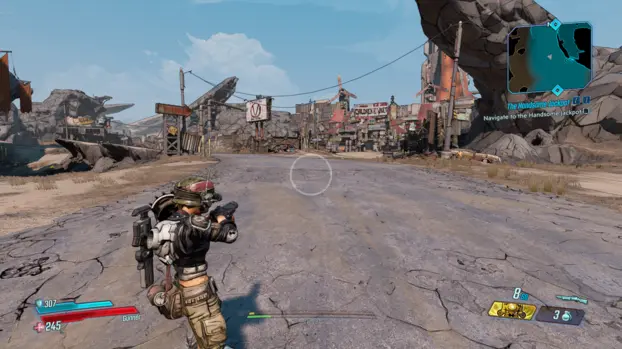
This mod enables you to experience Borderlands 3 in third-person mode, while seamlessly transitioning to a first-person perspective during aiming and shooting.
Ultimate third person mod by jackcabrero already does this but it has a couple of issues like the character movement stops whenever you aim down sights, camera drag when switching modes and no third person while sliding or slamming, which were making it harder to use the mod hence I looked around and ended up making this with the help of chatgpt as i'm not a programmer. The mod still has its limitations due to how the game works like the reload animations are generic and reload sound effects are low depending on how high you have the camera offset, while in third person.
TK554zHc3Yg
Installation Guide
- []The Gamepass version is currently not supported.
Step 1: Extract Mod File
After downloading the mod, extract the contents. You should have the following file:- []CameraToggle.sdkmod
Step 2: Install Plugin Loader
- []Apparently, this step is not needed as PythonSDK Mod Manager comes with its own plugin. If you have it already installed, then remove the file "d3d11.dll" located at Borderlands 3\OakGame\Binaries\Win64 and the file "pluginLoader.ini" in the plugins folder. This also fixes the Steam overlay not working issue.
Step 3: Install PythonSDK Mod Manager
-
[]Download the PythonSDK Mod Manager from:
https://github.com/bl-sdk/oak-mod-manager/releases
[]Extract the files.
[]Copy them into:
Steam\steamapps\common\Borderlands 3
Video tutorial:
https://www.youtube.com/watch?v=Xm1TLydB5Qo
For steamdeck users:
Step 4: Add Camera Toggle SDK Mod
- []Copy file "CameraToggle.sdkmod" from my mod into this folder:
Step 5: Enable Camera Toggle in Game
-
[]Launch Borderlands 3.
[]In the Main Menu, go to Mods > Camera Toggle > Enabled > switch to ON
-
[]This mod is possible because of these mods and their authors StandAlone Third Person · BLCM/bl3mods Wiki · GitHub, Ultimate Third Person Mod Experience at Borderlands 3 Nexus - Mods and community and Bonk Utilities at Borderlands 3 Nexus - Mods and community (For the camera code in sdk), StandAlone Third Person · BLCM/bl3mods Wiki · GitHub , Gears of War style Camera · BLCM/bl3mods Wiki · GitHub by deadjack.
[]Huge thanks to apple1417 from Borderlands modding discord.
Known Issues[]Melee vs objects is broken but it works fine against enemies and bosses. You can aim down the sight to use melee normally.
[]The Further you set the camera away from the character (sideways) there will be a noticeable offset when you ads, which is also the reason why the beam of laser weapons is a bit offset in third person as it shoots straight to the weapon reticle instead at the crosshair like other weapons. This offset becomes less noticeable as the distance between you and the target increases, so it doesn't cause many issues during gameplay.
[]Sometimes the ch
📊 Mod Details
- Game
- Borderlands3 Mods
- Author
- Jhonson
- Version
- 2.1.1
- Downloads
- 4,041
- Endorsements
- 85
- Category
- Gameplay
- Created
- 4/9/2025
- Updated
- 3/26/2026
🔧 How to Install Borderlands 3 Mods
Install via a mod manager (Vortex or Mod Organizer 2). Most mods drop into the game folder.
📖 Full step-by-step install guide for Borderlands 3 →
Visit the official mod page for specific installation instructions for this mod.
🎮 Need cheat codes or console commands? Check ur gaming wiki for Borderlands 3 commands, item IDs, and more.
Keep browsing — more Borderlands 3 mods await