Oli8 Map Scripts
⚪ Last updated 2020Preview
🔍 Analysis
- 👍 2.0% endorsement rate — high engagement, a strong quality signal
- 🏆 #22 of 79 Maps mods in this game by downloads
📋 About This Mod
Oli8's Map Scripts for Update 7
A collection of useful scripts that can be easily added to a map by placing some custom references and adding the modules to the map json.
THIS MOD DOESN'T ADD ANYTHING ON ITS OWN. You should only download this if another mod requires it, or you are a modder creating a map and want to add adventure mode elements.
For Map Makers:
This mod adds a few helpful LevelModules designed to help make adventure maps:
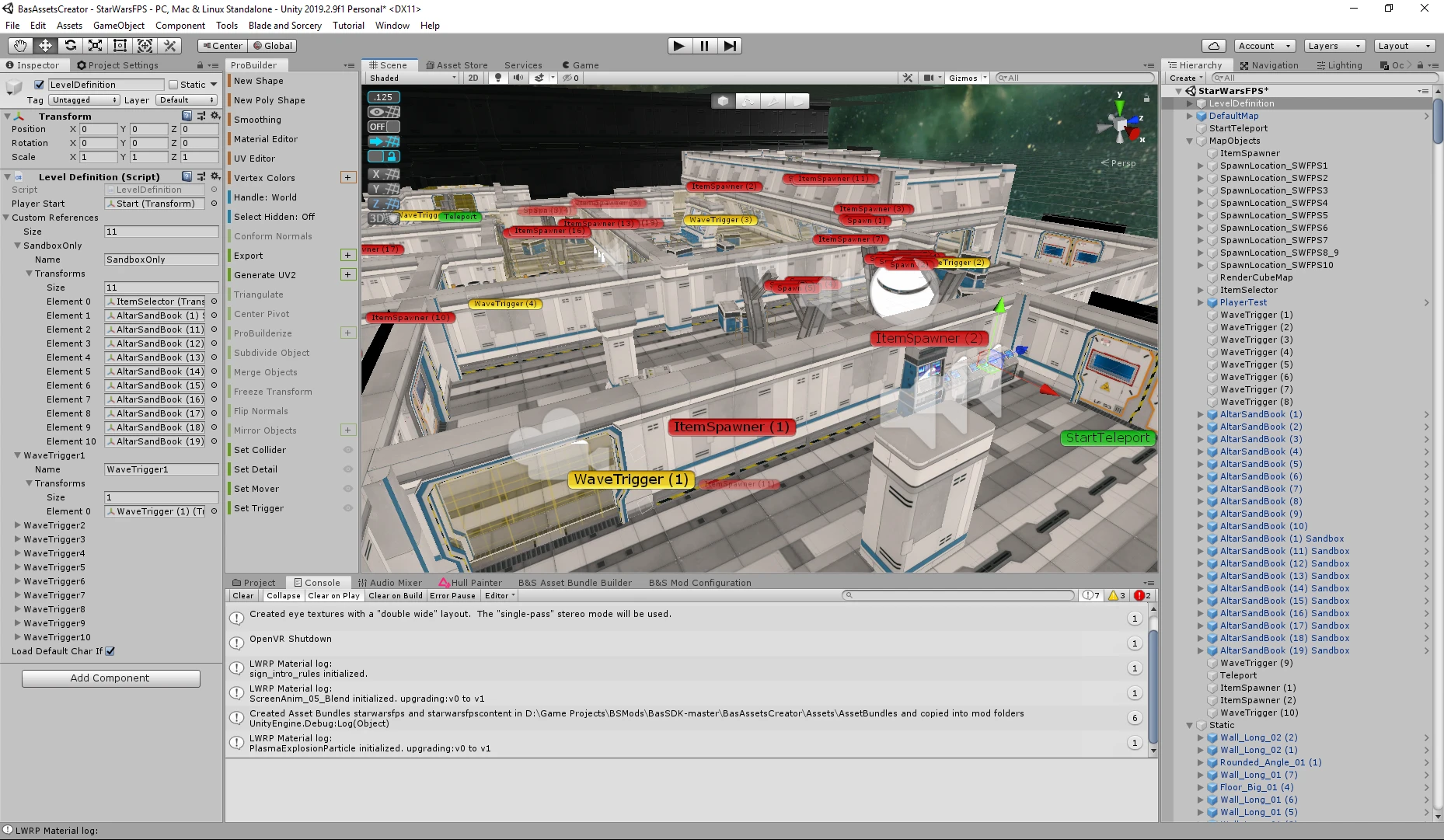
The CustomTriggerModule allows you to trigger various actions to occur when the player enters a trigger volume assigned in the CustomReferences of your map.
The module consists of an array of "triggerData", with one entry for each custom trigger. Each entry contains a trigger type, the name of the custom reference it uses, and some additional data depending on the type of trigger. For each type, you will need a trigger volume assigned as the first entry in a Custom Reference in the LevelDefinition in unity.
Wave Triggers: Wave triggers will spawn a wave if the player is in the volume in the specified CustomReference and there is no current active wave.
"waveTriggerData" contains the name id of the waveSelector to spawn from, and the waveId of the wave to start. You can use these to have a map automatically start waves as the player progresses without needing them to use the wave books.
"$type": "Oli8MapScripts. CustomTriggerModule, Oli8MapScripts",
"triggerData": [
"triggerType": "wave",
"customReferenceId": "WaveTrigger1",
"waveTriggerData":
"waveSelectorId": "SWFPS1",
"waveId": "SWFPS_Stormtroopers_PistolBaton_12"
AnimationTrigger: Animation triggers will set an Animators boolean value to true while any creature is in the volume, and false when there are none. The CustomReference specified must have the animator as the second entry after the volume. "animationTriggerData" contains one value "animatorValueId" which is the string id of the animator value to set when the trigger is activated. This can be used to have doors that automatically open when a creature approaches them.
SceneTrigger: Scene triggers will load a new scene when the player enters the volume. "sceneTriggerData" has only one value "sceneId" which is the scene to load. Use this to load a different level when the player reaches the volume, even creating branching levels that load different scenes based on the path the player takes.
RemoveGameObjectsModule is a module that deletes all the game objects in the specified Custom Reference after the level loads. Use this to have items that only exist in specific game modes. For example: Remove weapon racks if the player doesn't choose sandbox mode
"$type": "Oli8MapScripts. RemoveGameObjectsModule, Oli8MapScripts",
Oli8 Map Scripts is a utility mod in the Maps category that provides useful scripts to simplify creating maps with adventure elements. It has 533 endorsements and 26,395 downloads, last updated in February 2020. The mod aims to ease map creation for modders.
✨ Key Features
📊 Pros & Cons
✅ Pros
- 533 endorsements indicate community approval
- 26,395 downloads show moderate popularity
- Last updated in 2020, suggesting some maintenance
⚠️ Cons
- Limited description may lack detailed feature information
- No explicit dependencies listed, but may require other tools
- Last updated in 2020, so may not be compatible with newer game versions
This mod is for modders and map creators who want to build adventure-style maps with scripting assistance. It is not for players looking for new gameplay content, as it is a development tool.
💡 Beginner Tips
- Read the mod description carefully for usage instructions
- Test the scripts in a test map before applying to a full project
- Check for compatibility with your game version and other mods
📊 Mod Details
- Game
- Blade And Sorcery Mods
- Author
- Oli8
- Version
- 7.0.0
- Downloads
- 26,395
- Endorsements
- 533
- Category
- Maps
- Created
- 2/8/2020
- Updated
- 2/8/2020
🔧 How to Install Blade & Sorcery Mods
Use Vortex or manual. Drop mods into /Mods/ folder.
📖 Full step-by-step install guide for Blade & Sorcery →
Visit the official mod page for specific installation instructions for this mod.
🎮 Need cheat codes or console commands? Check ur gaming wiki for Blade & Sorcery commands, item IDs, and more.
Keep browsing — more Blade & Sorcery mods await