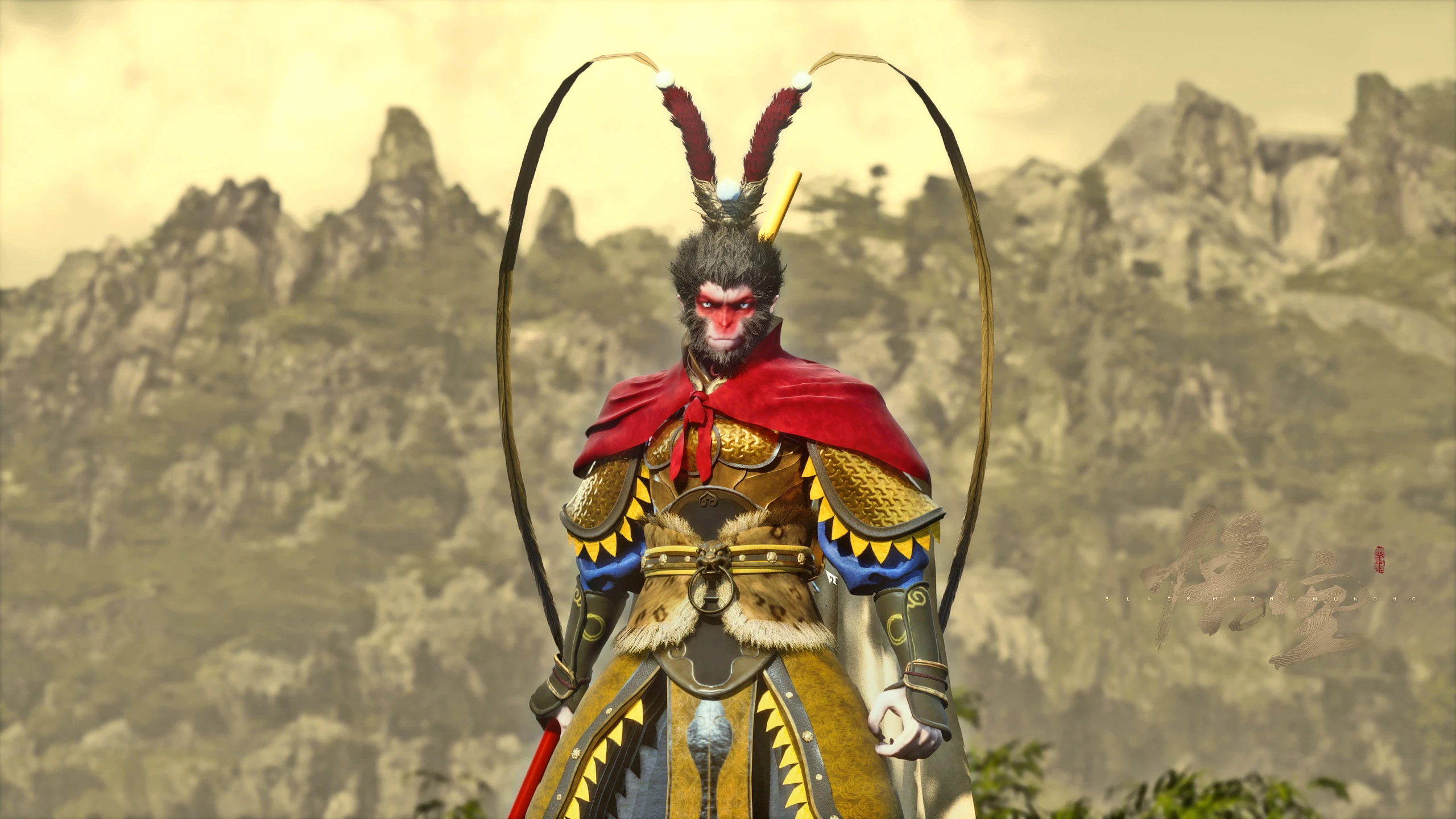
The Great Sage from the Unfinished animation
🟠 Updated over a year agoPreview
🔍 Analysis
- 👍 1.8% endorsement rate — high engagement, a strong quality signal
- 🏆 #40 of 93 Characters mods in this game by downloads
📋 About This Mod
还原了《黑神话悟空》第六章结尾动画《未尽》的大圣形象。Reproduced the appearance of the Great Sage in the ending animation "Unfinished" of the sixth chapter of "Black Myth Wukong".
自通关最后一章后就一直都很喜欢片尾动画《未尽》中大圣形象的设计,Mod一半是自己建模,一半是以游戏中其他服装的模型为基础修改而来,全新的头部、衣服、手臂、脚,和金箍棒,尽可能还原一个写实版的未竟大圣。
Since completing the final chapter, I have always been fond of the design of the Great Sage character in the ending animation "Unfinished". The Mod is half created by myself, and the other half is modified based on models of other costumes in the game. The new head, clothes, arms, feet, and golden cudgel aim to recreate a realistic version of the Unfinished Great Saget as much as possible.
----------------------------------------------------------------------------------------------------------------------
1.新的大圣套头部、新的大圣套衣服、新的大圣套手臂、新的大圣套脚部、新的金箍棒
2.六种不同的头部,分别替换凤翅紫金冠、闭眼禅、白脸子、行者戎箍、藏风兽面、长嘴脸
3.新的站姿动画替换原来的站姿
4.按键触发几个简单的动作,可拍照使用
5.金箍棒发光,可以自由开关
[ Content ]
1. New Great Sage's Head, New Great Sage's Clothing, New Great Sage's Arm, New Great Sage's Foot, New JinGuBang
2. Six different types of heads, replacing phoenix winged purple golden crown, closed eye Zen, white face, traveler Rong hoop, Tibetan wind beast face, and long mouth face respectively
3. New standing animations replace the original standing posture
4. Press the button to trigger a few simple actions, which can be used for taking photos
5. The golden hoop rod emits light and can be freely switched on and off
----------------------------------------------------------------------------------------------------------------------
1. Steam中右键库中的黑神话悟空→属性→在启动选项中填入“-fileopenlog”(去掉双引号)。
2.将文件夹“b1”放置黑神话悟空安装目录(....\Steam\steamapps\common\BlackMythWukong)里面,即可。
【可选安装-额外小功能】
1.下载并安装UE4SS(作用是作为部分功能性Mod的加载器),N网的UE4SS链接:https://www.nexusmods.com/blackmythwukong/mods/19
2.打开文件夹“可选功能”,将里面的文件夹“b1”放置黑神话悟空安装目录(....\Steam\steamapps\common\BlackMythWukong)里面,即可。
[ Install Mod ]
1. Right click on "Black Mythical Wukong" in the Steam library, go to "Properties", and fill in "- filepenlog" (remove double quotes) in the startup options.
2. Place the folder "b1" in the installation directory of Black MythWukong(....\Steam\steamapps\common\BlackMythWukong)).
[ Optional Installation - Additional Features ]
1. Download and install UE4SS (which serves as a loader for some functional mods), the UE4SS link: https://www.nexusmods.com/blackmythwukong/mods/19
2. Open the folder "Optional Features" and place the folder "b1" inside the installation directory of Black MythWukong(....\Steam\steamapps\common\BlackMythWukong)
---------------------------------------------------------------------------------------------
📊 Mod Details
- Game
- Black Myth Wukong Mods
- Author
- MaiKeJieKeXun
- Version
- 2.0
- Downloads
- 1,395
- Endorsements
- 25
- Category
- Characters
- Created
- 2/4/2025
- Updated
- 2/4/2025
🔧 How to Install Blackmythwukong Mods
Download from Nexus Mods.
📖 Full step-by-step install guide for Blackmythwukong →
Visit the official mod page for specific installation instructions for this mod.
🎮 Need cheat codes or console commands? Check ur gaming wiki for Blackmythwukong commands, item IDs, and more.
Keep browsing — more Blackmythwukong mods await