Transmog - Cosmetic Equipment
🟡 Updated this yearPreview
🔍 Analysis
- 👍 2.4% endorsement rate — high engagement, a strong quality signal
- 🏆 #25 of 32 Visuals and Graphics mods in this game by downloads
📋 About This Mod
NEW in 2. 0. 0: Regular troop transmogrification
- []You can use Ctrl+T to transmog a selected regular troop from either the Encyclopedia (N) or the party screen (P).
-
[]You can then choose to transmog the troop for everyone or only for the player clan.
[]If transmoged for the player clan, the transmog will only apply to those troops when they're in/from your clan's garrisons/parties!
[]Troops can even be transmoged differently for "everyone" and for the player clan only at the same time!
[]These troop transmog configurations can be shared and released as separate mods, allowing for visual troop tree overhauls!
[]When transmoging regular troops, you don't necessarily have to use Ctrl+C and Ctrl+V, but can simply equip the items with the desired looks directly to the desired variant's equipment. Upon clicking 'Done', they will be convered to transmogs.
Player-clan specific troop transmogs are stored in the savegame, but can be exported/imported through the MCM menu.
General troop transmogs (that always apply) are not stored in the savegame. They're stored in Modules\Transmog\ModuleData\TroopTransmogs, and are always loaded. Mod authors can copy their troop transmog files to their own Module using the same folder structure, they just have to add this mod as a dependency to their SubModule.xml so this mod will detect the troop transmog files and load them in order (the files from this mod are always loaded last, so the user's own transmogs always override those from other mods). The XML files can be renamed freely. In case of missing troops/items, the mod will just ignore that transmog.
NEW in 2. 0. 0: Quick-transmog
When managing the equipment of the player character or a companion, you can press and hold Left Alt when equiping a new item to automatically transmog the newly-equiped item to the current appearance. If the current appearance was from a transmoged item, that item will be reset to its original appearance (and moved back to your inventory, as usual). Use this if you are happy with your current looks, but want to equip items with better stats.
NEW in 2. 0. 0
You can now safely transmog items while trade transactions are pending.
Usage
Transmogrification works by simple copy-pasting, using Ctrl+C and Ctrl+V. To revert a transmoged item, use Ctrl+R. To hide an item, use Ctrl+H. Currently
only armor transmogrification is supported.
You can use Ctrl+C to copy transmog data from:
[]The inventory screen while hovering the mouse over an item, equipped or in one of the lists. This copies the visuals of only that item.
[]The inventory screen while NOT hovering the mouse over any item. This copies the visuals of ALL equipped armor of the active character.
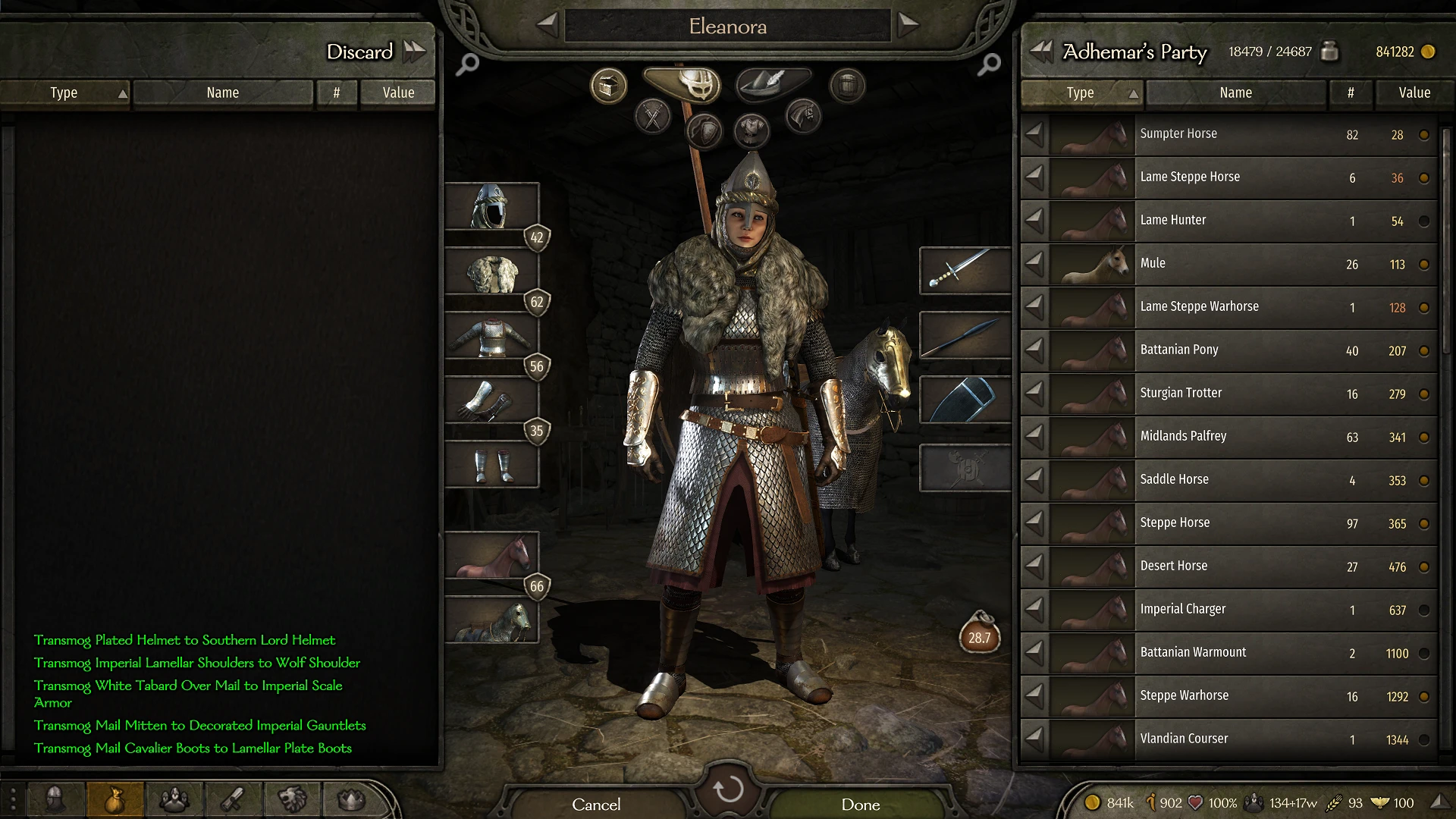
Transmog - Cosmetic Equipment lets you copy an item's visual appearance onto another item without changing its stats. It uses the clipboard for saving and sharing transmog setups. With 312 endorsements and recent updates, it's a solid choice for players who want to customize their character's look without sacrificing gear performance.
✨ Key Features
📊 Pros & Cons
✅ Pros
- 312 endorsements show the community trusts this mod for cosmetic customization.
- Clipboard integration makes it easy to save and share your favorite transmog setups.
- Recent update (June 2026) means it's actively maintained and likely compatible with current game versions.
⚠️ Cons
- Only 312 endorsements out of 13k downloads suggests some users may have had issues or moved on.
- No mention of UI integration details, so you might need to fiddle with menus or hotkeys.
- As a cosmetic mod, it may conflict with other mods that alter item visuals or inventory UI.
This is for players who want to look stylish without sacrificing their best gear stats. If you're tired of mismatched armor sets or want to share your fashion with friends, this mod is for you.
💡 Beginner Tips
- Use the clipboard feature to save your favorite transmog combos before you change gear.
- Experiment with different item visuals on your main weapon to see how it looks in combat.
- If you're using other UI mods, check for conflicts after installing to ensure the transmog menu appears correctly.
📊 Mod Details
- Game
- Bannerlord Mods
- Author
- Maegfaer
- Version
- 2.1.1
- Downloads
- 13,121
- Endorsements
- 312
- Category
- Visuals and Graphics
- Created
- 7/22/2020
- Updated
- 6/23/2026
🔧 How to Install Bannerlord Mods
Use Vortex or manual. Enable mods in launcher. Harmony required.
📖 Full step-by-step install guide for Bannerlord →
Visit the official mod page for specific installation instructions for this mod.
🎮 Need cheat codes or console commands? Check ur gaming wiki for Bannerlord commands, item IDs, and more.
Keep browsing — more Bannerlord mods await