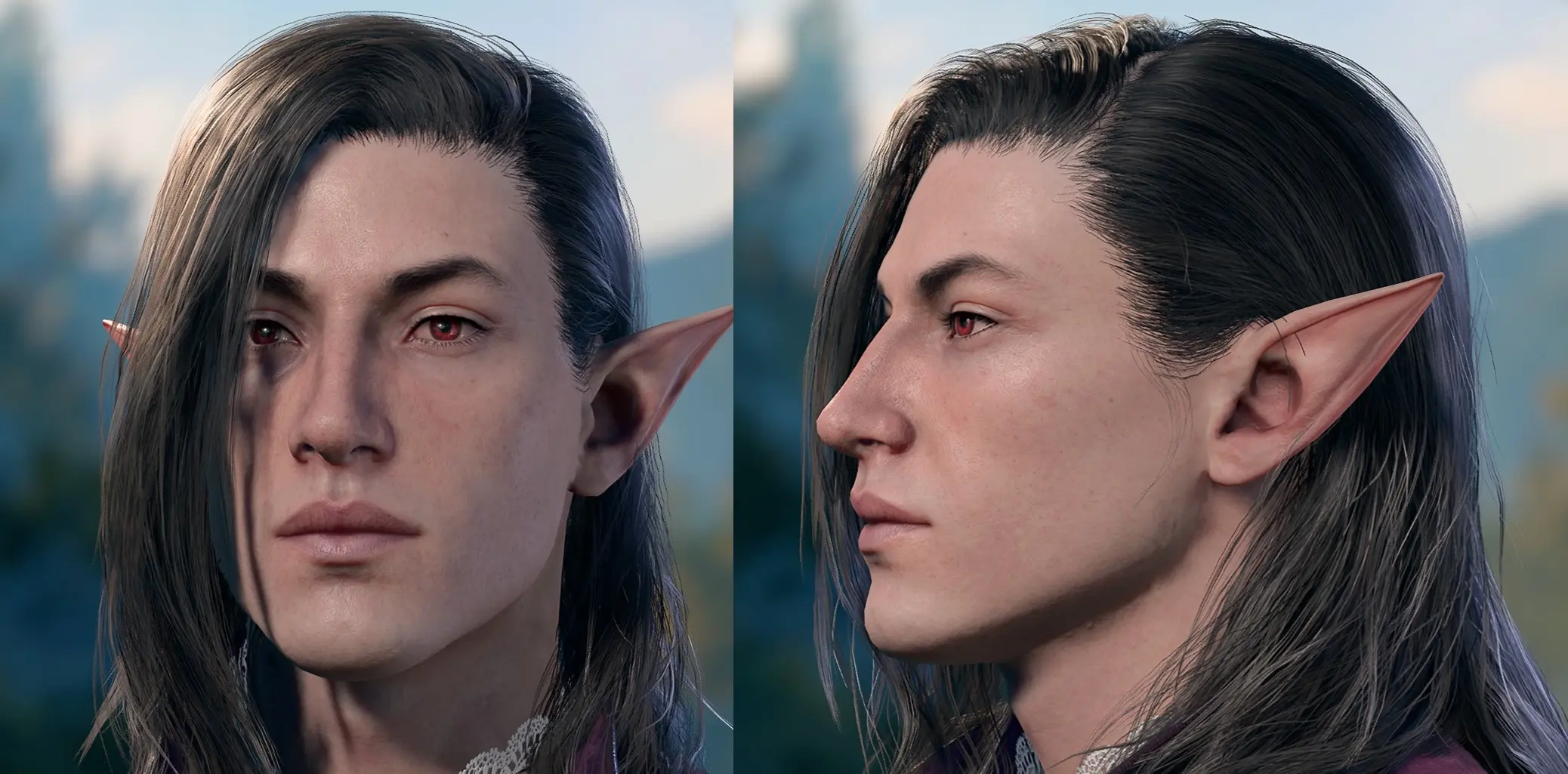
Younger Astarion
⚪ Last updated 2023⚠️ Install Order · 2 steps
Install in this order, then this mod last — most mods fail to load without their framework and dependencies in place.
Preview
🔍 Analysis
- 👍 3.8% endorsement rate — high engagement, a strong quality signal
- 🏆 #62 of 537 Character Customisation mods in this game by downloads
📋 About This Mod
Using my favorite half-elf face, I replaced Astarion's face textures and added in his puncture scar.
THIS DOES NOT CHANGE HIS HAIR OR HAIR COLOR.
If you only install this texture, you'll still have white haired Astarion in your game. To achieve the same look as the screenshots, use Long Black Hair For Astarion by Nyethux.
To install, just extract the contents of the zip into your Baldurs Gate 3\Data folder. This should be in your primary installation folder, not in your Appdata. Again, not in your AppData folder, this goes in the main installation location, in the Data folder. If you're struggling to find the folder, and at least if you have Steam, right click on the game in your Steam list, go down to Manage, then click Browse Local Files.
Younger Astarion is a texture replacement mod for Baldur's Gate 3 that makes Astarion appear younger. It has 696 endorsements and 18,448 downloads, last updated in August 2023. This is a simple cosmetic mod for players who want a different look for the popular vampire companion.
✨ Key Features
📊 Pros & Cons
✅ Pros
- Community-approved with 696 endorsements and 18k downloads.
- Easy to install – just drop in the texture files.
- Gives Astarion a fresh, younger look without changing his personality.
⚠️ Cons
- Only affects Astarion's appearance – no other companions or gameplay tweaks.
- Last updated in August 2023 – may not be compatible with the latest game patches.
For Baldur's Gate 3 players who want a visual refresh for Astarion, especially those who find his default look too weathered. If you're after a more youthful vampire spawn, this is a quick fix. Skip if you want more extensive character overhauls or gameplay changes.
💡 Beginner Tips
- Make sure to place the mod files in the correct Mods folder (usually under %LocalAppData%/Larian Studios/Baldur's Gate 3/Mods).
- If you're using other Astarion appearance mods, check for conflicts – texture replacements can override each other.
- Since the mod is from 2023, test it after a game update; if it breaks, look for an updated version or use a mod manager to toggle it.
📊 Mod Details
- Game
- Baldurs Gate 3 Mods
- Author
- Daraki
- Version
- 1
- Downloads
- 18,448
- Endorsements
- 696
- Category
- Character Customisation
- Created
- 8/13/2023
- Updated
- 8/14/2023
🔧 How to Install Baldurs Gate 3 Mods
Download from Nexus.
📖 Full step-by-step install guide for Baldurs Gate 3 →
Visit the official mod page for specific installation instructions for this mod.
🎮 Need cheat codes or console commands? Check ur gaming wiki for Baldurs Gate 3 commands, item IDs, and more.
Keep browsing — more Baldurs Gate 3 mods await