OIO - Overexplained Interaction Options - DCs Approvals and Flags in Dialogues
🟠 Updated over a year ago⚠️ Install Order · 4 steps
Install in this order, then this mod last — most mods fail to load without their framework and dependencies in place.
Preview
🔍 Analysis
- 👍 1.1% endorsement rate — high engagement, a strong quality signal
- 🏆 #10 of 82 User Interface mods in this game by downloads
📋 About This Mod
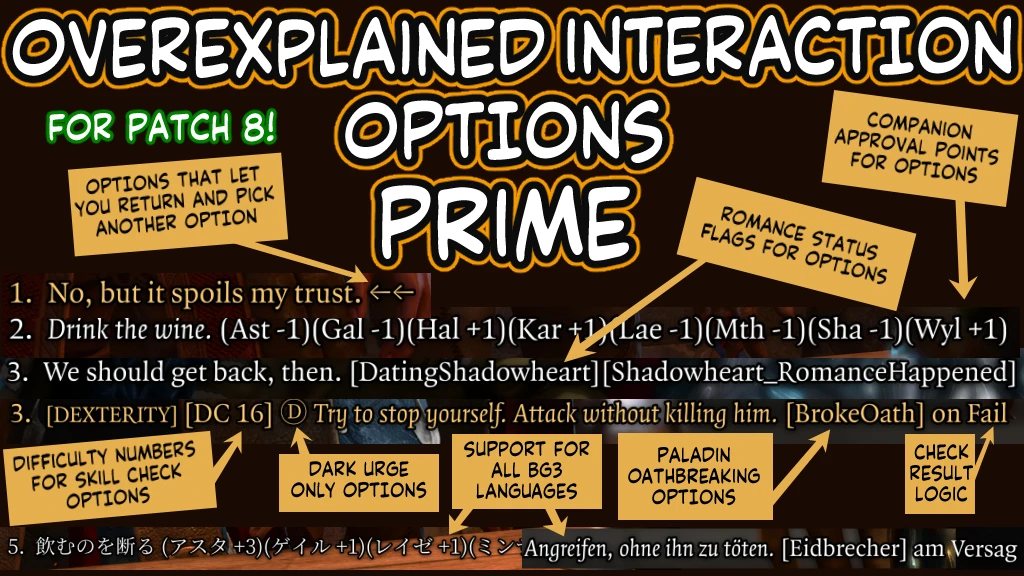
Ever unintentionally break a Paladin oath / keep pissing off Karlach / repeatedly pick the hardest skill checks / say something Gale took as a pick-up line? OIO is here for you.
OIO - Overexplained Interaction Options is a Baldur's Gate 3 UI mod that adds DCs, approvals, and flags to dialogue options, helping players avoid accidental oath breaks, companion disapproval, and failed skill checks. With 6,461 endorsements and 588,389 downloads, it's a popular quality-of-life tool for players who want more transparency in conversations.
✨ Key Features
📊 Pros & Cons
✅ Pros
- Huge community trust: 6,461 endorsements and 588k downloads — this is a must-have for many.
- Saves you from reloading saves after accidentally breaking your Paladin oath or ticking off Karlach.
- Takes the guesswork out of dialogue — no more squinting at vague options.
⚠️ Cons
- May spoil the role-playing experience by showing exact DCs and approvals — some players prefer blind choices.
- UI can get cluttered with extra info on every dialogue option, especially in dense conversations.
- Requires a mod manager and possibly script extender — setup is more involved than a simple drop-in.
For Baldur's Gate 3 players who hate unintended consequences and want full control over dialogue outcomes. Perfect for completionists and those who want to avoid reloading saves. Skip if you prefer immersive, blind role-playing without meta-knowledge.
💡 Beginner Tips
- Use a mod manager like Vortex or BG3MM to install — manual installation can break with game updates.
- Make sure you have the latest Script Extender version, as OIO relies on it for UI changes.
- If you're on patch 7 or later, check the mod's compatibility notes — UI mods often need updates after patches.
📊 Mod Details
- Game
- Baldurs Gate 3 Mods
- Author
- xmas214
- Version
- 8.0.0
- Downloads
- 588,389
- Endorsements
- 6,461
- Category
- User Interface
- Created
- 9/24/2023
- Updated
- 4/15/2025
🔧 How to Install Baldurs Gate 3 Mods
Download from Nexus.
📖 Full step-by-step install guide for Baldurs Gate 3 →
Visit the official mod page for specific installation instructions for this mod.
🎮 Need cheat codes or console commands? Check ur gaming wiki for Baldurs Gate 3 commands, item IDs, and more.
Keep browsing — more Baldurs Gate 3 mods await