Cleo's Custom Ink
⚪ Last updated 2024⚠️ Install Order · 2 steps
Install in this order, then this mod last — most mods fail to load without their framework and dependencies in place.
Preview
🔍 Analysis
- 👍 2.3% endorsement rate — high engagement, a strong quality signal
- 🏆 #488 of 537 Character Customisation mods in this game by downloads
📋 About This Mod
Installation Instructions:
Do not use Mod Manager! Manual installation by dragging the folder in the games directory! You should have only one "Generated" folder, without any numbers or letters. It will override other tattoo mods.
-
[]Locate your game data directory:
[
]Standard installation: C:\Program Files (x86)\Baldurs Gate 3\Data[]Steam installation: C:\Program Files (x86)\Steam\steamapps\common\Baldurs Gate 3\Data
[]Download the version with the Generated Folder and place it in the Data directory. You should have only one "Generated" folder. That’s it - Enjoy.
- **
- []Alternatively: Create a Generated folder with the following path and drop the Resources folder in : SHARED_Atlas_Resources Generated\Public\Shared\Assets\Characters\_Models\_SharedAssets\SHARED_Atlas_Resources
[]Load the game:
[]Start Baldur’s Gate 3 and enter the character creator or magic mirror.
-
Tattoos may appear warped due to varying face mod surfaces and polygons.
Uninstallation:
Follow the installation steps in reverse.
Mods in Screenshots:
Faces of Faerun
Vessnelle's Hair Collection
- **
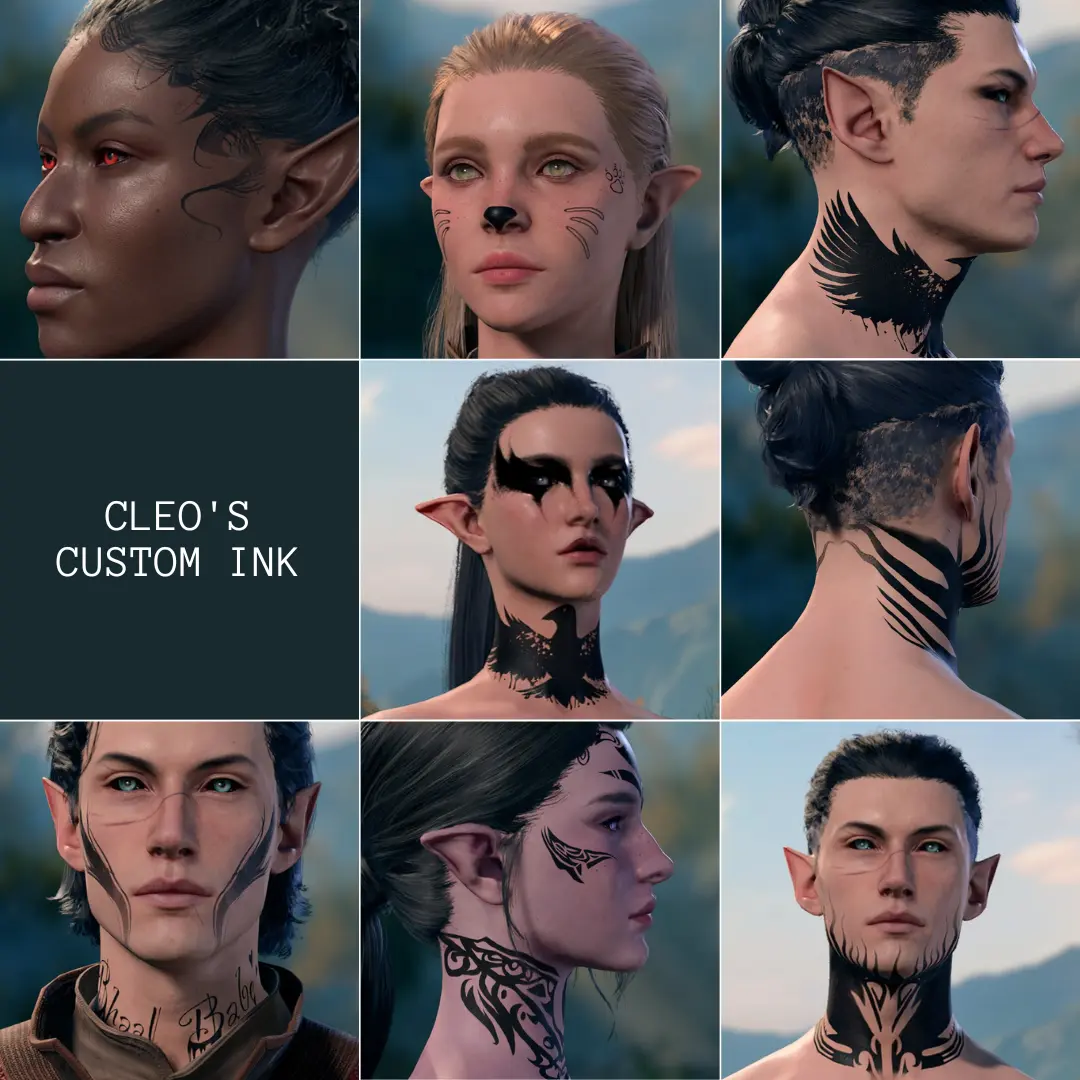
Cleo's Custom Ink is a character customization mod that remakes the iconic flame tattoo to make the neck more visible and eliminate the all-black neck visual, while also adding a variety of other tattoos. With 90 endorsements and nearly 4,000 downloads, it's a niche but appreciated cosmetic addition for players seeking improved tattoo visuals.
✨ Key Features
📊 Pros & Cons
✅ Pros
- Fixes the all-black neck issue, making the flame tattoo actually look like a tattoo.
- Adds extra tattoo options for more customization variety.
- Decent community traction with 90 endorsements and 3,883 downloads.
⚠️ Cons
- Only one specific tattoo is remade; the rest are just added, not necessarily improved.
- No screenshots or detailed previews in the description, so you're flying blind on what the new tattoos look like.
- Last updated in June 2024 — might not be compatible with the latest game patches.
For players who love character customization and want to fix that ugly all-black neck on the flame tattoo. Also for anyone looking to add more ink options to their character. Skip if you're not into cosmetic tweaks or if you rarely change your character's appearance.
💡 Beginner Tips
- Make sure to place the mod files in the correct character customization folder, as per the mod's file structure.
- If you're using a mod manager, let it handle the installation to avoid overwriting other tattoo mods.
- Check the mod's comments section for any user-reported compatibility issues with other customization mods.
📊 Mod Details
- Game
- Baldurs Gate 3 Mods
- Author
- Cleo
- Version
- 0.2.1.1
- Downloads
- 3,883
- Endorsements
- 90
- Category
- Character Customisation
- Created
- 6/19/2024
- Updated
- 6/23/2024
🔧 How to Install Baldurs Gate 3 Mods
Download from Nexus.
📖 Full step-by-step install guide for Baldurs Gate 3 →
Visit the official mod page for specific installation instructions for this mod.
🎮 Need cheat codes or console commands? Check ur gaming wiki for Baldurs Gate 3 commands, item IDs, and more.
Keep browsing — more Baldurs Gate 3 mods await